
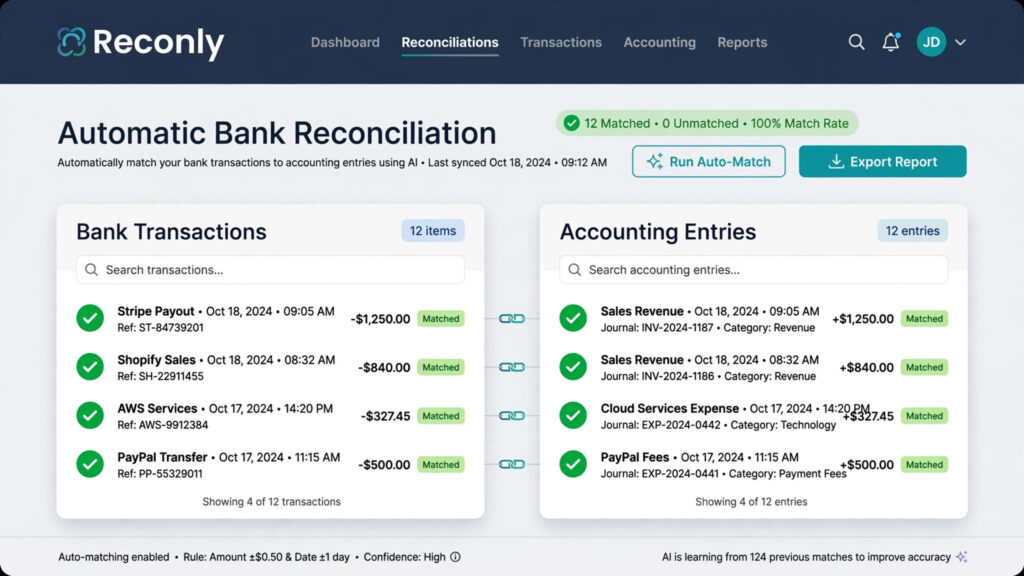
Running a small business gets much easier when your finances are organised from the start. The best accounting software for small business tracks income and expenses, sends professional invoices, reconciles your bank transactions automatically, monitors cash flow and keeps your records ready for tax time — without a shoebox of receipts or a spreadsheet held together with hope.
But choosing is not as simple as picking the platform with the most features. A freelancer needs simple invoicing and expense tracking. A growing company needs inventory, bills, multiple users and serious reporting. A UK sole trader in 2026 also faces a legal deadline: Making Tax Digital for Income Tax now requires digital records and quarterly HMRC updates for those with qualifying income over £50,000.
This guide compares 10 of the best accounting software options for small businesses in 2026 — QuickBooks Online, Xero, Zoho Books, FreshBooks, Wave, Sage, Patriot, Odoo, FreeAgent and Akaunting — with real pricing, honest pros and cons, and a “best for” verdict for each. Once your books are sorted, see how accounting connects to the rest of your stack in our guide to the best software for small business.
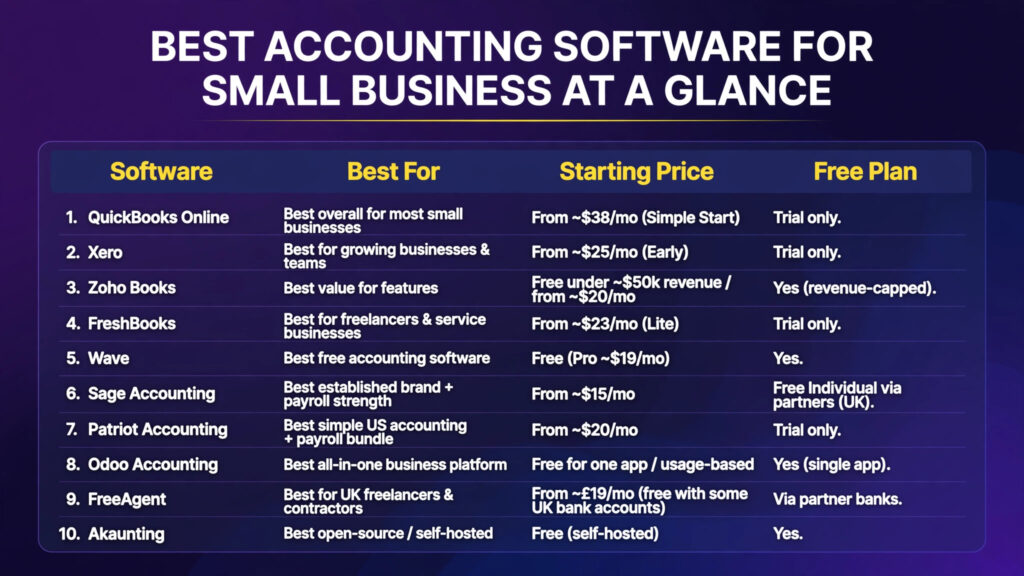
Quick Answer: The Best Accounting Software for Small Business at a Glance
| Software | Best For | Starting Price | Free Plan |
|---|---|---|---|
| QuickBooks Online | Best overall for most small businesses | From ~$38/mo (Simple Start) | Trial only |
| Xero | Best for growing businesses & teams | From ~$25/mo (Early) | Trial only |
| Zoho Books | Best value for features | Free under ~$50k revenue / from ~$20/mo | Yes (revenue-capped) |
| FreshBooks | Best for freelancers & service businesses | From ~$23/mo (Lite) | Trial only |
| Wave | Best free accounting software | Free (Pro ~$19/mo) | Yes |
| Sage Accounting | Best established brand + payroll strength | From ~$15/mo | Free “Individual” via partners (UK) |
| Patriot Accounting | Best simple US accounting + payroll bundle | From ~$20/mo | Trial only |
| Odoo Accounting | Best all-in-one business platform | Free for one app / usage-based | Yes (single app) |
| FreeAgent | Best for UK freelancers & contractors | From ~£19/mo (free with some UK bank accounts) | Via partner banks |
| Akaunting | Best open-source / self-hosted | Free (self-hosted) | Yes |
Bottom line: QuickBooks Online is the best accounting software for small business overall — the broadest integrations and accountant network. Xero wins when several people need access (unlimited users). Zoho Books is the value pick, and Wave is the strongest free option for solo operators.
1. QuickBooks Online – Best Overall for Most Small Businesses
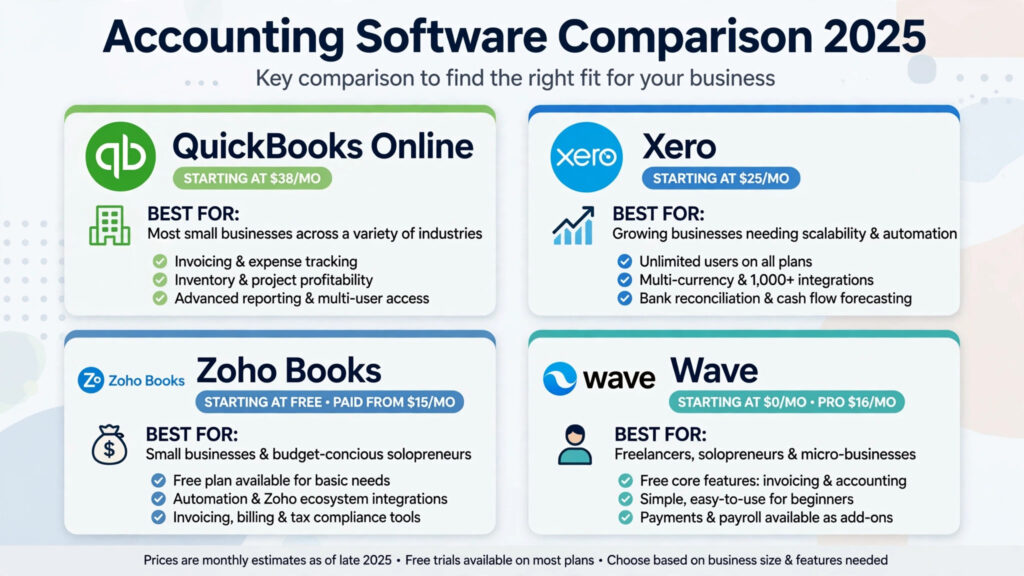
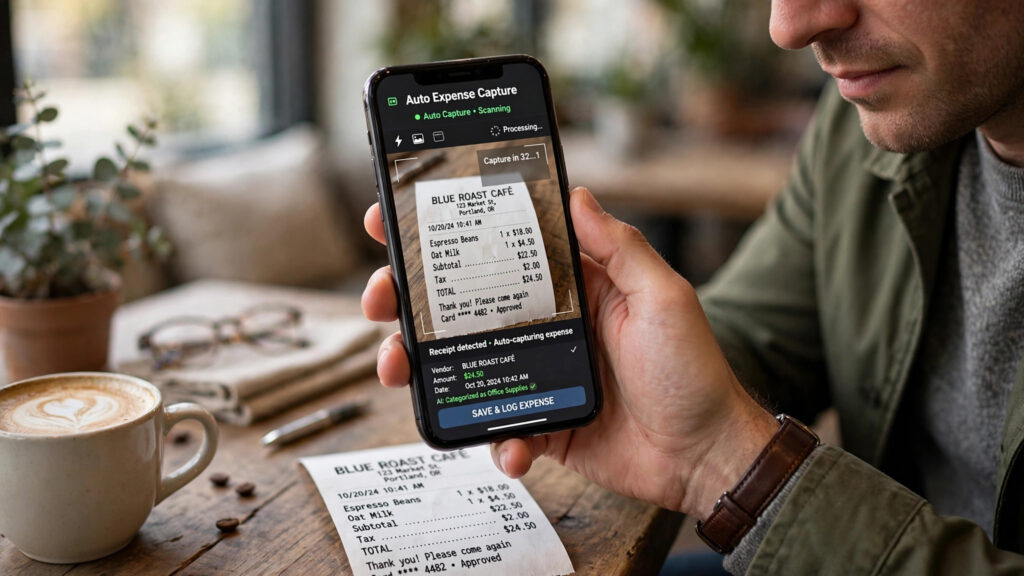
QuickBooks Online (Intuit) remains the default choice in 2026, and the reasons are practical: the largest accountant/bookkeeper network uses it, the integration ecosystem is the broadest (750+ apps), and its AI-assisted categorisation and receipt capture genuinely save hours each month. It scales from sole trader to 25 users across its tiers.
Key features: automatic bank feeds and reconciliation, invoicing with online payments, expense and mileage tracking, 100+ reports, inventory on Plus/Advanced tiers, optional integrated payroll, dedicated low-cost Sole Trader plan in the UK.
Pricing: Simple Start from around $38/mo in the US (intro discounts are common — check what month four costs, not month one). UK Sole Trader plan from around £10/mo.
Pros: widest accountant support; strongest integrations; AI bookkeeping features; HMRC-recognised for Making Tax Digital.
Cons: pricier than Xero/Zoho at equivalent tiers; user caps per plan; interface can overwhelm beginners.
Best for: most small businesses, especially those working with an external accountant — it is the path of least resistance nearly everywhere.
2. Xero – Best for Growing Businesses and Teams
Xero is the cloud-native favourite for businesses where several people need access: unlimited users on every plan removes the per-seat maths that makes QuickBooks expensive as you hire. Its bank reconciliation is widely considered best-in-class, and 1,000+ integrations cover most needs.
Key features: unlimited users, bank feeds with smart reconciliation, invoicing and quotes, multi-currency on higher plans, inventory (light), expense claims, strong reporting, analytics.
Pricing: Early from around $25/mo (US) / £16/mo (Ignite, UK). Note the lowest plan caps invoices (~20/month) and bills — most growing businesses land on Growing/Standard (~$47/mo).
Pros: no per-seat fees; beautiful, fast interface; excellent for collaboration with your accountant.
Cons: invoice/bill caps on entry plan; US payroll is via integration (Gusto) rather than native; support is ticket-based.
Best for: growing service businesses and teams of 2–25 where unlimited users and multi-currency matter.
3. Zoho Books – Best Value for Features
Zoho Books is the value champion: a complete double-entry accounting system — client portal, inventory, project billing, powerful workflow automation — free if your revenue is under roughly $50k/year, and cheap after that. If you already use Zoho CRM, the two connect without any fuss.
Key features: invoicing and recurring billing, expense automation, inventory, project time billing, client portal, workflow rules and custom functions, multi-currency, strong mobile apps.
Pricing: free tier for businesses under ~$50k annual revenue; Professional from around $20–30/mo.
Pros: best features-per-dollar in the category; generous automation; part of the wider Zoho suite (CRM, Inventory, Payroll in some regions).
Cons: fewer accountants know it than QuickBooks/Xero (though this is changing); full value leans into the Zoho ecosystem.
Best for: cost-conscious businesses and existing Zoho users. Pair it with the best CRM software for small business picks if you run the Zoho stack.
4. FreshBooks – Best for Freelancers and Service Businesses
FreshBooks started as invoicing software and it shows — in a good way. Sending a polished invoice, tracking time against a project and getting paid are effortless. Double-entry accounting was added later and is solid for simple businesses, though inventory-heavy firms should look elsewhere.
Key features: best-in-class invoicing and proposals, built-in time tracking, expense capture, project profitability, retainers, client portal, decent reports.
Pricing: Lite from around $23/mo (client limits on lower tiers have softened in recent plans — check your client count before choosing).
Pros: clients actually enjoy paying FreshBooks invoices; time tracking + billing in one flow; friendly support.
Cons: lighter pure-accounting depth than QuickBooks/Xero; per-client pricing history makes tier choice confusing.
Best for: freelancers, consultants, agencies and trades who bill by the hour or project.
5. Wave – Best Free Accounting Software
Wave is real double-entry accounting that costs nothing for the core product: accounting, invoicing and receipt scanning free in the US and Canada, monetised through payments and payroll add-ons. For a solo operator, it covers the essentials honestly.
Key features: free accounting and invoicing, receipt scanning, financial reports, optional paid payments processing and payroll; Pro plan (~$19/mo) unlocks auto bank imports and priority features.
Pros: genuinely free core product; simple enough for non-accountants; proper double-entry (unlike some “free” rivals).
Cons: automatic bank feeds need the paid Pro plan; US/Canada only; limited scalability past the micro-business stage.
Best for: solopreneurs, side hustles and very small businesses with simple finances. Graduate to QuickBooks or Xero when you hire or pass ~50 transactions/month.
6. Sage Accounting – Best for Established Tools and Payroll Strength
Sage is the veteran: decades of accounting pedigree, strong payroll heritage (especially in the UK), and cloud Accounting plans that suit businesses wanting an established vendor. In the UK it is HMRC-recognised and offers a free “Individual” plan for basic digital record-keeping through accountancy partners.
Key features: invoicing, bank feeds, VAT/MTD handling (UK), stock on higher tiers, integrated Sage Payroll options, cash-flow forecasting.
Pricing: from around $15/mo (US Start) / £15/mo (UK), often discounted; free Individual plan via UK partners.
Pros: trusted brand with deep payroll options; good UK compliance coverage; partner/accountant network.
Cons: interface less modern than Xero; features spread across tiers can confuse; US presence smaller than QuickBooks.
Best for: established firms, UK businesses prioritising payroll, and anyone whose accountant recommends Sage.
7. Patriot Accounting – Best for Simple US Small-Business Accounting
Patriot flies under the radar but earns loyal fans: straightforward US-focused accounting paired with genuinely affordable full-service payroll. If QuickBooks feels like overkill and you want one vendor for books + payroll, Patriot is a calm, budget-friendly answer.
Key features: invoicing, expense tracking, bank reconciliation (Premium tier), 1099 e-filing support, optional Patriot Payroll with tax filing handled.
Pricing: Basic from around $20/mo; PremiumAccounting around $30/mo. Payroll is a separate add-on.
Pros: simple, honest pricing; excellent US-based support; payroll bundle is great value.
Cons: important limitation — US only; fewer integrations than QuickBooks/Xero; no inventory depth.
Best for: US micro and small businesses that want accounting and payroll from one simple vendor.
8. Odoo Accounting – Best for an All-in-One Business Platform
Odoo is a full business suite (CRM, inventory, manufacturing, e-commerce, HR) with accounting as one app in the ecosystem. Accounting alone is free as a single app; the value explodes when you run operations on Odoo too, with transactions flowing straight into the books.
Key features: full double-entry accounting, invoicing, multi-company and multi-currency, bank synchronisation, and native links to Odoo Inventory/CRM/POS so operational data becomes accounting data automatically.
Pricing: one app free forever; Standard all-apps plan from around $25–31/user/mo.
Pros: unbeatable if you want operations + finance in one system; modular growth; strong in Europe and internationally.
Cons: implementation effort is real (often needs a partner); accounting-only users get less hand-holding than QuickBooks.
Best for: product businesses and growing firms that want an ERP-style platform without NetSuite prices.
9. FreeAgent – Best for UK Freelancers and Contractors
FreeAgent was built for UK freelancers and contractors: Making Tax Digital-ready, it files Self Assessment to HMRC directly, handles IR35-aware payroll for directors, and — the famous perk — is free for NatWest, RBS, Ulster Bank and Mettle business account holders.
Key features: invoicing and estimates, expense and mileage capture, Self Assessment filing, VAT/MTD submissions, project time tracking, tax timeline with upcoming liabilities.
Pricing: from around £19/mo standalone; free with qualifying UK bank accounts.
Pros: best UK freelancer experience; the bank-account-free deal is superb value; tax timeline prevents nasty surprises.
Cons: UK-centric; limited inventory and multi-user depth for growing product businesses.
Best for: UK freelancers, contractors and micro limited companies.
10. Akaunting – Best Open-Source Accounting
Akaunting is the open-source option: free self-hosted double-entry accounting with invoicing, expenses and reporting, plus a paid app marketplace and cloud plans. It suits businesses that want data control and no per-month subscription for the core ledger.
Key features: double-entry core, invoicing, bills, multi-currency, customer/vendor portals, 100+ marketplace apps (some paid), full data ownership when self-hosted.
Pricing: free self-hosted; cloud plans and premium apps cost extra.
Pros: no licence cost for the core; self-hosting means your financial data stays on your infrastructure; active community.
Cons: you (or your host) handle updates, backups and security; polish and support trail the big commercial rivals.
Best for: tech-comfortable businesses and privacy-focused owners who want open-source control.
Detailed Comparison: Best Accounting Software for Small Business
| Software | Starting price | Users | Invoicing | Inventory | Payroll | Best for |
|---|---|---|---|---|---|---|
| QuickBooks Online | ~$38/mo | 1–25 by plan | Yes | Plus tier+ | Add-on | Best overall |
| Xero | ~$25/mo | Unlimited | Yes (capped on Early) | Light | Integration (US) / add-on | Growing teams |
| Zoho Books | Free <$50k rev / ~$20/mo | By plan | Yes | Yes | Regional | Best value |
| FreshBooks | ~$23/mo | By plan | Excellent | No | Add-on partners | Freelancers/services |
| Wave | Free (Pro ~$19/mo) | Limited on free | Yes | No | Paid add-on (US) | Best free |
| Sage Accounting | ~$15/mo | By plan | Yes | Higher tiers | Strong (UK) | Established firms |
| Patriot | ~$20/mo | By plan | Yes | No | Add-on (US) | Simple US books + payroll |
| Odoo | Free 1 app / ~$25+/user | Unlimited | Yes | Excellent (app) | App | All-in-one platform |
| FreeAgent | ~£19/mo (or free via banks) | Limited | Yes | No | Basic (UK directors) | UK freelancers |
| Akaunting | Free self-hosted | Unlimited | Yes | App | App | Open-source control |
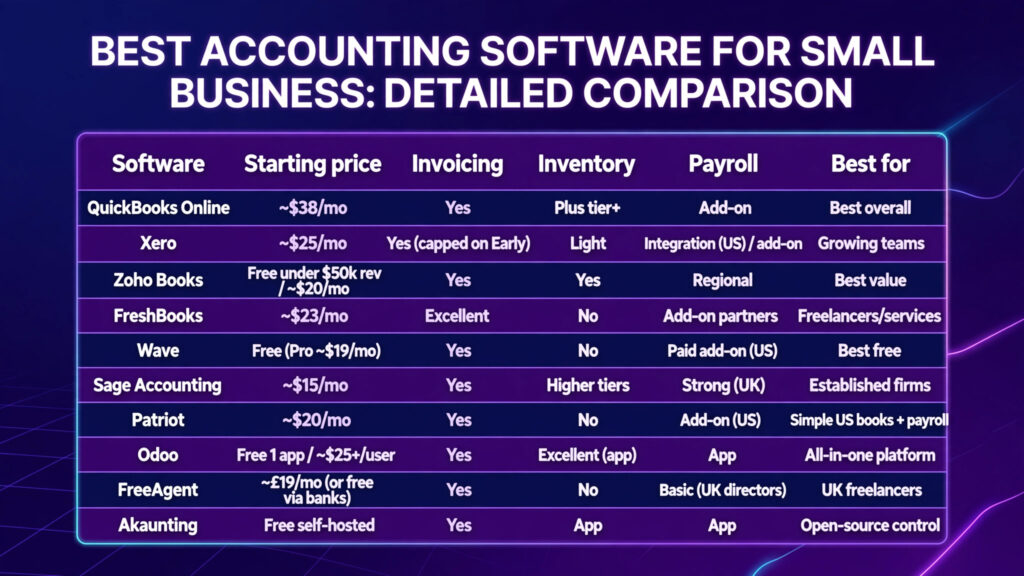
Pricing reflects 2026 US/UK list prices. Most small businesses spend $30–$80/month on accounting software once introductory discounts end — always check the month-four price, not the month-one offer.
How to Choose the Best Accounting Software for Your Small Business
Step 1 – Match the tool to your business type. Freelancer billing hours? FreshBooks or FreeAgent (UK). Product business with stock? QuickBooks Plus, Xero + inventory app, or Odoo. Simple US books + payroll? Patriot. Solo and skint? Wave or Zoho Books free.
Step 2 – Ask who needs access. If three or more people (plus your accountant) need logins, Xero’s unlimited users beat per-seat pricing quickly. If it is just you, nearly everything here works.
Step 3 – Check your country’s requirements. UK: the software must be MTD-compatible (QuickBooks, Xero, Sage, FreeAgent all are) — and from April 2026, MTD for Income Tax makes digital records mandatory for many sole traders. US: look for sales-tax handling and 1099 support. EU: check e-invoicing readiness and local tax reporting.
Step 4 – List your non-negotiable integrations. Bank feeds in your country, your payment processor (Stripe/Square/PayPal), your CRM and your e-commerce platform. QuickBooks and Xero lead here; check our roundup of software for small business for the wider picture.
Step 5 – Compare the true total cost. Subscription after the intro discount + payroll add-on + payment processing fees + extra users. The cheapest headline price is rarely the cheapest system by month six.
Step 6 – Trial with a month of real transactions. Import last month’s bank data, reconcile it, send two invoices and run a profit-and-loss. The tool that makes this feel easy is your answer.
Getting Started: Set Up Your Accounting Software in 5 Steps
- Connect your business bank account and cards on day one, and set the feed start date to the beginning of your financial year (or your start date) so reports are complete.
- Customise your chart of accounts lightly. Delete categories you’ll never use, add the 3–5 income/expense lines specific to your business, and leave the rest at defaults — over-customising early creates reporting chaos later.
- Set up invoice branding and payment methods. Logo, payment terms, and online card/ACH payment links. Invoices paid online typically get paid days faster than those asking for a bank transfer.
- Turn on receipt capture and rules. Photograph receipts in the mobile app and create bank rules for recurring transactions (subscriptions, fuel, software) so categorisation becomes automatic. Our guide to the best AI workflow automation tools for small business covers taking this further.
- Invite your accountant or bookkeeper and agree a monthly routine: reconcile weekly, review the P&L monthly, file taxes from the software — not from a last-minute spreadsheet.
Common Mistakes When Choosing Accounting Software
- Choosing purely on the introductory price. A 90%-off-for-3-months deal that renews at $99/month is not a $10 product. Compare steady-state pricing.
- Ignoring your country’s rules. Software that cannot file your VAT/MTD/sales tax correctly creates expensive accountant clean-up work.
- Buying features you’ll never open. Inventory, multi-currency and project costing are brilliant — if you need them. Otherwise they are clutter and cost.
- Forgetting migration timing. Switching mid-financial-year is painful. If you can, switch at year-end so opening balances are clean.
- Skipping the accountant conversation. If you have (or will hire) an accountant, ask what they prefer before buying. Their familiarity saves you billable hours every month.

Frequently Asked Questions
What is the best accounting software for small business in 2026?
QuickBooks Online is the best accounting software for small business overall, thanks to its scalability, integrations and unmatched accountant network. Xero is the best alternative when unlimited users matter, Zoho Books is the best value, and Wave is the best free option for solo operators.
How much does small business accounting software cost?
Most small businesses spend $30–$80 per month. Free options (Wave, Zoho Books under ~$50k revenue, Akaunting self-hosted) cover basics. QuickBooks Online starts around $38/mo, Xero around $25/mo, and add-ons like payroll typically cost extra per employee.
What is the best free accounting software for a small business?
Wave is the best free option for US/Canadian solo operators (free accounting and invoicing, paid Pro tier for auto bank feeds). Zoho Books is free for businesses under roughly $50k annual revenue and is more fully-featured. Akaunting is the best free open-source choice if you can self-host.
QuickBooks vs Xero: which should I choose?
Choose QuickBooks Online for the broadest integrations, the largest accountant network and (in the US) native payroll options. Choose Xero if several people need access — unlimited users on every plan — or you prefer its cleaner reconciliation workflow. Past two or three seats, Xero is often cheaper at steady state.
Do small businesses actually need accounting software?
Once you pass a few dozen transactions a month, yes. Spreadsheets demand manual entry and formula upkeep; accounting software connects to your bank, matches transactions automatically and produces real-time reports in clicks. In the UK, Making Tax Digital makes compatible software a legal requirement for many businesses from April 2026.
Can accounting software do my invoicing and payroll too?
Invoicing: yes — every tool here invoices, and FreshBooks does it best. Payroll: QuickBooks (US/UK add-on), Sage (UK strength) and Patriot (US) offer native or tightly bundled payroll; Xero integrates with Gusto in the US; Zoho Payroll covers some regions. Confirm payroll availability in your country before committing.
Is cloud accounting software safe for my financial data?
The major platforms use bank-level encryption, two-factor authentication and automatic backups, and are generally safer than a laptop spreadsheet. Enable 2FA, use unique passwords, and limit user permissions — and for self-hosted options like Akaunting, remember that security and backups become your responsibility.
When should I switch accounting software?
At your financial year-end, when opening balances are clean. Common triggers: outgrowing user/invoice caps, hiring your first employee (payroll), selling in multiple currencies, or your accountant recommending a move. Migrate one month’s data first as a test before committing fully.
Conclusion: Our Final Picks
- Best overall: QuickBooks Online
- Best for growing teams: Xero
- Best value: Zoho Books
- Best for freelancers: FreshBooks (US/global) or FreeAgent (UK)
- Best free: Wave
- Best simple US books + payroll: Patriot
- Best all-in-one platform: Odoo
Start with a free trial, run one real month of transactions through it, and check the price you’ll pay in month four — not the launch discount. The best accounting software for small business is the one that keeps your books clean every week, not just at tax time. If time billing is central to your business, our guide to the best time tracking software will help you connect hours to invoices cleanly.