

Most people who quit learning to code do not quit because coding is too hard. They quit because they get stuck alone: an error message they cannot read, or a tutorial that ends right where real work begins. The best AI tools for learning to code fix that exact problem. They give you practice with instant feedback, a tutor that answers at midnight, and a way to build real projects instead of only watching videos about them.
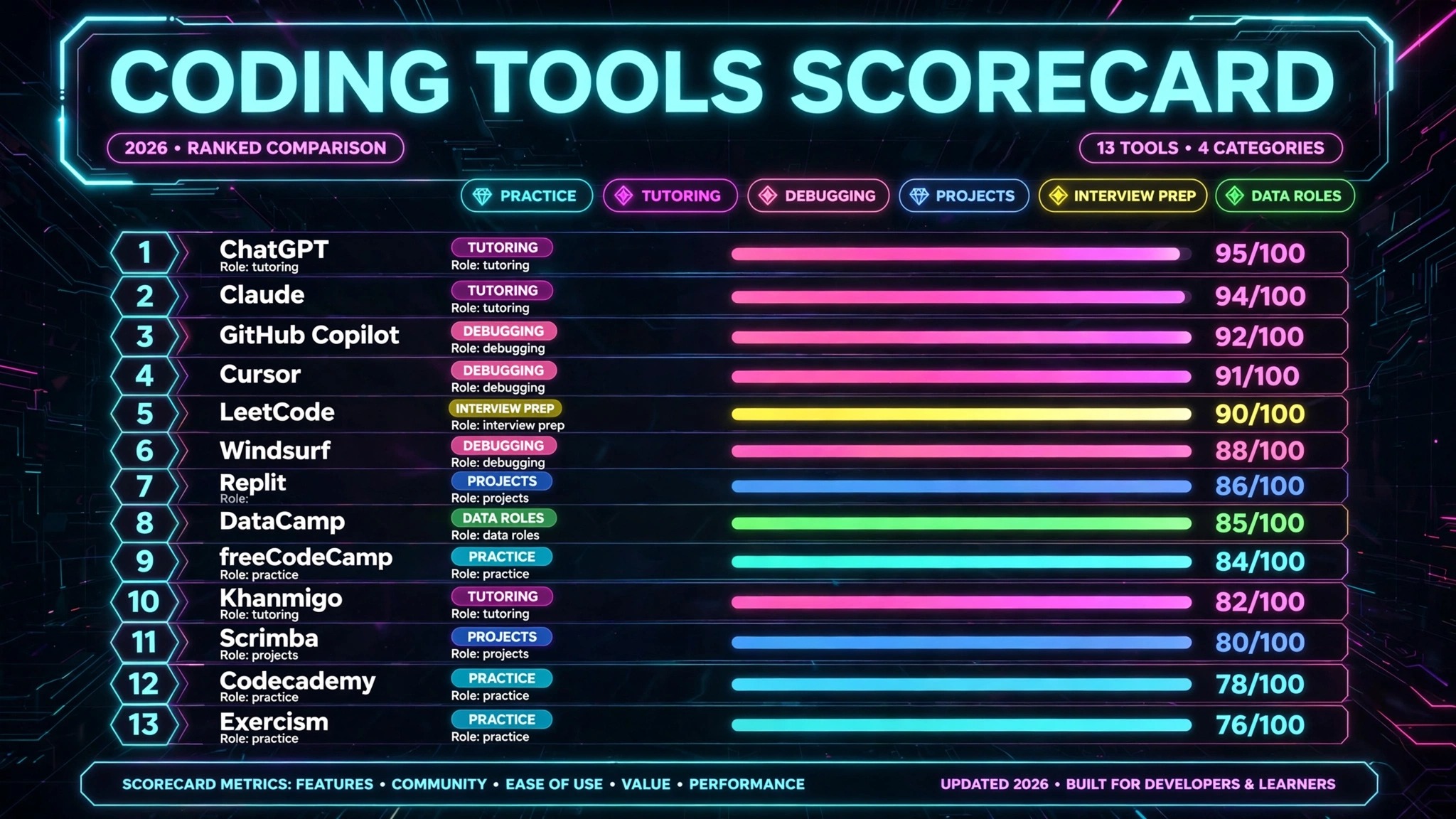
This guide compares 13 tools, grouped by the learning job each one does best. No single tool covers all five jobs well. The winning approach is a small stack: one practice platform, one AI tutor, and one place to build projects. Prices are October 2026 list prices in US dollars. Where sources disagreed, the guide says so.
The 13 best AI tools for learning to code at a glance
| Tool | Learning job | Free option | Paid from |
|---|---|---|---|
| Codecademy | Interactive practice | Yes, basic courses | $14.99 a month (Plus, annual) |
| freeCodeCamp | Interactive practice | Yes, everything | Free |
| Exercism | Interactive practice | Yes, everything | Free |
| ChatGPT | AI tutor | Yes | $20 a month (Plus) |
| Claude | AI tutor | Yes | $20 a month (Pro) |
| Khanmigo | AI tutor for students | Teachers free | $4 a month (families) |
| GitHub Copilot | Explanation and debugging | Yes, limited | $10 a month (Pro) |
| Cursor | Explanation and debugging | Yes, limited | $20 a month (Pro) |
| Windsurf | Explanation and debugging | Yes | $20 a month (Pro) |
| Replit | Project-based learning | Yes, starter | $20 a month (Core) |
| Scrimba | Project-based learning | Yes, intro modules | Around $24.50 a month (Pro, annual) |
| LeetCode | Interview prep | Yes, most problems | $35 a month or $159 a year (Premium) |
| DataCamp | Data and job prep | Yes, first chapters | Around $25 a month (Premium, annual) |
Best pick by job
| Your job | Start with | If that fails, try |
|---|---|---|
| Learn syntax by doing | Codecademy | freeCodeCamp |
| Learn free, at your own pace | freeCodeCamp | Exercism |
| Get unstuck with a mentor | Exercism | ChatGPT |
| Ask questions any hour | ChatGPT | Claude |
| Tutor a school-age learner | Khanmigo | ChatGPT |
| Understand real code | GitHub Copilot | Cursor |
| Build and debug in one editor | Cursor | Windsurf |
| Ship a first project | Replit | Scrimba |
| Learn by building web apps | Scrimba | Replit |
| Pass technical interviews | LeetCode | DataCamp |
| Move into data roles | DataCamp | Codecademy |
Interactive coding practice: learn by typing, not watching
Reading about loops teaches you almost nothing. Writing twenty loops, breaking half of them, and fixing them teaches you loops. These three platforms are built on that idea.
1. Codecademy
Codecademy is the most structured starting point in this guide. Short interactive lessons run in the browser, so there is nothing to install. Pricing: Basic is free and covers starter lessons. Plus costs $14.99 a month billed annually ($29.99 month to month) and opens the full course catalog. Pro costs $19.99 a month billed annually ($39.99 month to month) and adds career paths, certificates, and interview preparation.
Best for: Absolute beginners who want a clear path and are willing to pay for structure.
Watch out for: The hand-holding can become a crutch. Codecademy lessons tell you what to type, which means you can finish a path without ever starting a project from a blank file. Pair it with Replit or Scrimba from week three.
Try it at: codecademy.com
2. freeCodeCamp
freeCodeCamp is the free alternative that asks for nothing except time. Its curriculum covers web design, JavaScript, front end libraries, Python, and databases, and each certification takes roughly 300 hours. Everything is free, including the certifications, and the platform is run by a nonprofit.
Pricing: Free. Donations are optional and do not unlock extra content.
Best for: Learners on a zero budget, and anyone who wants a long, free, self-paced curriculum.
Watch out for: There is no AI tutor built in and no mentor checking your work. When you get stuck, the help comes from the forum and from reading documentation, which is a real skill but a slow one at 1 a.m. Pair freeCodeCamp with ChatGPT or Claude as your on-call tutor.
Try it at: freecodecamp.org

3. Exercism
Exercism is the smallest name in this section and the one serious learners praise most. It offers practice exercises in dozens of languages, and its standout feature is human mentoring: volunteers review your solutions and comment on your code, for free. That feedback loop is what automated lessons cannot give you: a mentor can tell you not just that your code works, but whether a working developer would write it that way.
Pricing: Free, including mentoring. Donations support the nonprofit behind it.
Best for: Learners who already know basic syntax and want feedback on real code, and anyone learning a second language.
Watch out for: Mentoring is volunteer-run, so feedback can take days rather than minutes, and the exercise library is practice, not a guided curriculum. Exercism works best as the second tool in your stack, after a practice platform has taught you the basics.
Try it at: exercism.org
AI coding tutors and mentors: answers at any hour
These three AI tutors answer instantly, explain the same concept five different ways, and never tire of beginner questions. The difference between them is how they teach: one gives answers, one explains deeply, and one refuses to give answers at all.
4. ChatGPT
ChatGPT is the most flexible tutor here, and the one most learners already have. Ask it to explain recursion using a real example, to rewrite your code with comments on every line, or to quiz you on Python basics. Its strength is range: it can move from explaining a concept to generating practice problems to reviewing your code in one conversation.
Pricing: Free tier with limits. Plus costs $20 a month.
Best for: Everyday questions, quick explanations, and generating practice problems on any topic.
Watch out for: ChatGPT will confidently explain code that is wrong, and it will hand you a finished solution when what you actually need is to struggle through the problem yourself. Use it to explain, not to complete your exercises. If you paste every exercise into ChatGPT, you will finish the course and learn very little. Creators documenting their learning journey can use our guide to best AI tools for content creators for the publishing side.
Try it at: chatgpt.com
5. Claude
Claude is the deeper explainer of the two general chatbots. Long explanations hold together better in Claude than in most rivals, and its answers tend to include the reasoning behind a solution, not just the solution itself. Paste in a full file and ask Claude to walk through it function by function.
Pricing: Free tier, with a daily message allowance. Pro costs $20 a month, with a lower annual rate reported on some pages, so check checkout for the current annual figure.Best for: Deep explanations of longer programs, code reviews with reasoning, and learners who want to understand rather than just finish.
Watch out for: Usage limits run on a rolling window, so a heavy study day can hit a wall sooner than expected. Claude also has no curriculum and no progress tracking, so it works as a tutor inside a plan you set yourself, not as the plan. Freelancers adding coding to their services can see our guide to best AI tools for freelance writers.
Try it at: claude.com
6. Khanmigo
Khanmigo is the only tutor in this guide designed for classrooms. Built into Khan Academy, it guides learners with questions instead of handing over final answers, and it is tied directly to Khan Academy exercises in computing, maths, and science. A parent dashboard shows chat history for up to ten children, and teachers get it free in dozens of countries.
Pricing: Free for teachers in 44 countries and territories. For families, $4 a month or $44 a year. A US billing address is required for family subscriptions.
Best for: School-age learners, parents who want a safe tutor, and teachers running a classroom.
Watch out for: Khanmigo is a guide, not a full coding curriculum on its own, and its coding coverage is narrower than Codecademy or freeCodeCamp. It is the right tutor for a younger learner or a classroom, and the wrong primary tool for an adult career changer who needs a full Python or web path.
Try it at: khanacademy.org

Code explanation and debugging help: learn inside real code
Tutorials use clean, tiny examples. Real code is messy and long. These three tools sit inside a real editor and explain real code as you read and write it.
7. GitHub Copilot
GitHub Copilot is the cheapest way to learn inside a real editor. It suggests code as you type and explains selected code in plain language. For a learner, its best feature is not autocomplete but explanation: highlight a function you do not understand and ask what it does, and Copilot walks through it in context. It lives inside VS Code and JetBrains editors, so you learn in the same environment working developers use.
Pricing: Free tier with 2,000 completions a month and limited chat. Pro costs $10 a month and includes a monthly credit pool for chat and agent features, while inline completions are unlimited on paid plans. Pro+ costs $39 a month for heavier use.
Best for: Learners ready to leave tutorial platforms and work in a real editor, and students who already use GitHub.
Watch out for: Autocomplete can teach you to accept code you do not understand. If you press tab on every suggestion, you will produce working programs you cannot explain. Read each suggestion, and if you cannot say what it does, ask Copilot to explain it before accepting.
Try it at: github.com
8. Cursor
Cursor is a full AI editor built for working with an AI agent across many files at once. For a learner, its value is in debugging: describe a bug in plain language, and the agent reads your project, finds the cause, and proposes a fix you can review line by line. That review step is where the learning happens: you see how a fault is traced through real code.
Pricing: Free tier with limited requests. Pro costs $20 a month with an included usage pool, and higher tiers add larger pools. Pricing and packaging have changed several times, so check checkout for the current tier names and limits before buying.
Best for: Learners who already write small projects and want AI help debugging and extending them.
Watch out for: Cursor is a professional tool, and its agent features can do too much for a beginner. If the agent builds your whole project, you learn project management, not programming. Use it on code you wrote yourself first, and treat agent-built code as reading material to study.
Try it at: cursor.com

9. Windsurf
Windsurf is the third AI editor in this group, and its pitch is predictable cost: unlimited tab completions on paid plans, with agent quotas that refresh on a daily and weekly cycle instead of a credit pool that can run dry mid-month. For a learner on a budget, that predictability matters. Windsurf now sits under the Devin brand, so older comparisons may show out-of-date figures.
Pricing: Free tier with unlimited tab completions and a light agent quota. Pro costs $20 a month, with higher tiers above it. Check checkout, because older roundups list a lower price from before the rebrand.
Best for: Learners who want a full AI editor with no surprise overage bills.
Watch out for: The rebrand means documentation and community answers are split between the old Windsurf name and the new Devin brand, which can make troubleshooting confusing. Most of its teaching material is written for working developers rather than beginners.
Try it at: windsurf.com
Project-based learning: build things, not just lessons
Employers do not hire certificates. They hire people who can show working projects. These two platforms are built around that fact: every lesson ends with something you made.
10. Replit
Replit is the fastest path from an idea to a live app, all in the browser. Describe an app and Replit Agent builds a first version and hosts it. For a learner, that removes the hardest part of starting a project: setup.
Pricing: Starter is free with a daily agent allowance and one published app. Core costs $20 a month, or $18 a month billed annually, and includes $20 of monthly credits. Credits pay for agent use, hosting, and databases, and pay-as-you-go billing applies when credits run out, so set a spending cap before building anything ambitious.
Best for: Learners who want to build and share real apps fast, and anyone whose computer cannot run a local development setup.
Watch out for: The agent does a large share of the building, which means you must deliberately study what it made, or you will finish with a portfolio of apps you cannot explain in an interview. Also watch the credit meter: heavy agent use drains the monthly pool fast. Small business owners building internal tools can see our guide to best AI tools for small business.
Try it at: replit.com
11. Scrimba
Scrimba teaches through interactive screencasts: the teacher’s code is on screen, and you can pause the video at any moment and edit that same code yourself, right in the lesson. That format closes the gap between watching and doing, because there is no moment where you think you understood something and then discover, twenty minutes later in your own editor, that you did not. Scrimba’s paths cover front end development, JavaScript, React, and AI engineering.
Pricing: Intro modules are free. Pro is listed at around $24.50 a month billed annually in a 2026 review, with regional pricing and student discounts, but the month to month figure could not be confirmed, so check checkout for the current price before buying.
Best for: Web development learners who like video teaching but want to code inside the lesson.
Watch out for: Scrimba is strongest for front end web work and thinner elsewhere. If your goal is Python, data, or mobile, its catalog will run out faster than Codecademy or freeCodeCamp. Treat Scrimba as the project layer on top of a broader platform.
Try it at: scrimba.com
Interview and job prep: prove the skill under pressure
Learning to code and getting hired to code are different skills. Interviews test data structures and problem solving under time pressure, and these two platforms train exactly that.
12. LeetCode
LeetCode is the standard interview preparation platform: its problem bank mirrors the questions product companies actually ask. The honest way to use it is pattern first, volume second: learn the common patterns, then practise each until you recognise it in an unfamiliar problem.
Pricing: Most problems are free. Premium costs $35 a month or $159 a year, and adds company-tagged questions, official video editorials, and interview simulations.
Best for: Learners preparing for technical interviews at product companies, and computer science students.
Watch out for: LeetCode is not a place to learn programming. If you cannot yet write a basic program, grinding easy problems will teach you little, and grinding hard problems will teach you frustration. Finish a practice platform first, then use LeetCode for the last stage of preparation.
Try it at: leetcode.com

13. DataCamp
DataCamp is the career-track option for learners heading into data roles rather than general software engineering. Its interactive courses cover Python, R, SQL, and data visualisation, and its career tracks bundle courses into paths for data analyst or data scientist roles. The exercises run in the browser, so there is nothing to install, and the focus stays on practical data work rather than theory.
Pricing: The first chapter of every course is free. Premium is listed at around $25 a month billed annually on several pages, but DataCamp quotes slightly different figures on different pages of its own site, so check checkout for the current annual price before buying.
Best for: Learners targeting data analyst or data scientist roles, and anyone who wants SQL and Python in one track.
Watch out for: DataCamp certificates are useful signals of initiative, not substitutes for a portfolio. Employers in data roles prioritise demonstrated work over credentials, so pair every track with at least two projects of your own that you can discuss in an interview.
Try it at: datacamp.com
Pricing compared
| Tool | Free plan | Paid from | Best value point |
|---|---|---|---|
| Codecademy | Yes, basic | $14.99 a month (Plus, annual) | Plus, for the full catalog |
| freeCodeCamp | Yes, everything | Free | Free, for a full curriculum |
| Exercism | Yes, everything | Free | Free, for mentored practice |
| ChatGPT | Yes | $20 a month | Plus, for daily tutoring |
| Claude | Yes | $20 a month | Pro, for deep explanations |
| Khanmigo | Teachers free | $4 a month | Family plan, for younger learners |
| GitHub Copilot | Yes, limited | $10 a month | Pro, for learning in a real editor |
| Cursor | Yes, limited | $20 a month | Pro, for agent debugging |
| Windsurf | Yes | $20 a month | Pro, for predictable cost |
| Replit | Yes, starter | $20 a month | Core, for building apps |
| Scrimba | Yes, intro modules | Around $24.50 a month | Pro annual, for web paths |
| LeetCode | Yes, most problems | $35 a month | Premium annual, for interview prep |
| DataCamp | Yes, first chapters | Around $25 a month | Premium annual, for data tracks |
A realistic starter stack costs $0 to $30 a month: freeCodeCamp or Exercism for practice, ChatGPT or Claude free for tutoring, and Replit starter for projects. Add Codecademy Plus or Copilot Pro once you are practising daily, and LeetCode Premium only in the final months before interviews.

How to choose: start from the stage you are stuck at
Start from your bottleneck, not from the tool list. If you have never written code, start with Codecademy or freeCodeCamp and finish the first path before buying anything. If you can write basic programs but get stuck constantly, add Exercism mentoring or a ChatGPT Plus subscription. If you understand concepts but cannot build anything alone, move to Replit or Scrimba and ship three small apps.
Second, protect your learning time from the tools themselves. A tutor that writes your solutions is not helping you learn. The rule that works is simple: use AI to explain, never to complete, until you can complete the same task alone.
Third, measure progress in projects, not in lessons completed. A certificate proves you finished a course. A project proves you can build. After every month of learning, you should have one new thing to show: a small app, a data analysis, or a set of solved problems you can explain out loud. If a tool is not producing that evidence, change the tool. Authors turning their learning into a book can see our guide to best AI book writing software.

Frequently Asked Questions
Can AI tools really teach me to code, or do they just do the coding for me?
They teach you only if you use them as tutors. An AI that explains your error and reviews your code accelerates learning. An AI that writes your exercises replaces learning. The difference is your habit: ask for explanations and hints first, and only look at full solutions after you have tried.
How long does it take to learn to code with these tools?
For a first job-ready foundation, most learners need six to twelve months of consistent practice at ten or more hours a week. That is the honest timeline. A freeCodeCamp certification takes roughly 300 hours, and a Codecademy career path takes several months.
Which language should I learn first?
Python, for most beginners, because its syntax reads close to plain language and it opens doors in web, data, and automation. JavaScript, if your goal is web development specifically. The language matters less than finishing: pick one, finish a path, and build three projects in it before switching.
Do I need to pay for any of these tools?
No, not at first. freeCodeCamp, Exercism, and the free tiers of ChatGPT, Claude, Copilot, and Replit cover every stage of early learning..
Will employers accept self-taught developers who learned with AI tools?
Yes, when the portfolio proves the skill. Employers hire for demonstrated work: projects you built and code you can explain. Certificates help a resume get read, but a portfolio and a clear interview performance are what get you hired.
Should children learn to code with AI tutors?
Yes, with guardrails. Khanmigo is built for that case, with guided questions instead of answers and a parent dashboard. General chatbots are better for older teens and adults.
Is LeetCode necessary for every coding job?
No. LeetCode matters most for product companies and large tech firms that run algorithm interviews. Many web development, freelance, and small company roles hire on portfolio and practical tasks instead. Learn the basics first, then check what your target employers actually test.
Conclusion
The best AI tools for learning to code are the ones that keep you practising, unstuck, and building. freeCodeCamp or Codecademy teaches the syntax. ChatGPT or Claude answers the questions that used to end a study session. Exercism mentors review code a lesson cannot judge. Copilot, Cursor, or Windsurf moves you into a real editor. Replit or Scrimba turns lessons into projects. LeetCode or DataCamp turns skill into a job offer.
Start with the stage you are stuck at and build one project a month. The learners who finish are not the ones with the most subscriptions. They are the ones who type code every day, ask for explanations instead of answers, and ship small things until the small things become real ones.