
If you run a small business, you do not have a leads problem so much as a follow-up problem. Deals stall in your inbox, quotes sit unanswered in a spreadsheet, and nobody quite remembers who last spoke to that promising prospect. The best CRM software for small business solves exactly this: it keeps every contact, conversation, deal stage and follow-up in one place your whole team can see.
But the CRM market is crowded in 2026. There are dozens of platforms pitched at small businesses, from free starter tools to AI-assisted sales suites, and the “best” pick genuinely depends on how you sell. A solo consultant needs something different from a 20-person agency with a phone-heavy sales floor.
This guide compares 16 of the best CRM software options for small businesses in 2026, including HubSpot, Zoho CRM, Pipedrive, Freshsales, Salesforce Starter, Close, Bigin, Insightly, Copper, monday CRM and more. For each tool you will find what it does well, where it falls short, real pricing, and a clear “best for” verdict — plus a buying guide, a detailed comparison table, and FAQs to help you decide.
If you are choosing tools across your whole business, see our roundup of the best software for small business and our overview of software for small business to see how a CRM fits into your stack.
Quick Answer: The Best CRM Software for Small Business at a Glance
Short on time? Here are our top picks for the best CRM software for small business in 2026:
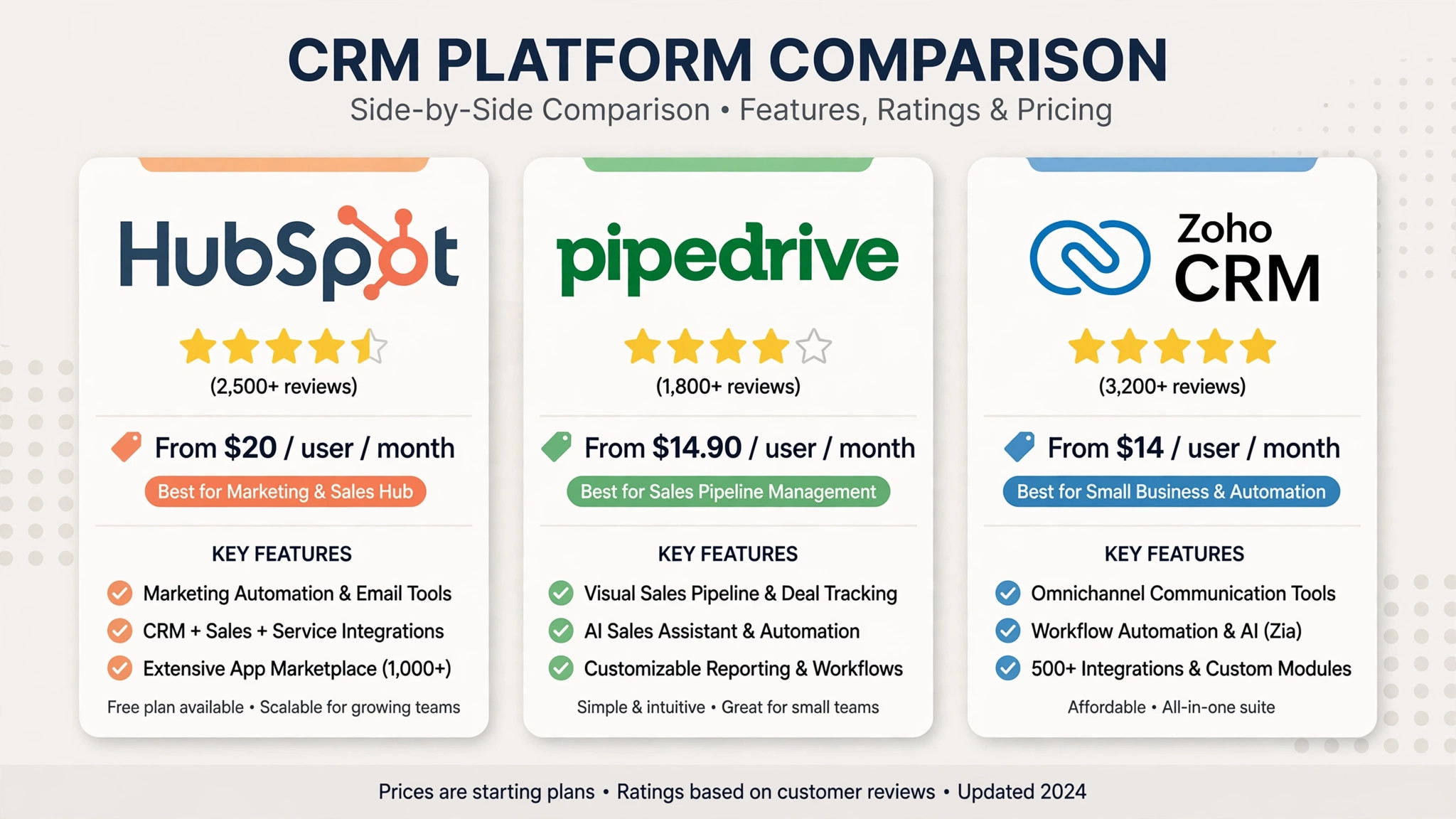
| CRM | Best For | Starting Price | Free Plan |
|---|---|---|---|
| HubSpot CRM | Best overall for most small businesses | Free / from $20/seat/mo | Yes |
| Pipedrive | Best for sales pipeline management | From $14/user/mo | 14-day trial |
| Zoho CRM | Best value and flexibility | From $14/user/mo | Yes (up to 3 users) |
| Freshsales | Best affordable sales CRM with AI | From $15/user/mo | Free plan available |
| Salesforce Starter | Best for businesses planning to scale | From $25/user/mo | No |
| Close | Best for outbound, call-heavy sales teams | From $9/user/mo | 14-day trial |
| Bigin by Zoho | Best lightweight CRM | From $7/user/mo | Free plan available |
| Insightly | Best CRM with built-in project management | From $29/user/mo | 14-day trial |
| Copper | Best for Google Workspace users | From $9/user/mo | 14-day trial |
| monday CRM | Best visual, flexible CRM | From $15/seat/mo | 14-day trial |
| Less Annoying CRM | Best simplest CRM, zero learning curve | $15/user/mo flat | No |
| Keap | Best for marketing automation + CRM | From $79/mo | 14-day trial |
Bottom line: Start free with HubSpot if you want the easiest path. Choose Pipedrive if your world revolves around the sales pipeline. Choose Zoho CRM if you want the most features per pound or dollar.
1. HubSpot CRM – Best Overall for Most Small Businesses
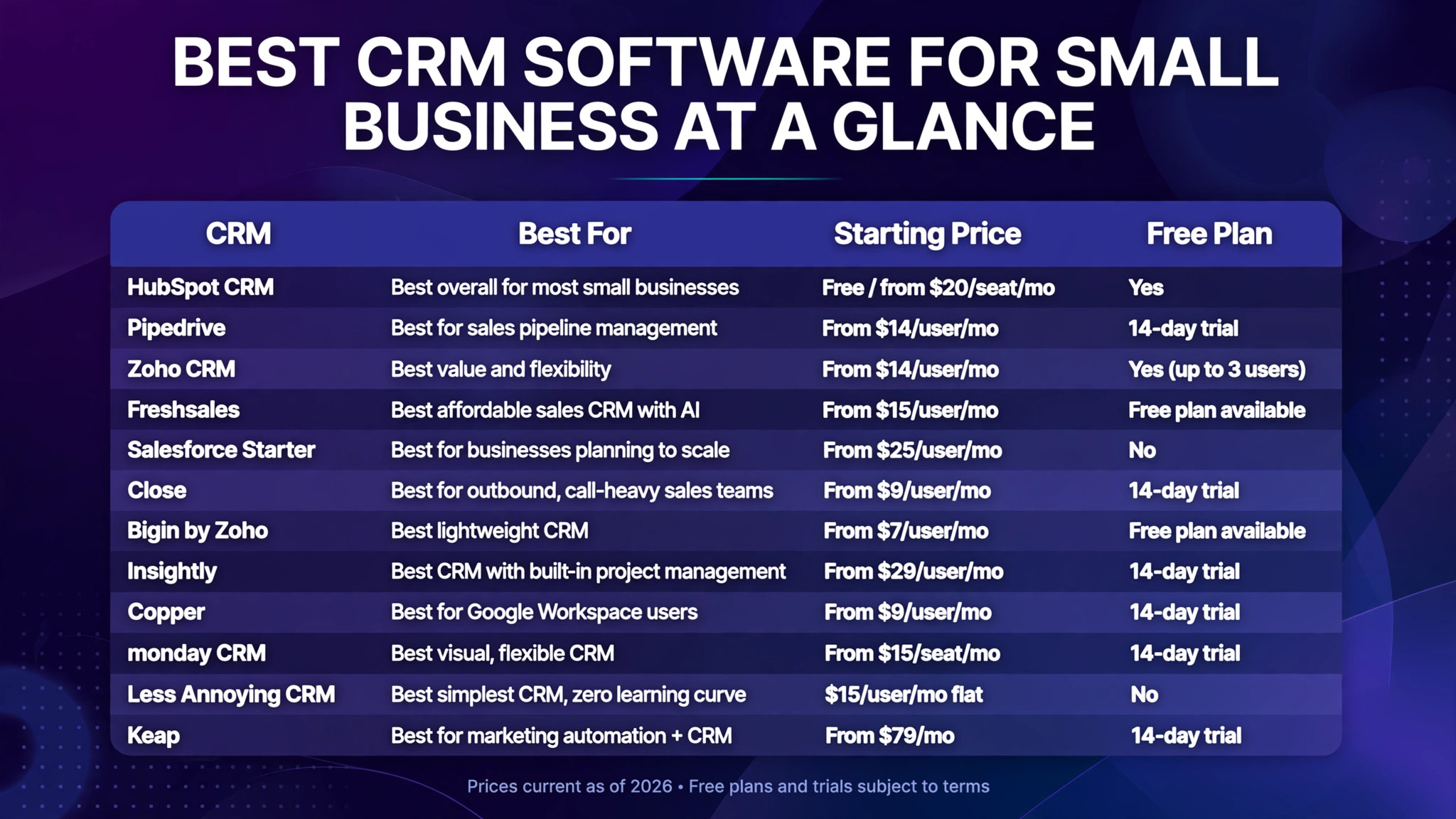
HubSpot remains the default recommendation for the best CRM software for small business, and for good reason: the free tier is genuinely usable, not a hollow demo. Contact management, deal pipelines, meeting scheduling, live chat and basic email marketing all cost nothing, so a two- or three-person team can run on it for months before spending a penny.
Key features: free CRM with unlimited users on the free tier, visual deal pipelines, email tracking and templates, meeting scheduler, forms and live chat, and a shared contact record across marketing, sales and service hubs as you grow.
Pricing: Free CRM available. Starter plans from around $20/seat/month. The catch competitors flag: email sequences, real automation and custom reporting require Sales Hub Professional (around $90/seat/month), so costs can jump as you scale.
Pros: genuinely generous free tier; guided setup a non-technical founder can finish; one shared database across marketing, sales and support.
Cons: steep pricing cliff to Professional; costs scale with marketing contacts; onboarding fees on higher tiers.
Best for: small businesses that want marketing and sales in one system and prefer to start free and upgrade gradually.
2. Pipedrive – Best for Sales Pipeline Management
Pipedrive is the best CRM software for small business teams that live in their pipeline. It does one thing extremely well: a visual, kanban-style deal board that is genuinely easy to keep up to date, with drag-and-drop deals, real-time sales reports and forecasting that scales from solo founder to small team.
Key features: visual pipeline with drag-and-drop, activity-based selling reminders, AI sales assistant, workflow automation, email sync, and 500+ integrations.
Pricing: from around $14/user/month (Lite, billed annually). No free plan — 14-day trial.
Pros: fastest to adopt for sales teams; clearest pipeline visibility of any tool here; strong automation on higher plans.
Cons: reviewers cite unreliable email syncing at times; mobile app feels limited for reps who work from phones; marketing features are thin compared to HubSpot.
Best for: sales-driven small businesses that want the whole team working the same pipeline on day one.

3. Zoho CRM – Best Value and Flexibility
Zoho CRM gives you arguably the most features per pound of any best CRM software for small business contender. Multichannel communication, AI assistant (Zia), workflow automation, analytics and a huge integration marketplace — starting at prices that undercut most rivals. It is also free for up to 3 users, making it a strong HubSpot alternative.
Key features: lead and deal management, omnichannel (email, phone, social, live chat), Zia AI predictions and anomaly detection, blueprint process automation, Canvas design studio, deep Zoho ecosystem integration (Books, Campaigns, Desk).
Pricing: from around $14/user/month (Standard, billed annually). Free for up to 3 users.
Pros: outstanding value; free plan for very small teams; scales from startup to enterprise without migrating.
Cons: interface can feel busy for beginners; full value often means buying into the wider Zoho ecosystem.
Best for: budget-conscious small businesses that want a full-featured CRM that can grow with them — especially if you already use Zoho Books or other Zoho apps.
4. Freshsales (Freshworks CRM) – Best Affordable Sales CRM with AI
Freshsales, now part of the Freshworks “Freddy AI” push, is a strong pick for small sales teams that call prospects. Built-in phone, email and chat sit inside the CRM, and AI features like deal insights and next-best-action suggestions come at prices well below Salesforce or HubSpot’s upper tiers.
Key features: built-in telephony and email, AI-powered lead scoring and deal insights, visual sales pipelines, workflow automation, territory management on higher plans.
Pricing: from around $15/user/month. Limited free plan available.
Pros: built-in calling without third-party tools; AI features included rather than gated; simpler than Salesforce.
Cons: smaller integration marketplace than HubSpot or Pipedrive; advanced customisation needs higher tiers.
Best for: small teams that sell by phone and email and want AI assistance without enterprise pricing.
5. Salesforce Starter – Best for Businesses Planning to Scale
Salesforce Starter (formerly Essentials) is the entry ramp to the world’s biggest CRM ecosystem. For a small business with ambitions to grow into a mid-market operation, starting on Salesforce means never having to migrate later — the AppExchange marketplace and Trailhead learning resources are unmatched.
Key features: account and opportunity management, built-in onboarding guidance, Einstein AI activity capture, 1,000+ AppExchange integrations, reports and dashboards.
Pricing: from around $25/user/month. No free plan.
Pros: scales infinitely; largest integration ecosystem; every consultant and hire already knows it.
Cons: more complex setup than Pipedrive or HubSpot; per-user cost adds up; some “simple” things require admin knowledge.
Best for: ambitious small businesses that want an enterprise-grade foundation from day one.
6. Close – Best for Outbound, Call-Heavy Sales Teams
Close is built for one workflow: high-volume outbound. Power dialler, predictive dialling, bulk SMS, and email sequences live inside the CRM, so reps never leave the app. If your team sells by phone all day, Close will out-produce a generic CRM.
Key features: built-in power dialler and calling, SMS automation, email sequences, predictive dialling, reporting on call activity and conversion.
Pricing: from around $9/user/month (Solo, billed annually). Call/SMS credits cost extra.
Pros: the fastest outbound workflow in its class; no separate dialler subscription needed.
Cons: call and SMS credits sit on top of the headline price; overkill if you do not sell by phone.
Best for: outbound sales teams, agencies doing cold outreach, and anyone whose reps live on the phone.
7. Bigin by Zoho – Best Lightweight CRM
Bigin is Zoho’s answer to the “I just need a simple pipeline” crowd. It strips CRM back to contacts, pipelines and activities with a clean, modern interface — at a fraction of the cost of full CRMs. Think of it as Pipedrive simplicity at Zoho prices.
Key features: visual pipelines, contact timelines, built-in telephony, workflow rules, mobile apps, integrations with Zoho and third-party apps.
Pricing: from around $7/user/month. Free plan available.
Pros: extremely affordable; genuinely easy to learn; free tier for tiny teams.
Cons: limited reporting depth; not suited to complex sales processes or marketing automation.
Best for: freelancers, solopreneurs and micro-businesses that find full CRMs overwhelming.
8. Insightly – Best CRM with Built-in Project Management
Insightly’s differentiator is that it does not stop at the sale: projects, milestones and task management live alongside contacts and pipelines. For service businesses and agencies that sell and deliver, that removes the need for a separate project tool.
Key features: CRM plus project management, opportunity linking to projects, workflow automation, email tracking, custom dashboards, AppConnect integrations.
Pricing: from around $29/user/month. 14-day trial.
Pros: sell and deliver in one system; strong for agencies and consultants.
Cons: pricier than pipeline-only rivals; marketing automation is lighter than Keap or HubSpot.
Best for: agencies, consultancies and service businesses that want CRM and project delivery under one roof. (See also our guide to the best project management software if you need a standalone tool.)
9. Copper – Best for Google Workspace Users
Copper lives inside Gmail and Google Workspace so completely that it barely feels like separate software. Contacts auto-enrich from your inbox, and you can manage deals without leaving Gmail — a huge adoption win for teams that already live in Google’s world.
Key features: Gmail-native interface, automatic contact enrichment, pipeline management, Google Calendar/Drive integration, workflow automation, email sequences.
Pricing: from around $9/user/month (Starter, billed annually). 14-day trial.
Pros: near-zero learning curve for Workspace teams; automatic data capture from email.
Cons: much less compelling outside Google Workspace; reporting depth lags Salesforce/HubSpot.
Best for: small businesses standardised on Gmail and Google Workspace.
10. monday CRM – Best Visual, Flexible CRM
monday CRM brings the colourful, board-based flexibility of monday.com to customer management. If your team thinks visually and wants to customise pipelines, dashboards and automations without code, it is one of the most adaptable options here.
Key features: customisable boards and pipelines, no-code automations, dashboards, email integration, AI features on the monday platform, 200+ integrations.
Pricing: from around $15/seat/month. 14-day trial (note: paid plans have seat minimums).
Pros: extremely customisable; great dashboards for screen-shares and client reviews; strong automation builder.
Cons: per-seat pricing with minimums can surprise tiny teams; can get complex if over-customised.
Best for: visual teams that want a CRM shaped exactly around their process.
11. Less Annoying CRM – Best Simplest CRM
Less Annoying CRM does exactly what the name promises: contacts, calendar, tasks and pipelines with zero learning curve, at a flat $15/user/month with no tiers, no upsells and genuinely human support. It will never win a feature war — that is the point.
Key features: contact management, simple pipelines, shared calendar, task reminders, straightforward reporting.
Pricing: $15/user/month flat. No free plan.
Pros: simplest onboarding of any CRM here; honest flat pricing; excellent support reputation.
Cons: no marketing automation; limited integrations; not for complex sales operations.
Best for: non-technical small business owners who want the simplest possible system their team will actually use.
12. Keap – Best for Marketing Automation + CRM
Keap (formerly Infusionsoft) combines CRM with serious marketing automation: lead capture, email/SMS sequences, appointment booking and payments. It is the pick when your bottleneck is follow-up marketing rather than pure pipeline management.
Key features: CRM with visual campaign builder, email and SMS automation, landing pages, appointment scheduling, invoicing and payments.
Pricing: from around $79/month. 14-day trial.
Pros: powerful automation for its price; built-in payments and invoicing; great for coaches, consultants and course sellers.
Cons: pricier entry point; sales pipeline features are less deep than Pipedrive.
Best for: small businesses that need automated follow-up marketing baked into their CRM — and if invoicing matters, pair it with one of the best accounting software for small business options.
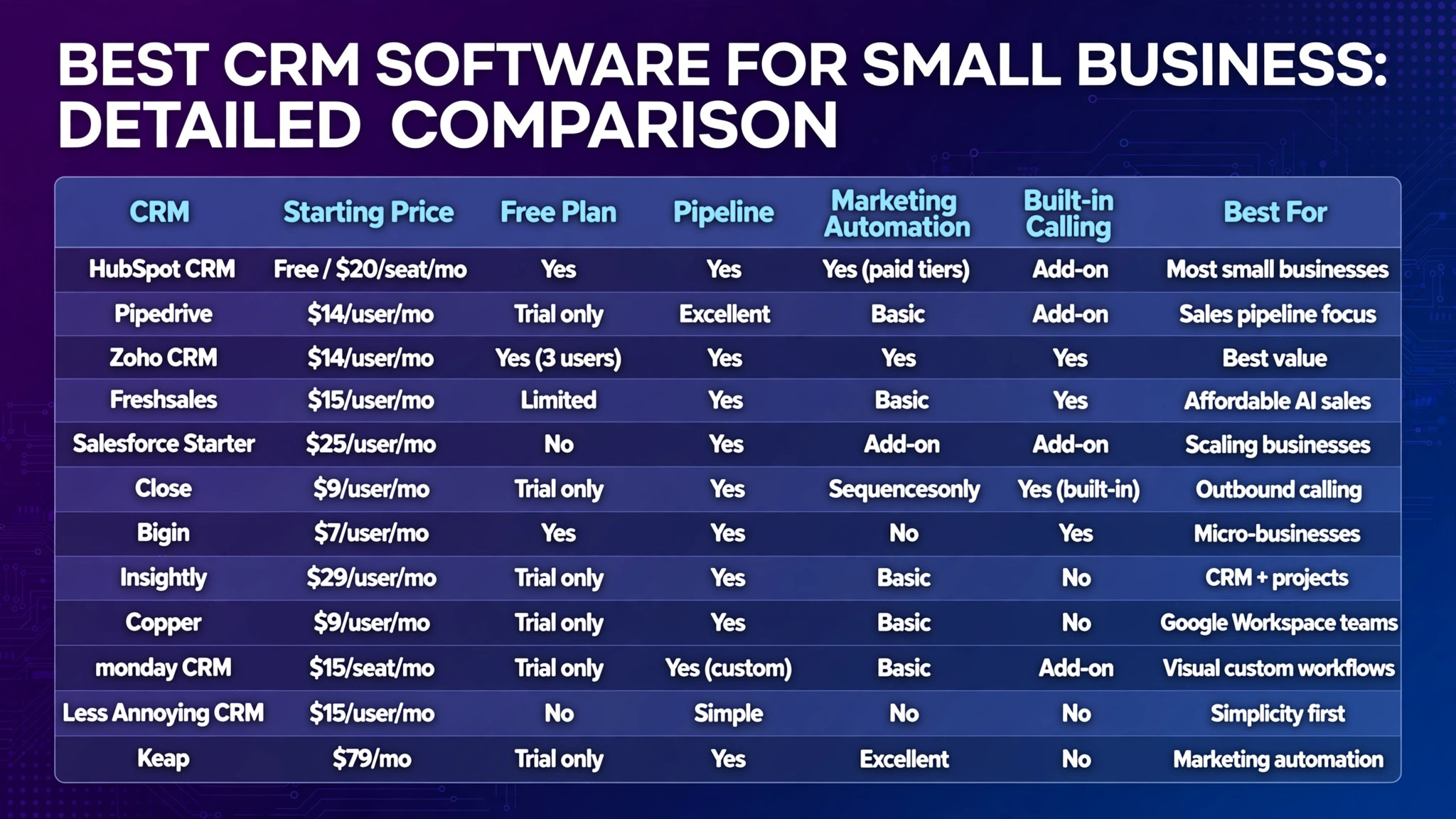
Detailed Comparison: Best CRM Software for Small Business
| CRM | Starting price | Free plan | Pipeline management | Marketing automation | Built-in calling | Best for |
|---|---|---|---|---|---|---|
| HubSpot CRM | Free / $20/seat/mo | Yes | Yes | Yes (paid tiers) | Add-on | Most small businesses |
| Pipedrive | $14/user/mo | Trial only | Excellent | Basic | Add-on | Sales pipeline focus |
| Zoho CRM | $14/user/mo | Yes (3 users) | Yes | Yes | Yes | Best value |
| Freshsales | $15/user/mo | Limited | Yes | Basic | Yes | Affordable AI sales |
| Salesforce Starter | $25/user/mo | No | Yes | Add-on | Add-on | Scaling businesses |
| Close | $9/user/mo | Trial only | Yes | Sequences only | Yes (built-in) | Outbound calling |
| Bigin | $7/user/mo | Yes | Yes | No | Yes | Micro-businesses |
| Insightly | $29/user/mo | Trial only | Yes | Basic | No | CRM + projects |
| Copper | $9/user/mo | Trial only | Yes | Basic | No | Google Workspace teams |
| monday CRM | $15/seat/mo | Trial only | Yes (custom) | Basic | Add-on | Visual custom workflows |
| Less Annoying CRM | $15/user/mo | No | Simple | No | No | Simplicity first |
| Keap | $79/mo | Trial only | Yes | Excellent | No | Marketing automation |
Pricing reflects 2026 list prices, typically billed annually. Always confirm on the vendor’s site before buying, as promotions change frequently.
How to Choose the Best CRM Software for Your Small Business
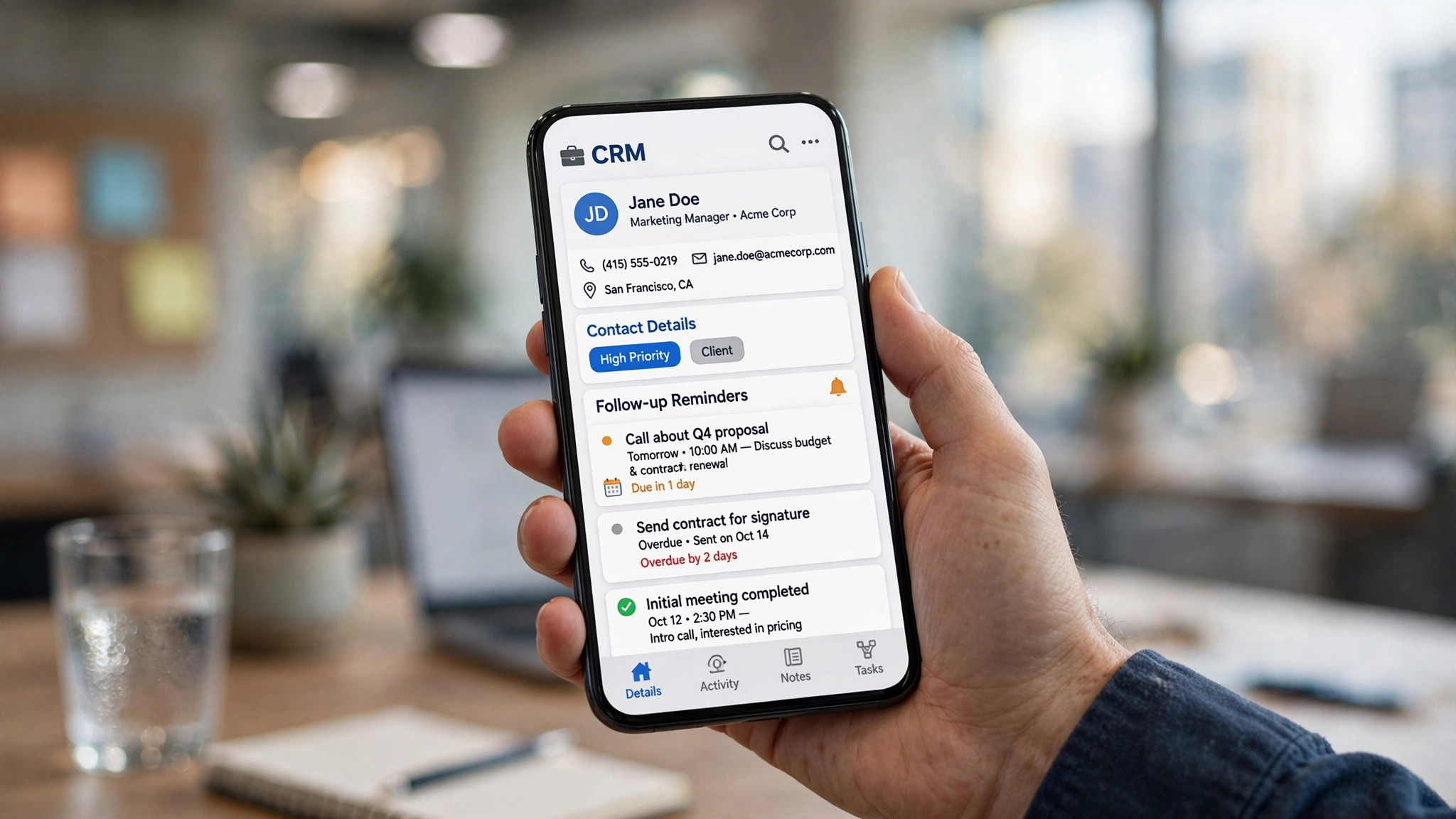
The best CRM software for small business is the one your team will actually keep updated. Follow these steps:
Step 1 – Define the job. Are you losing follow-ups (you need pipeline + reminders), doing cold outreach (you need built-in calling like Close), or nurturing leads with email (you need automation like Keap or HubSpot)? Name the single biggest pain first.
Step 2 – Count your users honestly. A 3-person team can live on HubSpot’s free tier or Zoho’s free plan for months. At 10+ seats, per-user pricing differences of $10/month become $1,200+/year — which is where Zoho CRM and Pipedrive pull ahead on value.
Step 3 – Map your sales process. Sketch your actual stages (e.g. New Lead → Qualified → Proposal Sent → Negotiation → Won). If your process fits a visual pipeline, Pipedrive, Bigin or monday CRM will feel natural. If it is relationship-heavy, look at Nimble-style tools or Copper.
Step 4 – Check the integrations you cannot live without. Email (Gmail/Outlook), accounting (QuickBooks/Xero), and your calendar are the big three. If you run on Google Workspace, Copper removes huge friction. If invoicing and books matter, check our guide to the best accounting software for small business.
Step 5 – Trial with real data. Import 50 real contacts and run one real deal through the pipeline during the trial. A CRM that feels clunky with your own data will feel worse at month six.
Step 6 – Price the whole bill, not the seat. Add onboarding fees, calling/SMS credits, marketing contact overages and the cost of the tier that unlocks the automation you need. HubSpot’s jump from Starter to Professional is the classic example.
Getting Started: Implement Your CRM in a Week
- Day 1–2: Clean your data. Export contacts from spreadsheets, inboxes and old tools. Deduplicate and standardise fields (name, company, email, phone, source) before importing — a CRM full of messy data dies fast.
- Day 3: Configure your pipeline. Create 4–7 stages that mirror how you actually sell. Fewer stages get used; more stages get ignored.
- Day 4: Connect email and calendar. This is the single highest-ROI step: automatic logging means reps stop doing manual data entry, which is why CRMs fail.
- Day 5: Build 3 core automations. New-lead assignment, a follow-up reminder for stalled deals, and a won-deal notification. If you want deeper workflow automation across your stack, see the best AI workflow automation tools for small business.
- Day 6–7: Train and set the rule. One 60-minute team session beats a 50-page manual. Set the rule: “if it isn’t in the CRM, it didn’t happen.”

CRM Software Mistakes Small Businesses Should Avoid
- Buying the most features. A complex CRM nobody updates is worse than a simple one everybody uses. Match the tool to your team’s actual discipline level.
- Ignoring the total cost. Introductory pricing, per-seat scaling, add-ons and onboarding fees can triple the headline number by year two.
- Skipping the data migration plan. Budget time (or money) to clean and import contacts properly. Messy imports are the #1 reason CRM rollouts stall.
- Choosing before trialling with real data. Demo data always looks perfect. Your messy, real-world pipeline is the true test.
- Forgetting mobile. If your team works from phones, test the mobile app during the trial — several well-known CRMs have weak mobile experiences.
Frequently Asked Questions
What is the best CRM software for small business in 2026?
For most small businesses, HubSpot CRM is the best starting point because the free tier is genuinely usable and it scales into marketing and service. Pipedrive is best if your world revolves around the sales pipeline, and Zoho CRM offers the best value per dollar with a free plan for up to 3 users.
What is the best free CRM for small business?
HubSpot CRM has the most generous free plan (free CRM with core features and no user cap on the free tier). Zoho CRM is free for up to 3 users, Bigin has a free tier, and Freshsales offers a limited free plan. For micro-businesses that may never pay, Less Annoying CRM’s flat $15/user/month is the cheapest honest paid option.
Is HubSpot really free?
The core HubSpot CRM is genuinely free — contacts, deal pipelines, meeting scheduling, live chat and basic email tools cost nothing. Paid tiers start around $20/seat/month for Starter. The catch: advanced automation, sequences and custom reporting require Professional (around $90/seat/month), so costs rise steeply as you scale.
Is Zoho CRM good for a small business?
Yes — it is one of the best-value options available. From around $14/user/month you get multichannel communication, AI insights, workflow automation and deep integration with the rest of the Zoho suite (Books, Campaigns, Desk). It is free for up to 3 users, making it ideal for very small teams.
Is Pipedrive good for small business?
Pipedrive is excellent for small businesses with a clear sales process. Its visual, drag-and-drop pipeline is the easiest in its class to keep updated, and it scales from solo founder to small team without feeling bloated. Just note there is no free plan (14-day trial) and email syncing gets mixed reviews.
How much does CRM software cost for a small business?
Most small businesses spend $0–$50/user/month. Free tiers (HubSpot, Zoho, Bigin) cover startups; $14–$25/user/month covers Pipedrive, Zoho CRM, Freshsales and Salesforce Starter; marketing-automation-heavy tools like Keap start around $79/month. For a 5-person team, budget roughly $840–$1,500/year plus any add-ons.
Can a small business use a CRM with Gmail or Outlook?
Yes. Copper is built natively for Gmail/Google Workspace, Streak works inside Gmail, and HubSpot, Pipedrive, Zoho and Freshsales all offer Gmail and Outlook integrations with email tracking and automatic logging.
Should a small business choose a CRM or just use spreadsheets?
Spreadsheets work until about 50–100 active contacts or your first missed follow-up that costs you a deal. A CRM adds automatic reminders, pipeline visibility, team collaboration and reporting that spreadsheets cannot match. If you are losing track of follow-ups, you have outgrown the spreadsheet.
Conclusion: Which CRM Should You Choose?
There is no single best CRM software for small business — only the best fit for how you sell:
- Start free and grow: HubSpot CRM
- Live in your pipeline: Pipedrive
- Maximum value per dollar: Zoho CRM
- Sell by phone: Close
- Automate your marketing: Keap
- Keep it dead simple: Less Annoying CRM or Bigin
Pick your top two, run a real trial with real data for 14 days, and commit. The CRM your team actually uses will always beat the “better” one they ignore. If you need help with follow-up scheduling once deals are moving, check our guide to the best scheduling apps too.