
Choosing the best team communication software sounds simple until your team actually has to live in it every day. A five-person startup needs fast chat, simple file sharing and the occasional video call. A 100-person company cares far more about permissions, searchable history, integrations, security controls and admin tools. A customer support team works in shared inboxes and response times; a software team lives in threads, code snippets and integrations with its development tools. One size genuinely does not fit all.
That is why this guide does not just list popular apps. We compared 11 of the best team communication software options for 2026 — Slack, Microsoft Teams, Google Chat, Zoom Chat, Twist, Mattermost, Rocket.Chat, Chanty, Basecamp, Missive and Front — and judged each one on the things that decide whether a tool survives contact with a real team: everyday usability, message history and search, video and audio, integrations, external collaboration, AI features, security and, of course, what it actually costs once your whole team is on a paid plan.
By the end, you will know which platform fits your team size, your existing software stack and your budget — and you will have a step-by-step rollout plan so the switch does not descend into chaos. If you are still building out the rest of your toolkit, our guide to the best software for small business covers the other categories worth pairing with your chat tool.
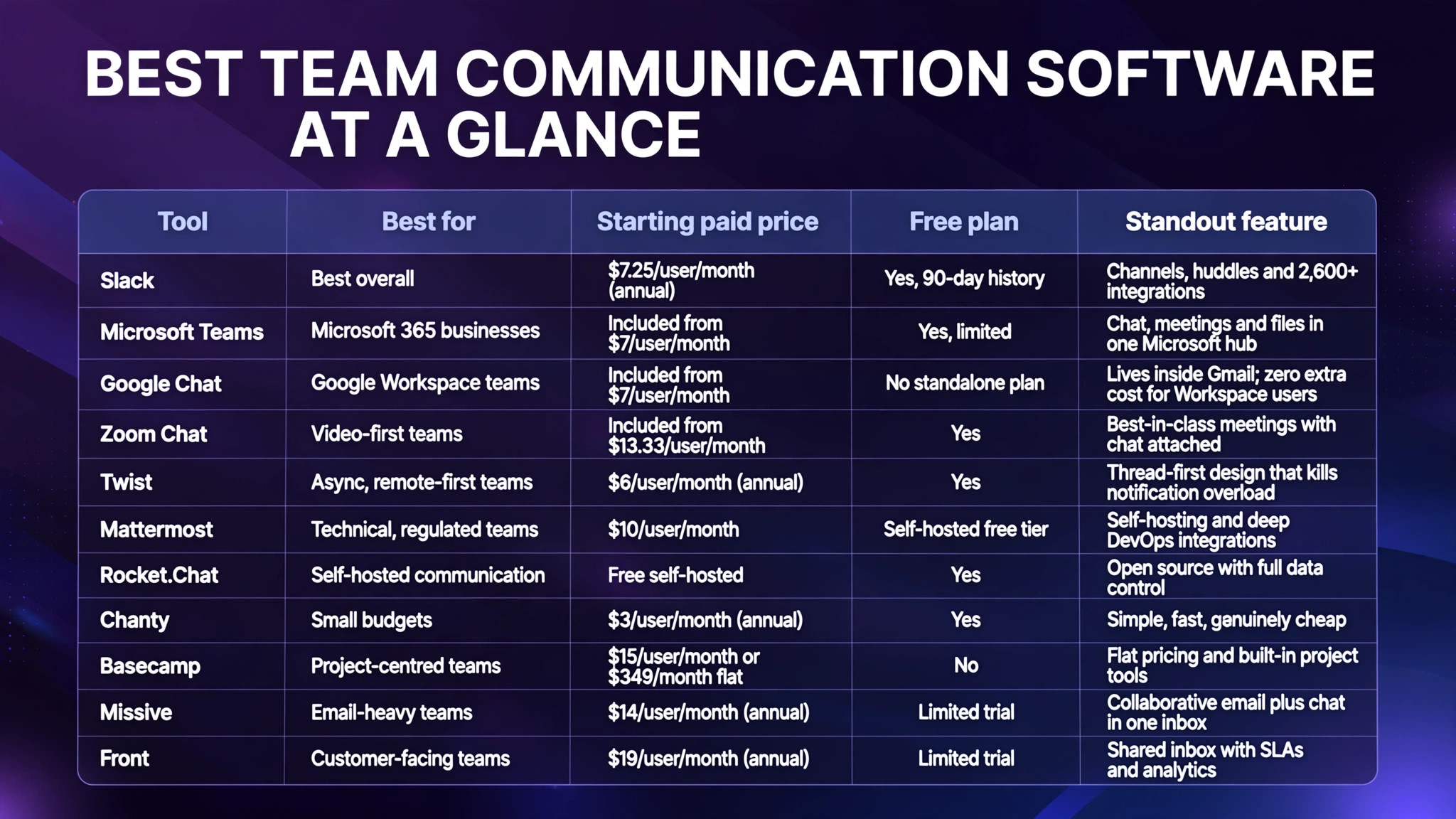
Quick Answer: The Best Team Communication Software at a Glance
If you only read one section, read this one. These are our headline verdicts, with full reviews below.
| Tool | Best for | Starting paid price* | Free plan | Standout feature |
|---|---|---|---|---|
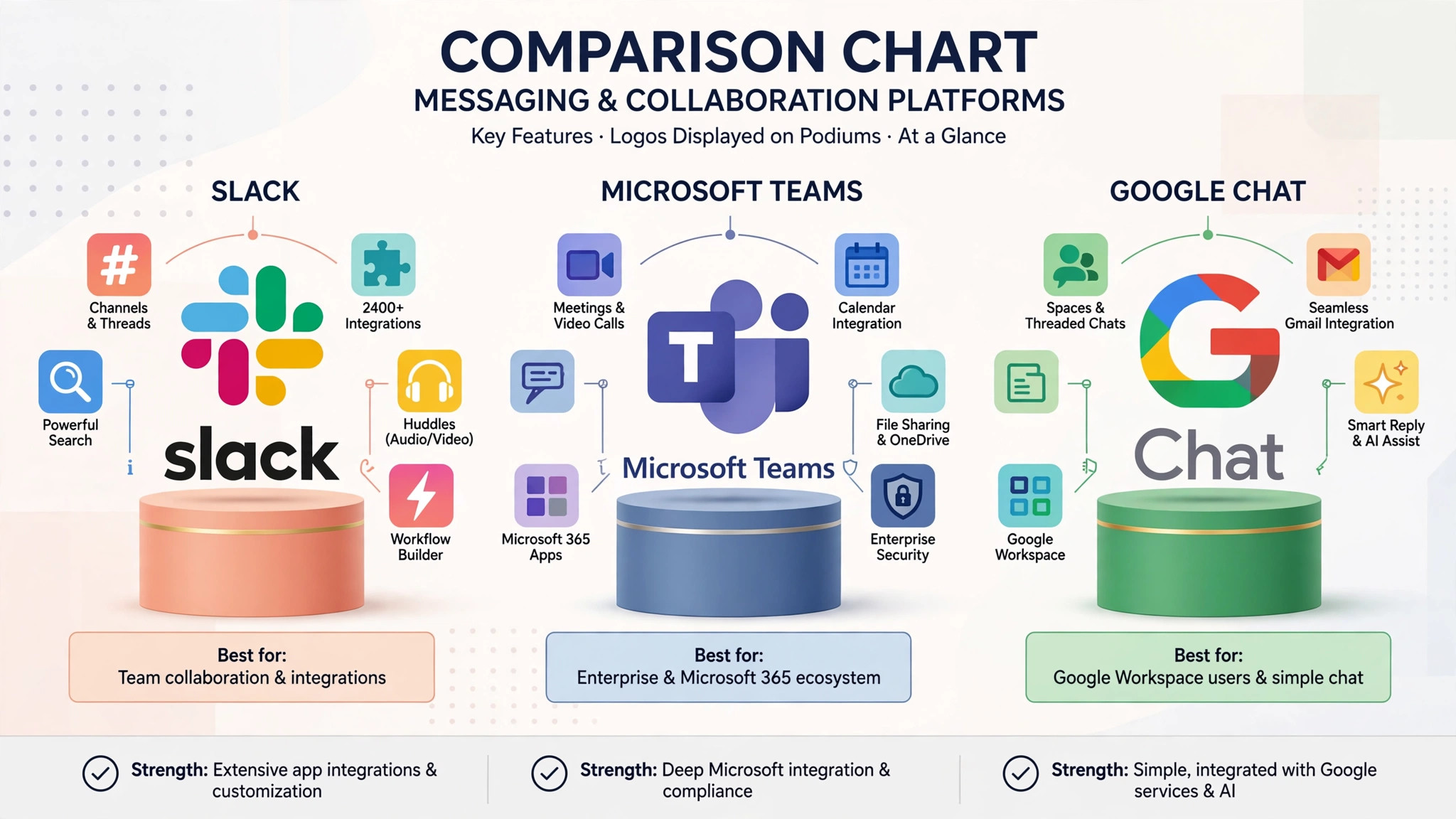
| Slack | Best overall | $7.25/user/month (annual) | Yes, 90-day history | Channels, huddles and 2,600+ integrations |
| Microsoft Teams | Microsoft 365 businesses | Included from $7/user/month | Yes, limited | Chat, meetings and files in one Microsoft hub |
| Google Chat | Google Workspace teams | Included from $7/user/month | No standalone plan | Lives inside Gmail; zero extra cost for Workspace users |
| Zoom Chat | Video-first teams | Included from $13.33/user/month | Yes | Best-in-class meetings with chat attached |
| Twist | Async, remote-first teams | $6/user/month (annual) | Yes | Thread-first design that kills notification overload |
| Mattermost | Technical, regulated teams | $10/user/month | Self-hosted free tier | Self-hosting and deep DevOps integrations |
| Rocket.Chat | Self-hosted communication | Free self-hosted | Yes | Open source with full data control |
| Chanty | Small budgets | $3/user/month (annual) | Yes | Simple, fast, genuinely cheap |
| Basecamp | Project-centred teams | $15/user/month or $349/month flat | No | Flat pricing and built-in project tools |
| Missive | Email-heavy teams | $14/user/month (annual) | Limited trial | Collaborative email plus chat in one inbox |
| Front | Customer-facing teams | $19/user/month (annual) | Limited trial | Shared inbox with SLAs and analytics |
*Prices in USD, checked against vendor pricing pages in 2026 and subject to change. See each tool’s official site for current figures.
Our top three picks:
- Slack — the best team communication software for most teams, thanks to the best search, the deepest integration library and an interface new hires already understand.
- Microsoft Teams — the smart default if you already pay for Microsoft 365, because it is effectively already in your subscription.
- Chanty — the budget pick that covers chat, tasks and calls for less than the price of a coffee per user.
-
- Everyday usability (25%) — how quickly a new hire can send messages, find conversations and join calls without training.
-
- Collaboration depth (25%) — threads, reactions, file sharing, screen sharing, huddles or meetings, and external guest access.
-
- Search and history (15%) — how much history you keep on each plan and how reliably search finds old decisions.
-
- Integrations and AI (15%) — the size of the app directory and the usefulness of built-in AI summaries, catch-ups and search.
-
- Value for money (20%) — the real monthly cost for a 25-person team on the plan most teams actually need, not the cheapest tier.
-
- Channels for teams, projects and topics, public or private
-
- Huddles: lightweight audio/video calls you can start in any channel
-
- 2,600+ integrations including Google Drive, Salesforce, GitHub and every major project tool
-
- Slack AI (on paid add-ons/tiers): thread summaries, daily recaps and natural-language search
-
- Slack Connect for working with external companies inside shared channels
-
- Canvas documents and Lists for lightweight docs and task tracking
-
- Best-in-class search and the most integrations of any tool here
-
- Interface most employees already know, so onboarding is minimal
-
- Huddles are perfect for quick got a minute? calls
-
- Costs add up quickly as headcount grows
-
- Free plan’s 90-day history limit pushes you to paid plans early
-
- Busy workspaces can become notification overload without good channel hygiene
-
- Chat, channels, meetings and calling in one app
-
- Files stored in SharePoint/OneDrive with real-time co-editing
-
- Copilot AI summaries, meeting recaps and message drafting (licence-dependent)
-
- Strong admin, compliance and data-loss-prevention controls
-
- Guest access and shared channels for external partners
-
- Effectively free if you already pay for Microsoft 365
-
- Excellent meetings and enterprise-grade security/compliance
-
- Files, chat and meetings genuinely in one place
-
- Interface feels heavier and less intuitive than Slack
-
- Search is weaker than Slack’s, especially across old conversations
-
- Notification and settings sprawl can confuse new users
-
- Spaces with threaded conversations, in-line tasks and shared files
-
- Deep integration with Gmail, Drive, Calendar and Meet
-
- Gemini side panel for summaries and drafting on higher Workspace tiers
-
- Smart chips and rich previews for Docs, Sheets and Slides
-
- Strong admin controls via the Google Admin console
-
- No extra cost for Workspace customers
-
- Lives inside Gmail, so adoption friction is near zero
-
- Excellent if your files already live in Google Drive
-
- Smaller integration ecosystem than Slack
-
- Less polished for cross-company collaboration
-
- Fewer advanced workflow/automation options
-
- Chat channels, DMs and meeting-chats that persist after calls end
-
- AI Companion: meeting summaries, chat thread summaries and draft help
-
- Jump from a chat thread to a video meeting in one click
-
- Zoom Phone integration for businesses that want calling in the same app
-
- Best video meeting quality and reliability in the group
-
- One app for chat, meetings and phone
-
- AI Companion included at no extra cost on paid plans
-
- Chat features trail Slack and Teams in depth
-
- You are really buying it for meetings; chat is the supporting act
-
- Admin experience can feel fragmented across Zoom products
-
- Threads as the default unit of conversation — no endless scrolling streams
-
- Channels organised by team or project
-
- Inbox view that gathers threads needing your attention
-
- Generous message history even on lower tiers
-
- Integrates with Zapier and common productivity tools
-
- Dramatically calmer than Slack for distributed, multi-timezone teams
-
- Conversations stay findable weeks later
-
- Encourages thoughtful, written communication
-
- No built-in video calling (you will pair it with Zoom or Meet)
-
- Smaller integration library
-
- Less suitable for teams that genuinely need instant responses
-
- Self-hosting with full data ownership and custom retention
-
- Channels, boards (Kanban) and playbooks for incident workflows
-
- Strong DevOps integrations: GitHub, GitLab, Jira, Jenkins
-
- Granular permissions, audit logging and compliance exports
-
- Works in classified and regulated environments
-
- Unmatched control over data and deployment
-
- Built for engineering and operations workflows
-
- No vendor lock-in on your message history
-
- Self-hosting means you manage updates and uptime
-
- Interface is functional rather than delightful
-
- Video calls require integrations (e.g. Jitsi or Zoom)
-
- Open-source core with self-hosting and federation options
-
- Omnichannel live chat for websites and messaging apps
-
- Customisable with a large marketplace of apps
-
- End-to-end encryption options and granular permissions
-
- White-labelling on higher tiers
-
- True data sovereignty and no per-seat cost if you self-host the free edition
-
- Extremely customisable
-
- Doubles as a customer live-chat platform
-
- You are responsible for servers, security patches and backups
-
- Polish and mobile apps lag behind Slack
-
- Some enterprise features require paid plans
-
- Unlimited searchable message history on all plans
-
- Built-in tasks with Kanban view
-
- Voice messages and one-click calls
-
- Clean, genuinely easy interface for non-technical teams
-
- Outstanding value; history is never held hostage
-
- Very low learning curve
-
- Tasks built in, so you may not need a separate tool
-
- Integration library is small
-
- Fewer enterprise admin and compliance features
-
- Less suited to companies beyond ~100 people
-
- Message boards that replace chaotic email threads
-
- Campfire group chats per project
-
- Automatic check-in questions that replace status meetings
-
- Flat-rate Pro Unlimited pricing option — one price for the whole company
-
- Kills the chat app plus project app double subscription
-
- Flat pricing is predictable and scales brilliantly
-
- Opinionated design reduces meetings
-
- Not a real-time chat tool in the Slack sense
-
- Fewer integrations; Basecamp wants you inside Basecamp
-
- Per-user plan is pricey for tiny teams
-
- Shared inboxes for support@, sales@ and team addresses
-
- Internal comments and chat attached to each conversation
-
- Assignments, snoozing, canned responses and automation rules
-
- Also handles SMS, WhatsApp and social messages on higher tiers
-
- Ends did anyone reply to this? chaos
-
- Feels like email, so adoption is easy
-
- Powerful rules and integrations for a small app
-
- Not a replacement for company-wide chat
-
- Per-user pricing climbs for larger teams
-
- Learning the workflow takes a week or two
-
- Shared inboxes with clear ownership and collision detection
-
- SLA tracking, analytics and CSAT reporting
-
- AI triage, suggested replies and summarisation
-
- Deep CRM integrations (Salesforce, HubSpot)
-
- Best-in-class for support and success teams
-
- Visibility managers actually use
-
- Automations cut repetitive triage work
-
- Overkill for internal team chat
-
- Premium pricing
-
- Setup and workflow design take real effort
-
- What suite do you already pay for? If Microsoft 365 or Google Workspace is in place, trial its chat tool first.
-
- How do you actually talk? Meeting-heavy teams lean Zoom/Teams; async teams lean Twist/Slack; email-heavy teams lean Missive/Front.
-
- Who is outside the company? Frequent client collaboration favours Slack Connect or Teams shared channels.
-
- What are your compliance needs? Regulated or data-sensitive work points to Mattermost or Rocket.Chat.
-
- What is the three-year cost? Model headcount growth — a cheap tool you outgrow in a year costs more than the right tool now.
-
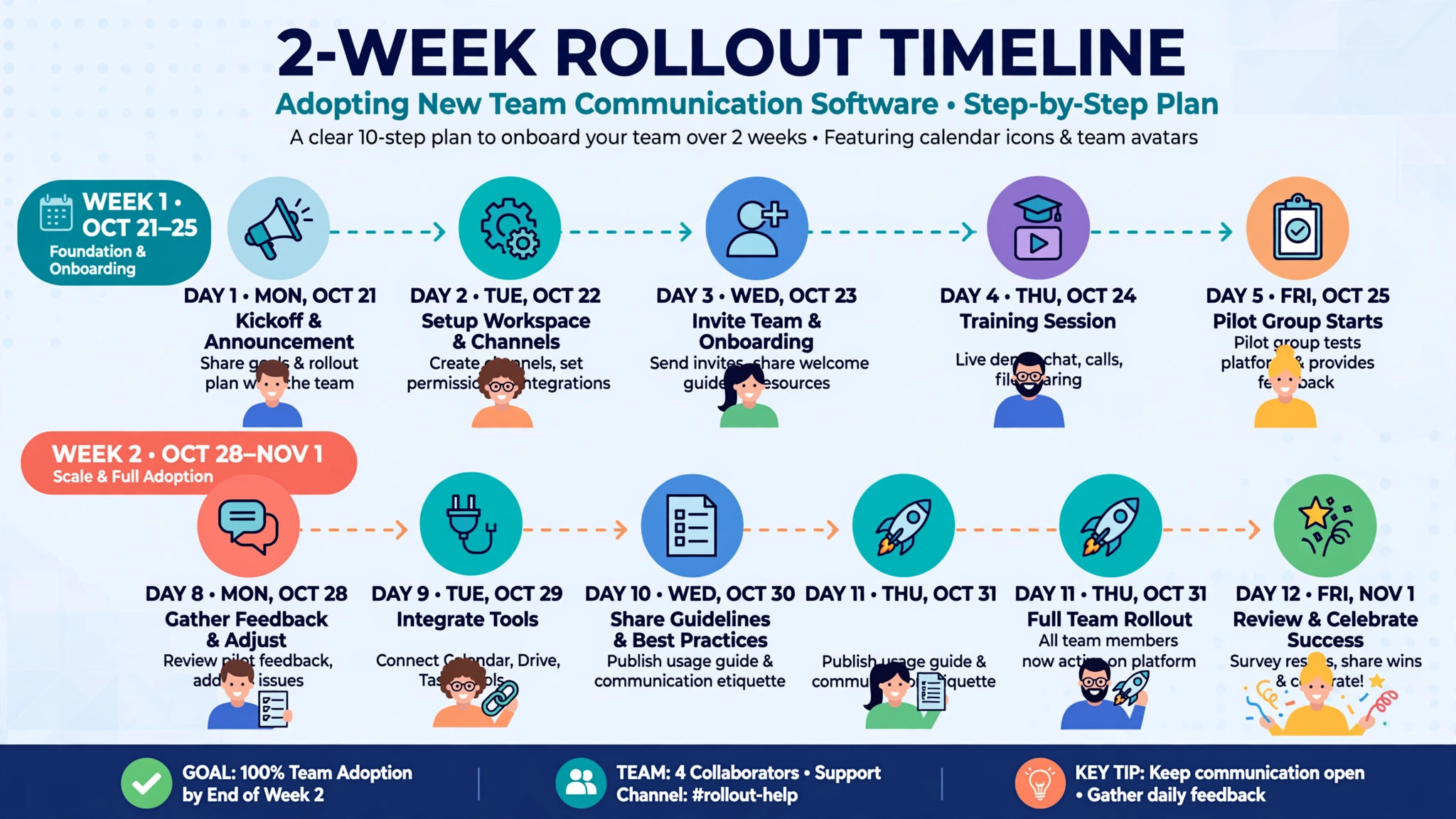
- Days 1–2: Pick one pilot team (8–15 people) and one tool. Create a simple channel structure: #announcements, #general, one channel per active project, and a social channel.
-
- Days 3–5: Connect your calendar, file storage and project tool. Write a one-page etiquette guide: threads for replies, reaction emojis for acknowledgement, no @channel unless urgent.
-
- Week 2: Move one recurring meeting into an async check-in thread. Review what’s working, adjust notification norms, and gather the pilot team’s verdict.
-
- Rollout: Migrate team by team, appoint a champion in each, and archive (don’t delete) the old tool’s history for 90 days.
How We Evaluated These Tools
Every tool in this guide was scored against the same criteria so the rankings mean something:
What Makes Good Team Communication Software?
Before the individual reviews, it helps to know what separates a tool your team loves from one they quietly abandon for WhatsApp groups.
Message history that does not disappear. Free tiers often delete or hide history after 30–90 days. The moment an old decision becomes unsearchable, your chat tool stops being a knowledge base. Check the limit before you commit.
Search that actually works. You will search for that file Sarah shared in March far more often than you expect. Slack still sets the standard here; several cheaper tools are noticeably weaker.
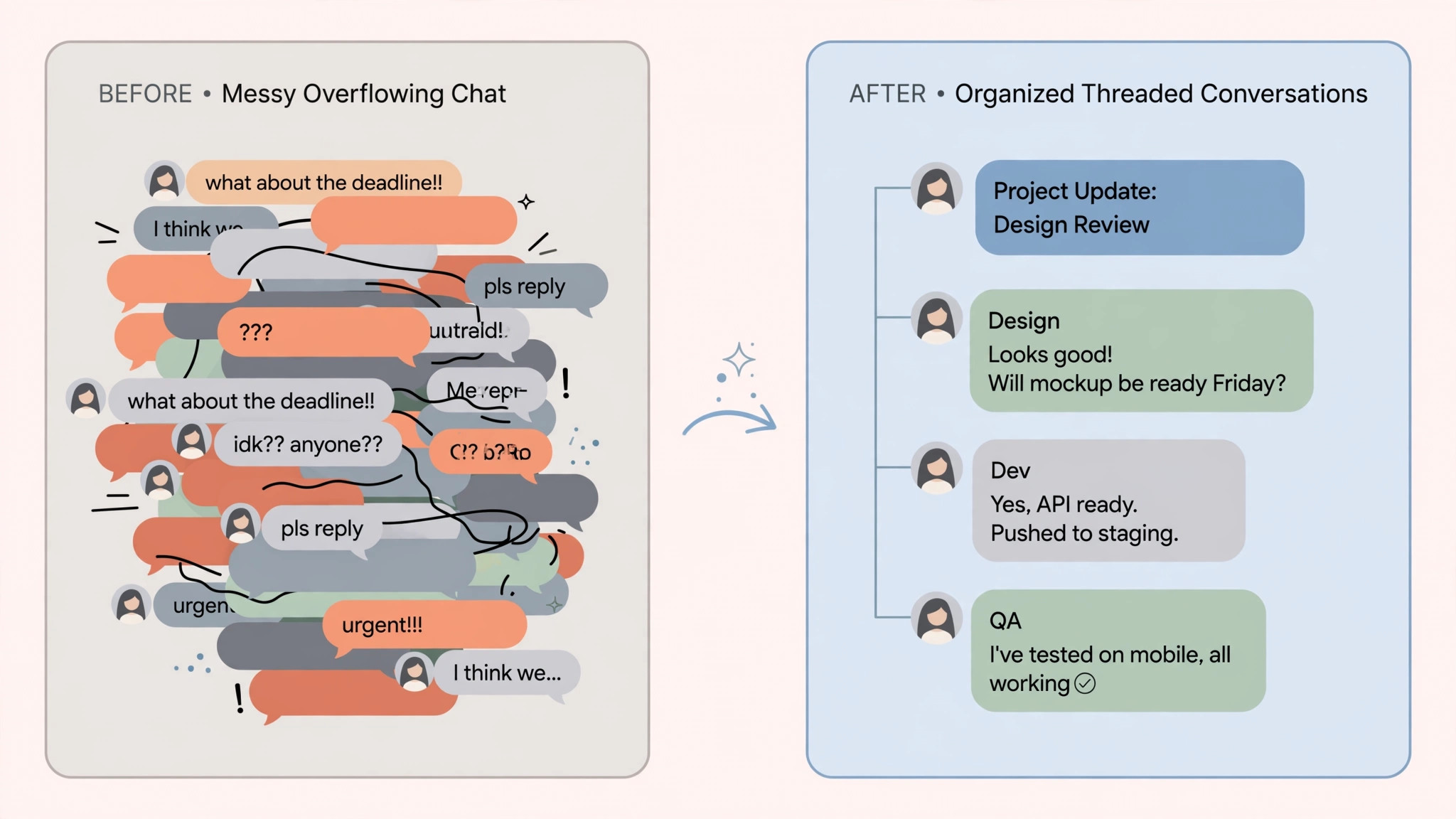
Threads, not noise. In busy channels, threaded replies are the difference between a readable conversation and an overwhelming scroll. Every serious contender now supports threads, but Twist builds its entire product around them.
Integrations with the tools you already use. Your chat app should connect to your project manager, CRM, calendar and file storage. If you are comparing ecosystems, our round-up of the best free AI tools shows which AI assistants plug into these platforms for summaries and drafting help.
External collaboration. Agencies, freelancers and clients need guest access that is easy for you and not confusing for them. Slack Connect and Teams shared channels handle this well; some budget tools make it painful.
Security and administration. As you grow, you will need SSO, data retention policies, audit logs and the ability to remove a departing employee’s access in one click. These features usually sit on higher tiers — factor that into the price.
AI that saves real time. Thread summaries, catch me up digests and AI search answers are now standard on the big platforms. They are genuinely useful in busy channels, but rarely a reason to switch platforms on their own.
1. Slack – Best Overall Team Communication Software
Slack remains the benchmark against which every other team chat tool is measured. Its channel-based structure, polished apps on every platform and enormous integration directory make it the safest recommendation for most teams in 2026.
What it is. A channel-based messaging platform with direct messages, group chats, threaded replies, audio and video huddles, screen sharing, file sharing and a workflow builder for simple automations.
Key features
Pricing summary. Free plan with 90 days of message history. Pro costs around $7.25 per user/month billed annually ($8.75 monthly). Business+ is around $15 per user/month annually and adds advanced identity management and Slack AI features on higher tiers.
Pros
Cons
Best for: Most teams of 5–500 people who want the most capable, best-supported chat platform and are happy to pay for it. Verdict: our top pick overall.
2. Microsoft Teams – Best for Microsoft 365 Businesses
Microsoft Teams combines chat, meetings, calls and file collaboration, and it is bundled into most Microsoft 365 business plans — which makes it the rational default for a huge number of companies.
What it is. Microsoft’s communication hub: persistent chat, teams and channels, meetings for up to 300 people on standard plans, and deep integration with Word, Excel, SharePoint and OneDrive.
Key features
Pricing summary. Included with Microsoft 365 Business Basic from around $7 per user/month; Business Standard (around $14) adds desktop Office apps. A standalone Teams Essentials plan exists at roughly $4 per user/month.
Pros
Cons
Best for: Businesses already committed to Microsoft 365. Verdict: do not pay for Slack until you have seriously tried the tool already in your subscription.
3. Google Chat – Best for Google Workspace Teams
Google Chat is the communication app built into Google Workspace. If your company runs on Gmail and Google Drive, Chat is already paid for — and in 2026 it is far more capable than its old reputation suggests.
What it is. Spaces (Google’s version of channels), direct messages and group conversations that live inside Gmail, with Google Meet one click away and Gemini AI assistance woven through.
Key features
Pricing summary. Included in Google Workspace plans from around $7 per user/month (Business Starter). There is no separate Chat subscription, which is precisely the point.
Pros
Cons
Best for: Google Workspace shops that want good-enough chat without another subscription. Verdict: the best value on this list if you are a Google business. Our guide to the best spreadsheet software for small business covers the Sheets side of the same ecosystem.
4. Zoom Chat – Best for Video-First Teams
Zoom built its name on meetings, and Zoom Team Chat is the messaging layer that sits alongside Zoom Meetings, Zoom Phone and Zoom Whiteboard in the Zoom Workplace bundle.
What it is. Persistent team chat bundled with the meeting platform most people already know, plus AI Companion summaries and catch-up features.
Key features
Pricing summary. Included with Zoom Workplace plans from around $13.33 per user/month billed annually. A basic free tier covers meetings up to 40 minutes plus limited chat.
Pros
Cons
Best for: Teams whose work revolves around live calls — sales, support, remote-first companies with a meeting culture. Verdict: pick it when video is the main event.
5. Twist – Best for Asynchronous Team Communication
Twist, from the makers of Todoist, is built on a simple belief: real-time chat creates pressure, interruptions and fear of missing out. Twist replaces frantic channels with calm, thread-first conversation.
What it is. A thread-based team communication tool where every discussion starts as a titled thread inside a channel, so conversations stay organised and searchable without anyone needing to be online at the same time.
Key features
Pricing summary. Free plan for small teams with limited history. Paid plans start around $6 per user/month billed annually.
Pros
Cons
Best for: Remote-first and async teams across time zones, especially those suffering from Slack overload. Verdict: the antidote to always-on chat.
6. Mattermost – Best for Technical and Controlled Environments
Mattermost is an open-core messaging platform designed for technical teams that need control over their data — including the option to self-host on their own infrastructure.
What it is. Slack-like channels, threads and file sharing with deployment options ranging from Mattermost’s cloud to fully air-gapped, self-hosted installations.
Key features
Pricing summary. A free self-hosted tier covers small teams. Cloud and licensed plans start around $10 per user/month for professional features.
Pros
Cons
Best for: Engineering teams, government, defence and regulated industries. Verdict: the pick when data control is non-negotiable.
7. Rocket.Chat – Best Open-Source, Self-Hosted Option
Rocket.Chat is the leading open-source team communication platform, used heavily by public-sector and privacy-conscious organisations worldwide.
What it is. A fully featured chat platform — channels, DMs, threads, video via integrations, omnichannel customer messaging — that you can host yourself for free or buy as a managed cloud service.
Key features
Pricing summary. Self-hosted community edition is free. Managed cloud and premium self-hosted plans are priced per user or by quote depending on scale and features.
Pros
Cons
Best for: Organisations with IT capacity that want total control at minimal licence cost. Verdict: the open-source champion.
8. Chanty – Best Budget-Friendly Team Communication Tool
Chanty is a simple, fast team chat app aimed squarely at small businesses that find Slack expensive and overwhelming.
What it is. Unlimited message history even on the free plan, a built-in task manager (Teambook), voice messages, and audio/video calls — at a fraction of Slack’s price.
Key features
Pricing summary. Free for teams up to 5 users. Business plan around $3 per user/month billed annually — the cheapest full-featured option here.
Pros
Cons
Best for: Small businesses and startups that need proper team chat on a tight budget. Verdict: the best cheap Slack alternative in 2026.
9. Basecamp – Best for Project-Centred Communication
Basecamp takes a different philosophy: communication should live inside projects, next to the tasks, files and schedules — not in a separate chat app.
What it is. An all-in-one project management and team communication tool with message boards, to-dos, schedules, documents, group chat (Campfires) and automatic check-ins.
Key features
Pricing summary. Around $15 per user/month, or a flat $349/month (billed annually) for unlimited users — which becomes very cheap per person as you grow.
Pros
Cons
Best for: Small companies that want communication and project management in one calm place. Verdict: best when projects, not messages, are your organising principle.
10. Missive – Best for Email-Heavy Teams
Missive reimagines the shared inbox: email, chat and collaboration in one app, where your team can discuss a message internally before anyone replies.
What it is. A collaborative email client with shared inboxes, internal chat threads on every email, assignments, rules and integrations with tools like Asana and HubSpot.
Key features
Pricing summary. Free trial; paid plans start around $14 per user/month billed annually.
Pros
Cons
Best for: Teams drowning in shared email — support, operations, agencies. Verdict: the best collaborative inbox in this round-up.
11. Front – Best for Customer-Facing Communication
Front is built for teams whose communication is primarily with customers: shared inboxes with assignments, SLAs, analytics and AI-assisted replies across email, chat, SMS and social channels.
What it is. A customer communication platform that looks like email but behaves like a ticketing system, with collaboration, automation and reporting layered on top.
Key features
Pricing summary. Plans start around $19 per user/month billed annually, scaling up for analytics and enterprise features.
Pros
Cons
Best for: Customer support, success and operations teams measured on response times. Verdict: buy Front for customer conversations, not internal ones.
Detailed Comparison Table
| Feature | Slack | Teams | Google Chat | Zoom Chat | Twist | Mattermost | Chanty | Basecamp |
|---|---|---|---|---|---|---|---|---|
| Free plan | Yes (90-day history) | Yes (limited) | Workspace only | Yes (limited) | Yes | Self-hosted | Yes (5 users) | No |
| Threads | Yes | Yes | Yes | Yes | Core design | Yes | Yes | Message boards |
| Built-in video | Huddles + calls | Yes | Via Meet | Best in class | No | Via integration | Yes | No |
| Integrations | 2,600+ | 700+ | 150+ | 200+ | 100+ | 100+ (DevOps-heavy) | 30+ | Limited |
| AI summaries | Yes (tiers vary) | Copilot | Gemini | AI Companion | Basic | Plugins | Basic | No |
| Self-hosting | No | No | No | No | No | Yes | No | No |
| Guest/external access | Excellent | Good | Fair | Good | Fair | Good | Fair | Good |
| Starts at (per user/month) | $7.25 | $7 (M365) | $7 (Workspace) | $13.33 | $6 | $10 | $3 | $15 |
Slack vs Microsoft Teams vs Google Chat: The Big Three Compared
Most teams end up choosing between these three, so here is the honest breakdown.
Choose Slack if integrations, search quality and cross-company collaboration matter most, and your budget allows roughly $7–15 per user per month. It is the best standalone product.
Choose Microsoft Teams if you already pay for Microsoft 365. The marginal cost is zero, meetings are excellent, and Copilot closes much of the AI gap.
Choose Google Chat if you are a Google Workspace business that wants chat inside Gmail with no new vendor, no new bill and no new app for staff to learn.
Whichever you pick, remember that switching later is painful — message history rarely migrates cleanly. Run a two-week pilot with one real team before rolling out company-wide.
How Much Does Team Communication Software Cost in Practice?
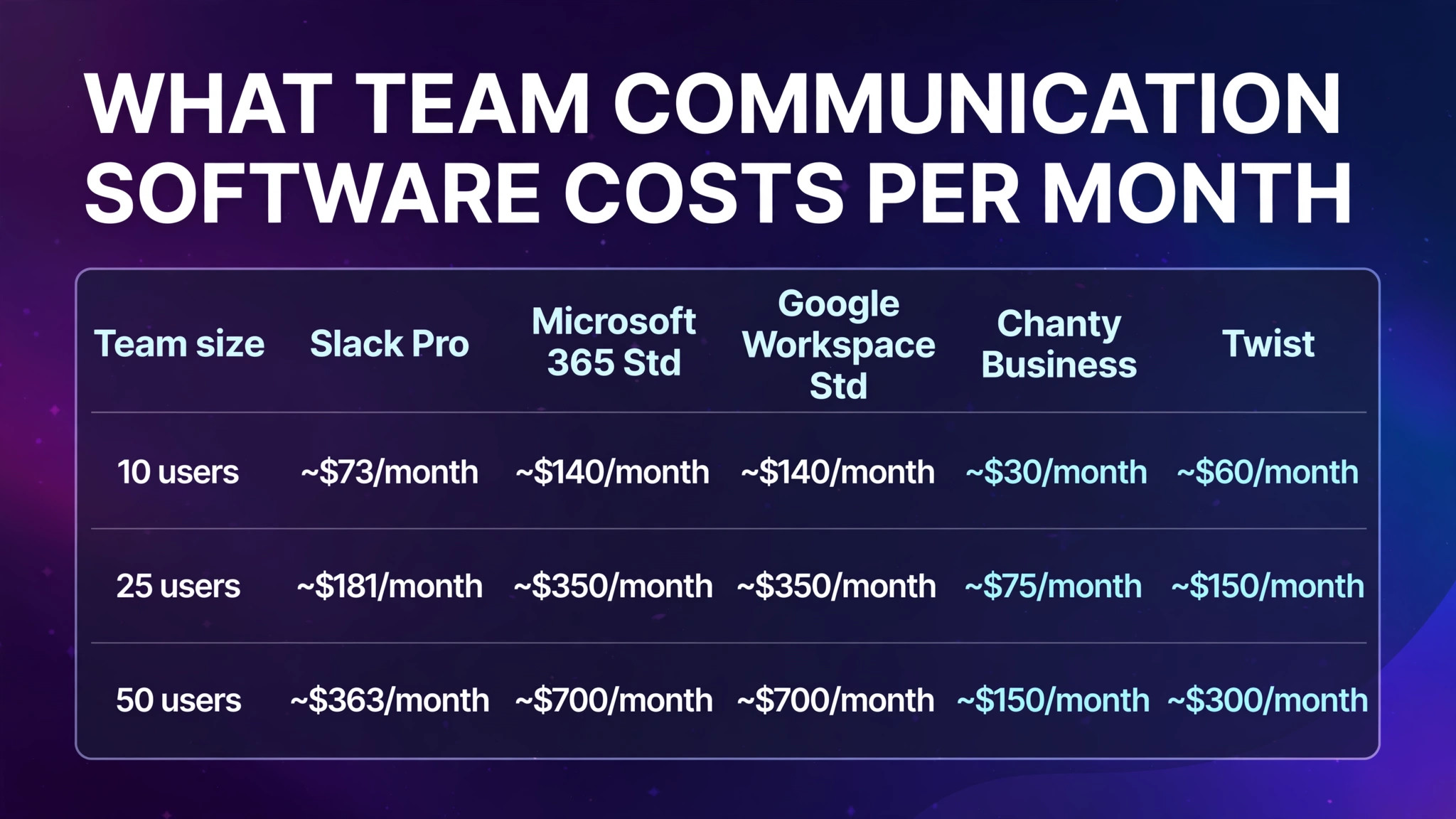
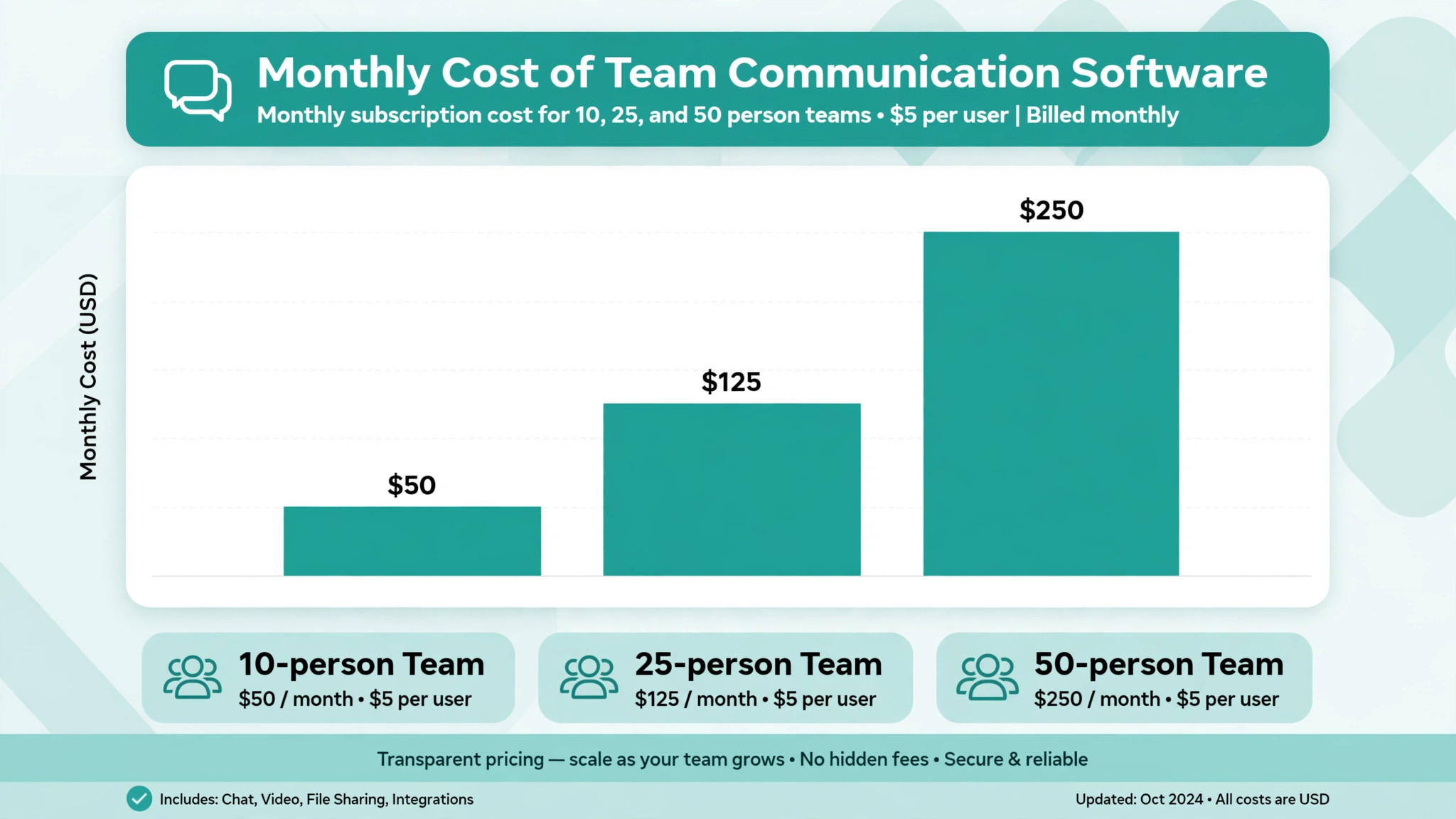
Per-user pricing hides the real bill. Here is what the mid-tier plan most teams actually need costs at three common sizes:
| Team size | Slack Pro | Microsoft 365 Std | Google Workspace Std | Chanty Business | Twist |
|---|---|---|---|---|---|
| 10 users | ~$73/month | ~$140/month (incl. Office apps) | ~$140/month (incl. Workspace apps) | ~$30/month | ~$60/month |
| 25 users | ~$181/month | ~$350/month | ~$350/month | ~$75/month | ~$150/month |
| 50 users | ~$363/month | ~$700/month | ~$700/month | ~$150/month | ~$300/month |
Figures are approximate, billed annually, and bundle prices include the wider productivity suite — which is why Teams and Chat look expensive in isolation but are often already paid for.
How to Choose the Right Tool for Your Team
Work through these five questions in order:
Getting Started: A Two-Week Rollout Plan
If your wider stack still needs work, pair this guide with our best AI tools for marketing round-up to cover the customer-facing side of the business.
Frequently Asked Questions
What is the best team communication software in 2026?
Slack is the best team communication software for most teams in 2026, thanks to its search, integrations and ease of use. Microsoft Teams is the better choice if you already pay for Microsoft 365, and Chanty is the best budget option.
What is the best free team communication software?
Slack’s free plan is the most capable but limits history to 90 days. Chanty offers unlimited history for up to 5 users, and Rocket.Chat’s self-hosted edition is free if you can run a server.
Is Slack better than Microsoft Teams?
Slack is the better standalone chat product — better search, more integrations, easier external collaboration. Teams is better value if your company already uses Microsoft 365, and its meetings and compliance tools are stronger.
How much should a small business pay for team communication software?
Expect $3–$15 per user per month. A 10-person team can communicate well for $30–$150 per month; paying more usually means you are buying a wider productivity suite as well.
Can team communication software replace email?
It replaces most internal email. External communication, formal records and customer conversations still run partly through email, which is why tools like Missive and Front exist to make shared inboxes collaborative.
Which tool is best for remote teams across time zones?
Twist, because its thread-first design removes the pressure to reply instantly. Slack with disciplined notification settings is the mainstream alternative.
What security features should I look for?
SSO/SAML, two-factor authentication, data retention controls, audit logs and admin controls for removing users. These typically require mid-tier or higher plans.
Do these tools include AI features?
Yes — Slack AI, Microsoft Copilot, Gemini in Google Chat and Zoom’s AI Companion all offer summaries and catch-up digests. Quality is comparable; treat AI as a bonus, not the deciding factor.
Conclusion
The best team communication software is the one your team will actually use, every day, without working around it. For most businesses that is Slack. For Microsoft and Google shops, the tool already inside your subscription is the sensible default. For async teams, budget teams and control-focused teams, Twist, Chanty and Mattermost each solve a specific problem better than the giants do.
Start with a two-week pilot, keep your channel structure simple, and set notification norms early. Then explore the rest of our small business software guides to complete your stack — your future self, searching for a decision from March and actually finding it, will be grateful.