
For most teachers, the best headphones for online teaching are the ones students can hear clearly for six hours without hurting your ears or dying mid-lesson. That single test matters more than sound quality for music, brand prestige or the longest battery number on the box. A boom microphone close to your mouth beats a fashionable pair with a distant built-in mic every time, because distance is what lets fan noise, keyboard clicks and hallway sound into your lesson. Comfort comes second, because a headset that pinches after an hour will be taken off, and durability comes third, because a teaching headset is used, folded, plugged in and dropped far more often than a pair kept for weekend listening.
Prices in this guide are approximate ranges seen in retail listings in October 2026. They move with sales, bundles and region, so check the price at checkout before you buy. The specs quoted here come from vendor and retailer specification pages checked at draft time. Where two listings disagree, for example on battery life with noise cancelling on or off, this guide says so. Treat battery claims as best-case figures. Real talk time is shorter when noise cancelling, a busy light and a wireless dongle are all running at once.
The Short Verdict
If you teach full days on Zoom, Teams or Meet and want one safe purchase from the best headphones for online teaching, buy the Jabra Evolve2 65 stereo. It gives you a proper boom microphone, a wireless dongle far more stable than laptop Bluetooth alone, up to 37 hours of music playback and 24 hours of talk time, and a weight of 176 grams most teachers can wear all day. It is not the cheapest pick, but it is the best balance of voice clarity, comfort and battery for teaching.
If your budget is tight or you teach from one desk and never move, buy the Logitech H390. It plugs in by USB and just works, and its rotating noise-cancelling boom microphone is clearer than the built-in microphone on almost any laptop. If you teach in a noisy house and need silence for yourself as well as clarity for students, step up to the Jabra Evolve2 75 or the Poly Voyager Focus 2. If you already own a great pair of noise-cancelling headphones for music, read the Sony and Bose sections before you assume they are ideal for teaching, because a great listening headphone and a great teaching headset are not the same product.
What Actually Matters When You Teach All Day
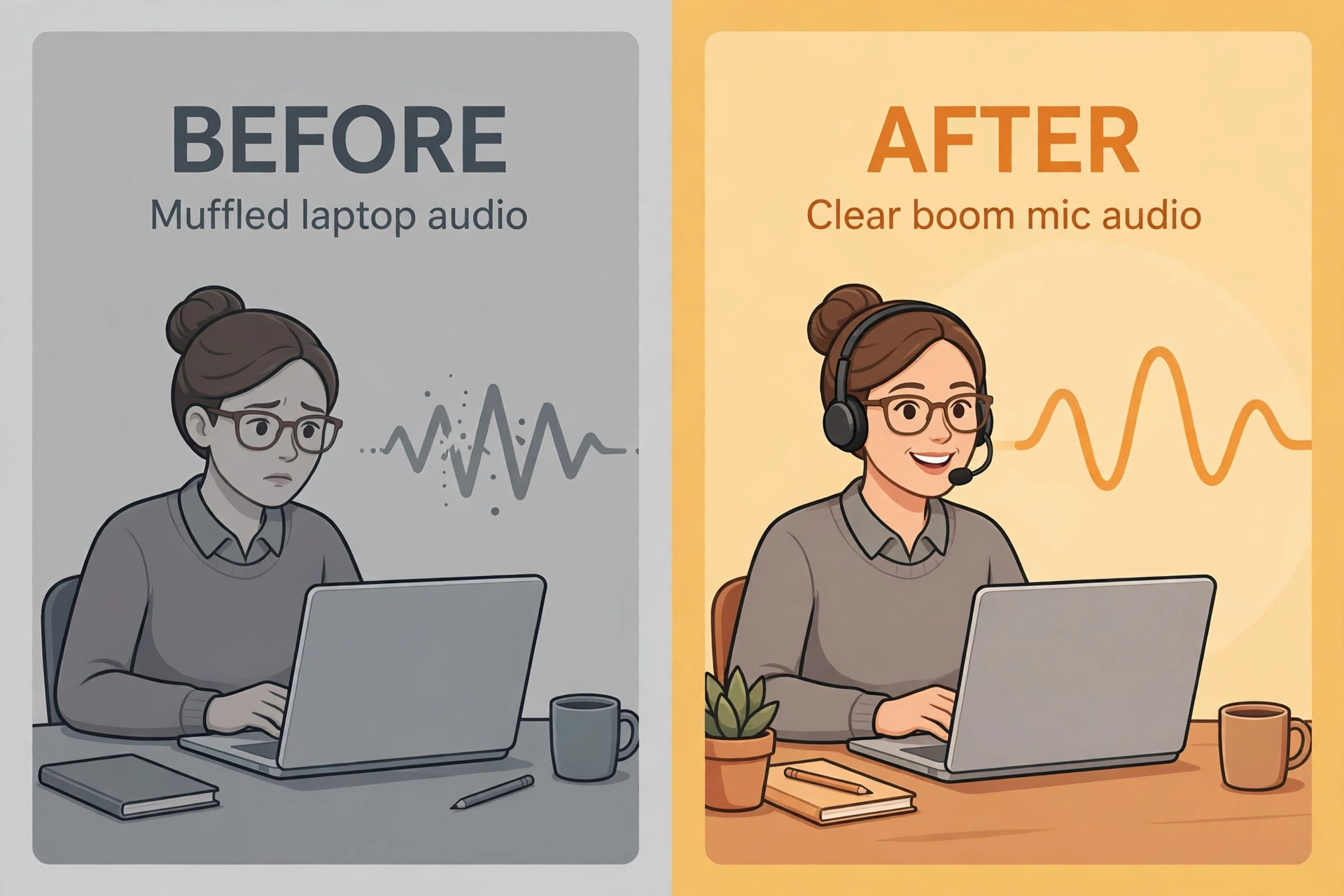
Teaching audio fails in predictable ways, and almost none of them are about how good music sounds through the drivers. Start with the microphone position. A boom microphone sits a few centimetres from your mouth, so your voice arrives loud compared with the room. A microphone built into an earcup sits much farther away, so it must turn up its gain, and turning up the gain turns up the room as well. That is why teachers who switch from earbuds to a boom headset often sound instantly better. If a headphone has no boom, it needs a strong beamforming microphone array to compensate, and even then it will struggle more in a noisy room than a boom will.
Next comes comfort over a full timetable, not over a ten-minute test in a shop. Weight matters, but pressure distribution matters more. A 250 gram pair with wide, soft cushions can feel easier after four hours than a 185 gram pair with narrow cushions that press on one spot. On-ear models press directly on the ear, while over-ear models spread pressure around it. If you wear glasses, test the seal where the temple arm meets the cushion, because a gap there leaks sound in. Leatherette cushions seal well and wipe clean, but they trap heat. Fabric cushions breathe better in a warm room, at the cost of slightly less isolation.
Durability for teaching is about hinges, cables, ear cushions and batteries. The headband slider, the boom hinge and the earcup yoke break first, especially when a headset is folded into a bag between classes. Metal sliders last longer than thin plastic ones, and a wired headset has no battery to wear out. Wireless batteries fade after a couple of years of daily charging, and replacements are rarely sold. Check whether ear cushions are replaceable before you buy, since a cheap cushion replacement can add a year to a headset that would otherwise be thrown away.
Connectivity is the hidden cause of most teaching audio complaints. A dedicated USB dongle gives a steadier connection than direct Bluetooth to a laptop, especially on older machines. Multipoint pairing, which lets a headset stay connected to a laptop and a phone at once, is genuinely useful for teachers who take parent calls between classes. Before you blame a headset for echo or dropouts, check the platform settings too. Zoom, Teams and Meet each have their own echo cancellation and noise suppression controls, and a headset that sounds fine in one app can sound thin in another until those settings are matched.
The Comparison Table and Rejection Reasons
This table is the heart of the guide. Find your situation, read the verdict, then read the rejection reason, because the rejection often saves you more money than the recommendation.
| Headphone | Mic | Comfort and weight | Battery | Approx price | Best for | Rejected for whom and why |
|---|---|---|---|---|---|---|
| Jabra Evolve2 65 | 3-mic boom, noise cancelling | On-ear, 176 g stereo | 37 h music, 24 h talk | About 180 to 250 dollars | Full-day wireless teaching | Music-first buyers, call tuning beats music tuning here |
| Logitech Zone Vibe 100 | Flip-to-mute boom, dual MEMS with beamforming | On-ear, 185 g | 18 h talk, 20 h listening | About 130 dollars | Light wireless teaching, mid budget | Noisy homes, no active noise cancelling for the teacher |
| Logitech H390 | Rotating noise-cancelling boom | On-ear, 197 g | Wired, no battery | About 21 to 30 dollars | Desk teachers, tight budget | Teachers who stand or move, cable ties you to the desk |
| Jabra Evolve2 75 | 8-mic array, retractable boom | On-ear, 197 g | 36 h music ANC off, 25 h talk ANC off | About 300 dollars and up | Noisy homes, premium comfort | Tight budgets, H390 covers the same lessons for far less |
| Poly Voyager Focus 2 | Acoustic Fence mic system, flexible boom | On-ear, plush cushions | 25 h talk, 40 h listening | About 200 dollars | Focus in a busy house, Teams users | Glasses wearers who dislike on-ear pressure, test fit first |
| Sony WH-1000XM5 | 4 beamforming call mics, no boom | Over-ear, 250 g | 30 h ANC on, 40 h ANC off | 399 dollars list, often 250 to 350 on sale | Teachers who also want top music and silence | Mic-first buyers, a boom headset beats it for voice pickup |
| Bose QuietComfort Ultra | Built-in beamforming mics, no boom | Over-ear, about 254 g | 24 h ANC on | 429 dollars list, often less on sale | Comfort and silence for long days | Voice-first buyers, premium paid for listening features teaching does not need |
| Anker Soundcore Life Q30 | Built-in call mics, no boom | Over-ear, 260 g | 40 h ANC on, 60 h ANC off | About 50 to 80 dollars | Budget noise cancelling for listening | Noisy teaching rooms, call mic sits far from the mouth |
| Corsair HS80 Max | Omnidirectional boom, flip-to-mute | Over-ear, 352 g | 65 h wireless RGB off, 24 h RGB on | About 150 to 180 dollars | Standing teachers, long wireless days | Small frames and hot rooms, heavy and gaming styled |
| Jabra Evolve2 30 | 2-mic boom, noise cancelling | On-ear, 125 g stereo | Wired, no battery | About 65 to 90 dollars | Reliable wired teaching, schools | Wireless buyers, no battery or Bluetooth at all |
Two patterns in that table deserve emphasis for anyone comparing the best headphones for online teaching. First, every pick with a boom microphone beats every pick without one for voice clarity in a normal home, regardless of price. Second, weight alone does not predict comfort. The 352 gram Corsair feels heavy after a long day, while the 250 gram Sony disappears because its cushions and headband spread the load.
How to Choose the Best Headphones for Online Teaching
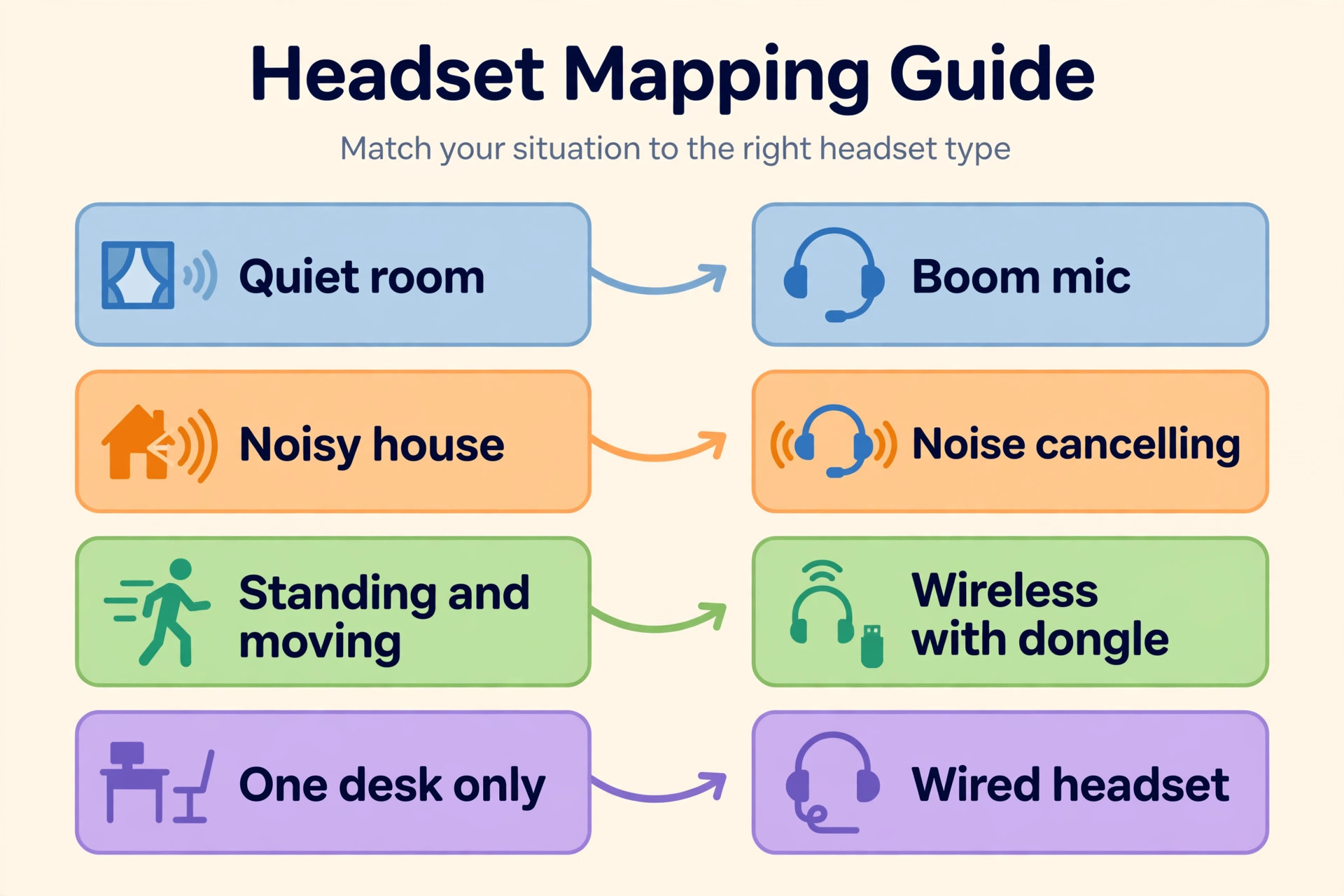
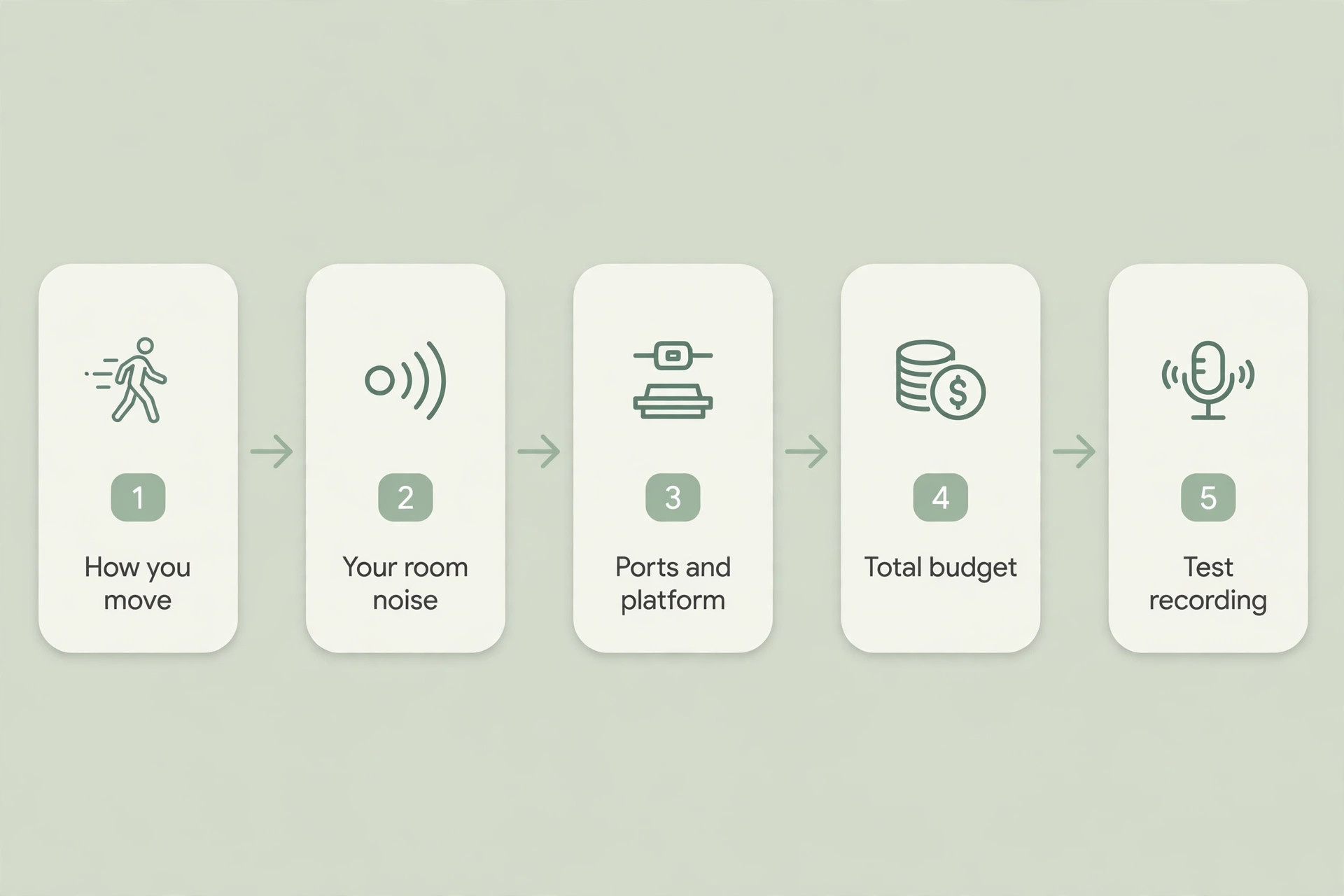
Choosing well is a sequence, not a single product decision. Start with how you teach, then the room, then the connection, then the budget. Skipping the first step is how teachers buy a well-reviewed music headphone and then blame it when students still ask them to repeat themselves.
First, decide whether you move. If you stand, pace or walk to a second screen, you need wireless with a dongle and a battery that covers your longest teaching block plus a margin. If you sit at one desk all day, a wired headset removes charging, pairing and dropout problems entirely. Second, judge your room honestly. A quiet study needs only a good boom microphone. A house with children, traffic or a television needs noise cancelling for you and a strong microphone system for students, which points to the Evolve2 75 or the Voyager Focus 2.
Third, check your ports and platform before you order. A USB-A headset needs an adapter on a laptop with only USB-C ports, and a Teams-certified variant is worth choosing if Teams is your main platform. Fourth, set a total budget, not a headphone budget. Add the adapter if you need one, a spare set of ear cushions, and a cheap wired backup for the day a wireless battery dies before a lesson. Finally, test with a real lesson recording, not a quick voice note. Record two minutes of actual teaching, with your normal fan and room noise, and listen on earphones.
The 10 Picks, With Mic, Comfort, Durability and Price
The ten picks below are the full shortlist for the best headphones for online teaching. Each one is judged on the same four tests. Microphone clarity for students, comfort across a teaching day, durability under daily use, and price against what you actually get.
1. Jabra Evolve2 65 for the Full Teaching Day
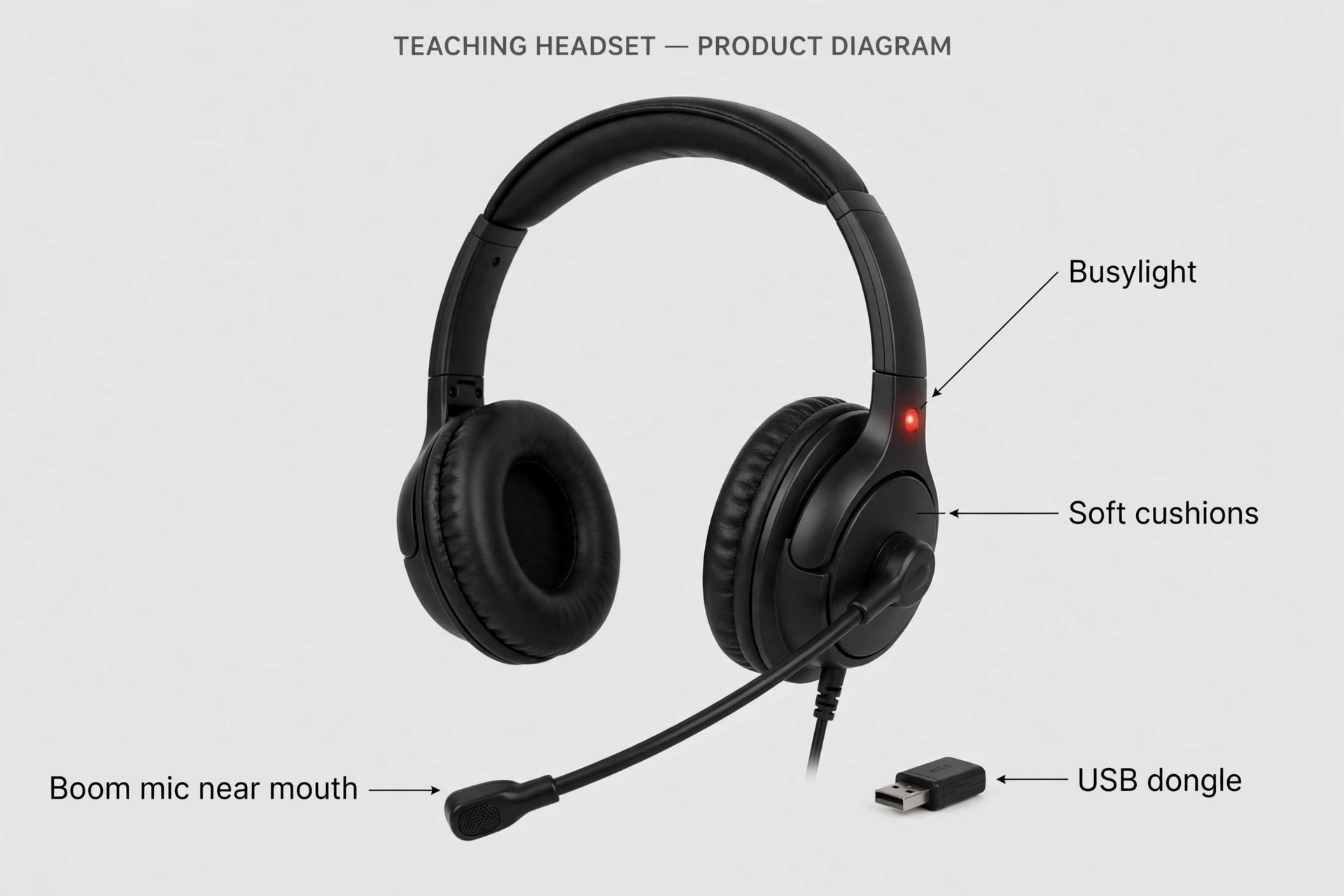
The Evolve2 65 is the default wireless teaching headset. Its three-microphone boom with noise cancelling puts your voice first, its USB dongle keeps the connection steady on crowded laptops, and its busylight tells the household you are live. Jabra rates it at up to 37 hours of music and 24 hours of talk time, with a 1.5 hour recharge. The stereo version weighs 176 grams, while the mono version weighs only about 99 grams. Durability is a genuine strength, with a headband and hinge design built for daily office use. The limits are the on-ear fit, which some teachers find tiring after five or six hours, and bundle pricing.
Street prices sit around 180 to 250 dollars depending on the bundle.
2. Logitech Zone Vibe 100 for Light Wireless Teaching
The Zone Vibe 100 is the light wireless option for teachers who want freedom without a business-headset price. It weighs 185 grams, uses 40 mm drivers, and pairs over Bluetooth 5.2 with multipoint, so it can stay connected to a laptop and a phone. Its flip-to-mute boom uses dual MEMS microphones with beamforming, and Logitech rates it at up to 18 hours of talk time and 20 hours of listening, with a five-minute charge giving about an hour of use. Knitted fabric cushions breathe better than leatherette in a warm room. Comfort is good for a mid-priced pair, though the on-ear design still presses more than over-ear. The main limit is the lack of active noise cancelling.
You will hear the house, even though students hear you clearly. At about 130 dollars, it suits quiet rooms.
3. Logitech H390 for the Tightest Budget
The H390 proves that a teaching headset does not need to be expensive to be clear. It is a wired USB headset with a rotating, noise-cancelling boom microphone, 30 mm drivers, a 1.9 metre cable and in-line volume and mute controls. It weighs 197 grams, uses swivel-mounted leatherette cushions, and works on Windows, macOS and ChromeOS without software. There is no battery to charge and no Bluetooth to pair, which is why it survives in classrooms. Comfort is better than the price suggests, though the plastic headband will not match a premium pair after six hours. The USB-A plug needs an adapter on USB-C-only laptops, and a USB-C version exists.
At about 21 to 30 dollars, it is the best value here by a wide margin, as a main headset for desk teaching or as a backup for wireless setups.
The Evolve2 75 is the upgrade for teachers whose room fights back. It combines an eight-microphone array with a retractable boom, active noise cancelling, and a hear-through mode. Jabra rates music playback at up to 36 hours with noise cancelling off and 33 hours with it on, and talk time at up to 25 hours with noise cancelling and the busylight off, falling to about 19 hours with both on. It weighs 197 grams, uses dual-foam leatherette cushions, and folds for travel. Comfort is where the premium price shows, with cushions and a headband designed for all-day office wear. The retractable boom hides away for music between classes. Prices sit around 300 dollars and up in US listings.
5. Poly Voyager Focus 2 for Focus in a Busy House
The Voyager Focus 2 is built around a simple idea. You should hear only the call, and students should hear only you. Its three levels of hybrid active noise cancelling create that focus zone, while its Acoustic Fence microphone system keeps background sound out of your voice. Poly rates it at up to 25 hours of talk time and 40 hours of listening, with a full recharge in about two hours. It connects over Bluetooth 5.1 with a BT700 dongle and pairs with two devices at once. Comfort comes from a sling-style headband and plush cushions, and smart sensors can answer a call when you put the headset on.
On-ear pressure bothers some glasses wearers, so test the fit if you can. At about 200 dollars, it is the strongest rival to the Evolve2 75 for noisy homes.
6. Sony WH-1000XM5 for Teachers Who Also Want Top Music Sound
The WH-1000XM5 is the best listening headphone in this guide, and that distinction matters for how you judge it for teaching. Its noise cancelling is superb, its 30 mm drivers sound rich and detailed, and its four beamforming microphones handle calls well in quiet rooms. Sony rates battery at up to 30 hours with noise cancelling on and 40 hours with it off, and a three-minute charge adds about three hours of playback. It weighs 250 grams, uses soft leather cushions, and pairs with two devices at once over Bluetooth 5.2. Comfort is excellent for long sessions, because the over-ear cushions and balanced headband spread pressure evenly. The teaching limit is the microphone.
With no boom, your voice is picked up from farther away than on any business headset here, so in a noisy room students will hear more of the room. At a 399 dollar list price, often 250 to 350 dollars on sale, it is hard to justify for teaching alone.
7. Bose QuietComfort Ultra for Comfort and Silence
The QuietComfort Ultra is the comfort-first premium pick. Its noise cancelling is among the best available, and its cushions are soft and forgiving. Bose rates the first generation at up to 24 hours with noise cancelling on, with a 15-minute charge adding about 2.5 hours, and it weighs about 254 grams. It pairs over Bluetooth 5.3 with two devices at once, folds into a compact case, and offers quiet and aware modes. Durability is solid for personal daily use, but like the Sony it is a personal headphone, not a shared classroom tool. The teaching limit is again the microphone. Its built-in beamforming microphones are good for calls, but they cannot match a boom for rejecting a noisy room.
The list price is 429 dollars, with frequent sale prices below that.
8. Anker Soundcore Life Q30 for Budget Noise Cancelling
The Life Q30 is the cheapest way to get real hybrid active noise cancelling with over-ear comfort. It uses 40 mm drivers, offers three noise cancelling modes for transport, outdoor and indoor use, and supports custom EQ through the Soundcore app. Listings based on Anker specifications quote up to 40 hours with noise cancelling on and 60 hours with it off, with a five-minute charge adding about four hours of playback. It weighs about 260 grams, uses memory foam protein leather cushions, and folds for travel, with a wired cable for the day the battery runs out. Comfort is good for the price, though the weight can tire smaller heads over a very long day.
The teaching limit is the call microphone, built into the earcup and far from the mouth. In a quiet room it is perfectly usable. In a noisy room, students will hear the room more than they would with any boom headset here. At about 50 to 80 dollars, it is a smart buy for quiet listening and acceptable lesson audio.
9. Corsair HS80 Max for Standing Teachers and Long Wireless Days
The HS80 Max is the outlier in this list. It is a gaming headset with a flip-to-mute omnidirectional boom microphone, 50 mm drivers, Dolby Atmos on PC, and battery life that embarrasses most business headsets. Corsair rates it at up to 65 hours over wireless with RGB lighting off, 24 hours with RGB on, and up to 130 hours over Bluetooth. A 15-minute charge adds about six hours of playback. It connects over low-latency 2.4 GHz wireless and Bluetooth, and its memory foam cushions and floating headband are comfortable despite the weight. That weight is the main problem.
At 352 grams, it is the heaviest headset here by a clear margin, and teachers with smaller frames should test it before committing. The microphone is strong for a gaming headset, though it is omnidirectional rather than noise-cancelling in the business-headset sense. At about 150 to 180 dollars, it suits teachers who stand and pace through long wireless days.
10. Jabra Evolve2 30 for Reliable Wired Teaching
The Evolve2 30 is the wired business headset for teachers and schools who want no surprises. It is a plug-and-play USB headset with a two-microphone boom system that captures your voice while reducing surrounding noise, 28 mm speakers, an angled earcup design with memory foam cushions, and an integrated busylight. The stereo version weighs 125 grams and the mono version only 92 grams, making this one of the lightest headsets in the guide. No battery, pairing or app is involved, so it works the same way on the first lesson and the hundredth. Comfort is good for its weight class, though the on-ear fit will not match premium over-ear models on the longest days.
Durability is strong, with a stainless steel headband slider and a carrying pouch. The cable is 1.5 metres, enough for a desk but short for standing, and USB-A and USB-C versions exist. At about 65 to 90 dollars, buy it if you want a dependable wired headset that will last.
Your Pre-Lesson Setup Checklist
A good headset still sounds bad with a bad setup, so run this checklist once.
- Plug in the dongle or cable before you open your teaching app, then select the headset as both speaker and microphone in the app settings.
- Position the boom about two finger widths from the corner of your mouth, slightly off to the side, so breath noise does not hit it directly.
- Record a two-minute test lesson with your normal fan and room noise, then listen back on earphones and adjust the microphone level until your voice is clear without distortion.
- Turn on platform noise suppression at a moderate level first. The strongest setting can clip the start of words.
- Keep a wired backup headset at your desk, so a flat battery never cancels a lesson.
- Wipe the cushions weekly, check the boom hinge monthly, and order replacement cushions when the foam starts to flatten.
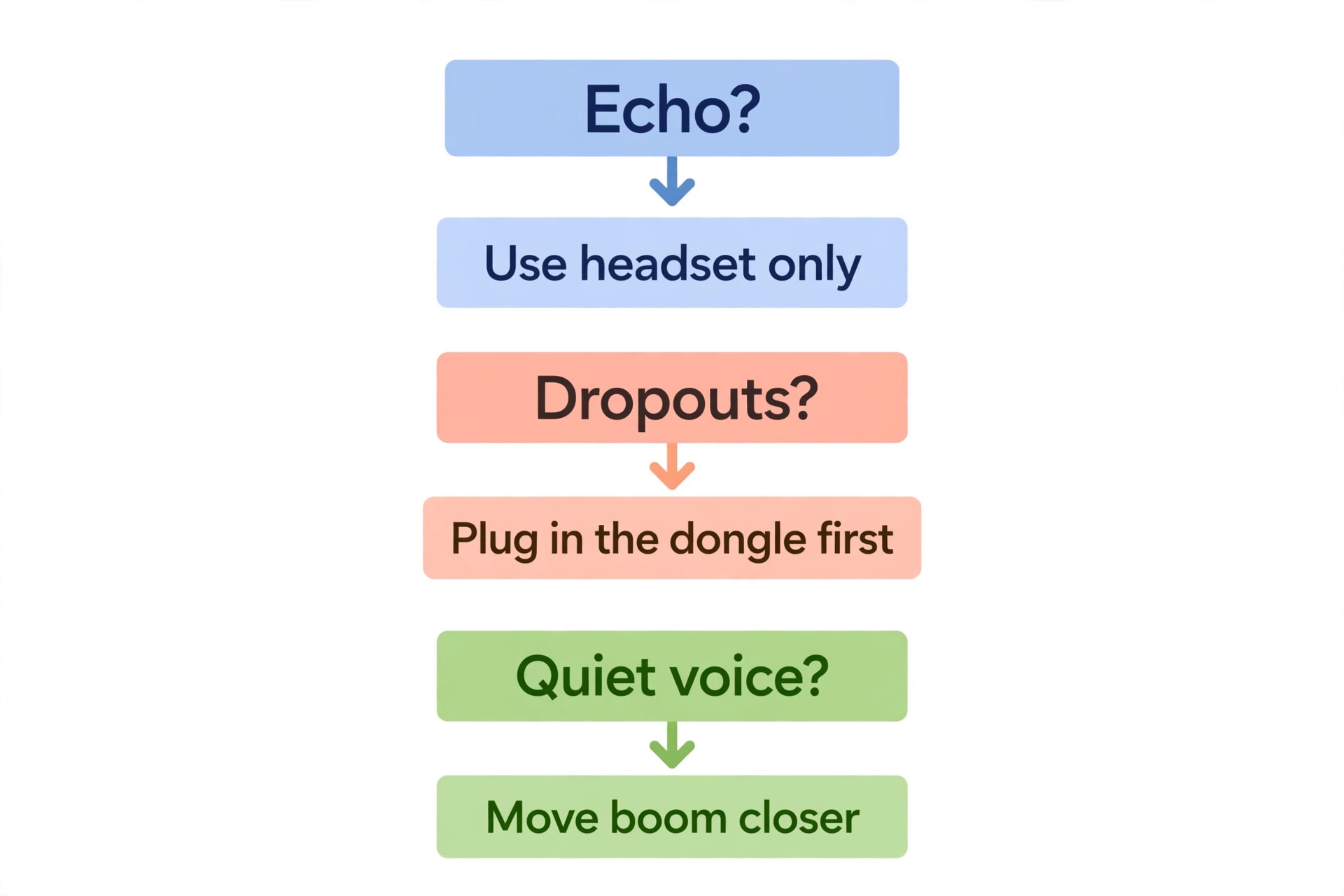
- If echo appears, mute your speakers and use the headset earcups only, then check the echo guide linked in this article before you replace the headset.
Mistakes That Ruin Teaching Audio
The most common mistake is buying for music first and teaching second. A headphone can sound wonderful for films and still give students a distant, echoey voice, because its microphone was an afterthought. The second mistake is wearing a boom microphone too far from the mouth. A few centimetres of distance changes the balance between voice and room more than any software filter. The third mistake is trusting Bluetooth alone on an old laptop. If dropouts appear only on calls and never on music, the dongle or the platform audio settings are usually the cause.
A fourth mistake is ignoring ear cushion wear. Flattened foam breaks the seal, lets room sound in, and forces you to turn the volume up, which tires your ears and can feed echo back into the call. A fifth mistake is teaching with laptop speakers still on, which guarantees echo no matter how good the microphone is. Fix the setup before you upgrade the hardware.

If audio problems persist after you choose from the best headphones for online teaching, the cause is often the platform or the room rather than the headset itself. Our guide to the best video conferencing tool for hybrid classes compares the platforms teachers actually use, including how each one handles noise suppression and echo. For echo that appears only in one app, the Zoom echo fix walks through the exact settings to check, and the Teams microphone fix covers the equivalent steps for Microsoft Teams users. Readers who want to go beyond a headset should also read the noisy-room microphone guide, which explains when a desk microphone outperforms a headset.
You can find those guides at the best video conferencing tool for hybrid classes, the Zoom echo fix, the Teams microphone fix and the noisy-room microphone guide.
The Best Pick by Job
Use this table to turn the shortlist into a single decision, using the same tests as the best headphones for online teaching comparison above.
| Teaching job | Pick | Why it wins |
|---|---|---|
| Full-day wireless teaching | Jabra Evolve2 65 | Boom mic, dongle stability, 24 h talk time, light enough for all day |
| Tightest budget, desk teaching | Logitech H390 | Clear boom mic, no battery or pairing, about 21 to 30 dollars |
| Noisy house, premium comfort | Jabra Evolve2 75 | 8-mic boom, noise cancelling, long battery, comfortable all day |
| Busy house, Teams-first teaching | Poly Voyager Focus 2 | Acoustic Fence mics, 3-level noise cancelling, Teams controls |
| Light wireless, mid budget | Logitech Zone Vibe 100 | 185 g, flip-to-mute boom, multipoint, breathable cushions |
| Teaching plus music and travel | Sony WH-1000XM5 | Top noise cancelling and sound, good calls in a quiet room |
| Comfort and silence first | Bose QuietComfort Ultra | Soft cushions, strong noise cancelling, easy all-day wear |
| Budget noise cancelling | Anker Soundcore Life Q30 | Over-ear comfort, hybrid noise cancelling, long battery |
| Standing and pacing teachers | Corsair HS80 Max | Huge battery, strong boom, low-latency wireless |
| Schools and wired reliability | Jabra Evolve2 30 | Light, durable, plug-and-play, no battery to manage |
Frequently Asked Questions
Do I need a boom microphone for online teaching?
Yes, for most teachers. A boom microphone sits close to your mouth, so your voice stays loud compared with room noise. A built-in earcup microphone sits farther away and must use more gain, which also turns up fan and household sound. If your room is quiet, you can teach without a boom, but in any normal home the boom gives students a clearer lesson for less money.
Is wireless or wired better for teaching?
Wired is better if you sit at one desk, because there is no battery to charge, no pairing to fail and no dropout risk. Wireless is better if you stand, pace or move between screens. The best compromise for many teachers is a wireless headset with a dongle for daily use plus a cheap wired headset kept at the desk as a backup.
How long should a teaching headset battery last?
It should cover your longest teaching block with a margin, not just your average day. For a full school day, look for at least 18 to 20 hours of talk time, not music playback time, because talk time is always lower. If you teach two or three hours a day, even an 18-hour headset will last a week between charges.
Why do students hear an echo when I use headphones?
Echo usually means your speakers are still playing lesson audio into the room, or a second device in the room is joining the same call with its microphone live. Mute or disconnect laptop speakers, wear the headset earcups properly sealed, and check that no phone or tablet in the room is also in the call. If echo persists only in one app, check that app’s echo cancellation settings before you replace the headset.
Are gaming headsets good for online teaching?
Some are, and the Corsair HS80 Max in this guide is a good example, because gaming headsets are built for clear voice chat over long sessions. The limits are weight, looks and microphone design. Gaming headsets are often heavier than business headsets, and an omnidirectional gaming microphone may pick up more room sound than a noise-cancelling business boom. Judge a gaming headset by its microphone type and weight, not by its sound quality for games.
When is the best headphones for online teaching not a headset at all?
When you teach from a treated, quiet room and want the best possible recorded voice, a separate desk microphone can beat every headset here for tone and richness. The trade is movement. A desk microphone only sounds its best when you stay close and on axis, so it suits recorded lessons and seated teaching far better than standing or whiteboard work. For most live teaching, a boom headset remains the practical choice, because it moves with you.
What to Buy on Monday Morning
Start from your room and your timetable, not from the most expensive pair. If you teach all day wirelessly, order the Evolve2 65 and keep the H390 as a backup. If your house is noisy, stretch to the Evolve2 75 or the Voyager Focus 2. If money is tight, order the H390, position the boom correctly, and spend the money you saved on replacement cushions and a decent webcam, because students learn more from a clear voice and a clear face than from a premium badge. Whichever pair you choose from the best headphones for online teaching, test it with a real two-minute lesson recording before your first live class.
That one recording will tell you whether the fit, the microphone position and the platform settings are right.