
If your important information still lives in random documents, browser tabs, screenshots, and messaging apps, the best note-taking apps in 2026 can genuinely change how you work and study. Modern note-taking apps are no longer simple text editors — the best note-taking apps now combine documents, tasks, databases, handwriting, web clipping, AI search, collaboration, and personal knowledge management in one place.
But there is no single perfect app for everyone, and that is exactly why this guide exists. A student taking lecture notes needs something different from a manager running meetings, and both need something different from a researcher building a lifelong knowledge base. Below, we compare 15+ of the best note-taking apps available in 2026 by features, platforms, organisation, AI capability, privacy, and price — so you can pick the one that fits how you think.
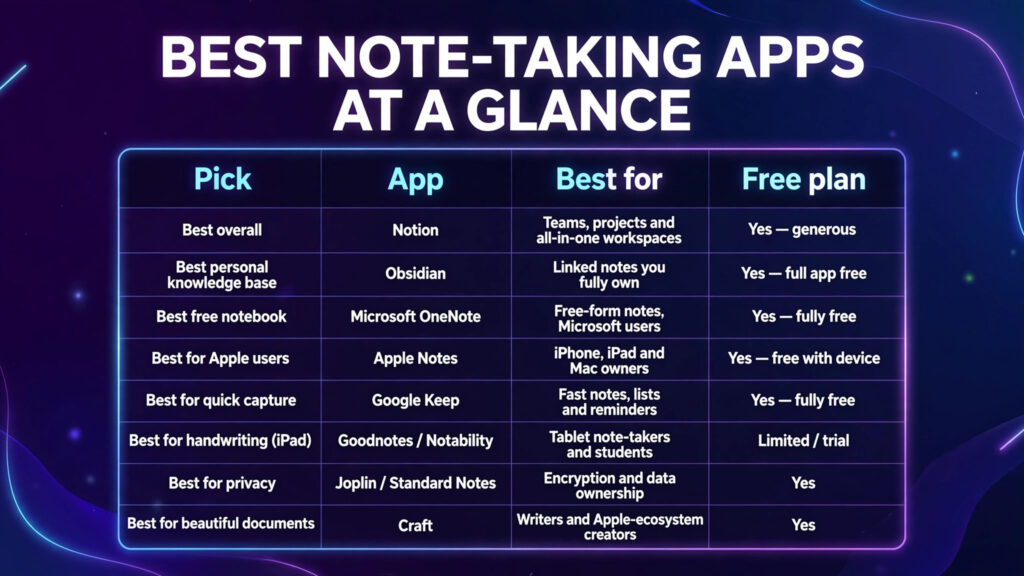
Quick Answer: The Best Note-Taking Apps at a Glance
| Pick | App | Best for | Free plan |
|---|---|---|---|
| Best overall | Notion | Teams, projects and all-in-one workspaces | Yes — generous |
| Best personal knowledge base | Obsidian | Linked notes you fully own | Yes — full app free |
| Best free notebook | Microsoft OneNote | Free-form notes, Microsoft users | Yes — fully free |
| Best for Apple users | Apple Notes | iPhone, iPad and Mac owners | Yes — free with device |
| Best for quick capture | Google Keep | Fast notes, lists and reminders | Yes — fully free |
| Best for handwriting (iPad) | Goodnotes / Notability | Tablet note-takers and students | Limited / trial |
| Best for privacy | Joplin / Standard Notes | Encryption and data ownership | Yes |
| Best for beautiful documents | Craft | Writers and Apple-ecosystem creators | Yes |
What Makes a Good Note-Taking App in 2026?
Before the list, here’s what separates the best note-taking apps from the rest:
- Fast capture — the app must open instantly and accept text, photos, voice, web clips and files with zero friction.
- Powerful search — including search inside PDFs, images (OCR) and attachments.
- Organisation that matches your brain — folders, tags, links/backlinks, or databases.
- AI features — summarising, Q&A over your notes, and automatic organisation are now standard expectations. For meeting-specific AI, see our guide to the best AI meeting assistants.
- Offline access and data ownership — your notes should be yours, exportable in open formats.
- Cross-platform sync — phone, tablet, desktop and web without losing formatting.
The Best Note-Taking Apps in 2026, Reviewed
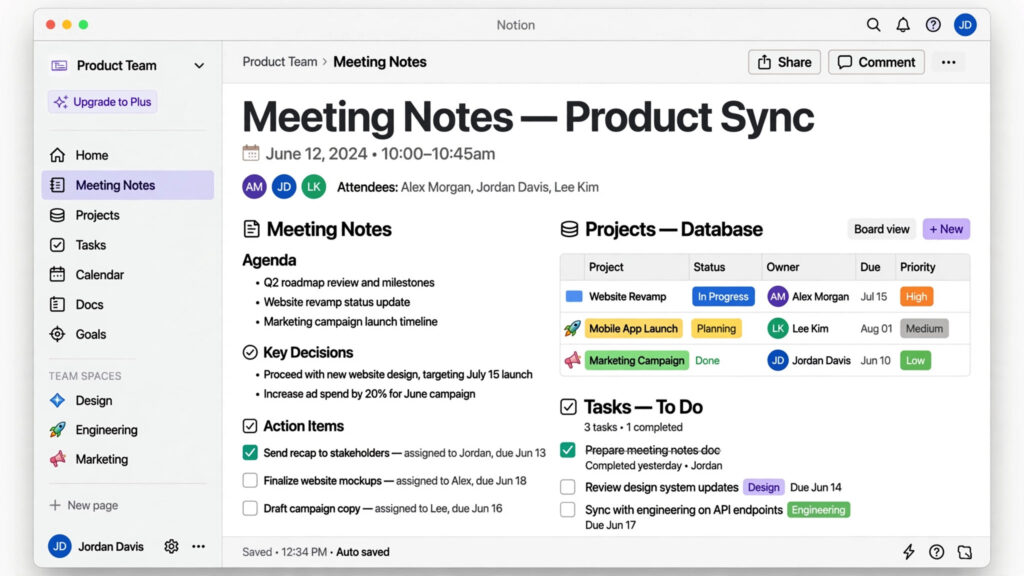
1. Notion — Best Overall Note-Taking App
What it is: Notion is an all-in-one workspace combining notes, documents, databases, wikis, tasks and project management. Instead of just storing notes, you build systems: a page for every project, a database for every kind of information.
Key features: Flexible pages and databases; real-time collaboration; Notion AI for summaries, drafting and Q&A over your workspace (full AI on Business plans); thousands of templates; calendar and task integrations.
Pricing: Free plan is generous for individuals. Plus runs around $10/member/month billed yearly; Business around $20/member/month. Verify current pricing at notion.com.
Pros: Unmatched flexibility; excellent for teams; huge template ecosystem.
Cons: Can feel slow and over-engineered for simple notes; offline mode is limited; AI costs extra on lower tiers.
Best for: Teams, professionals and students who want notes, docs and projects in one workspace. Students should also check our AI tools for students guide.
2. Obsidian — Best for Personal Knowledge Management
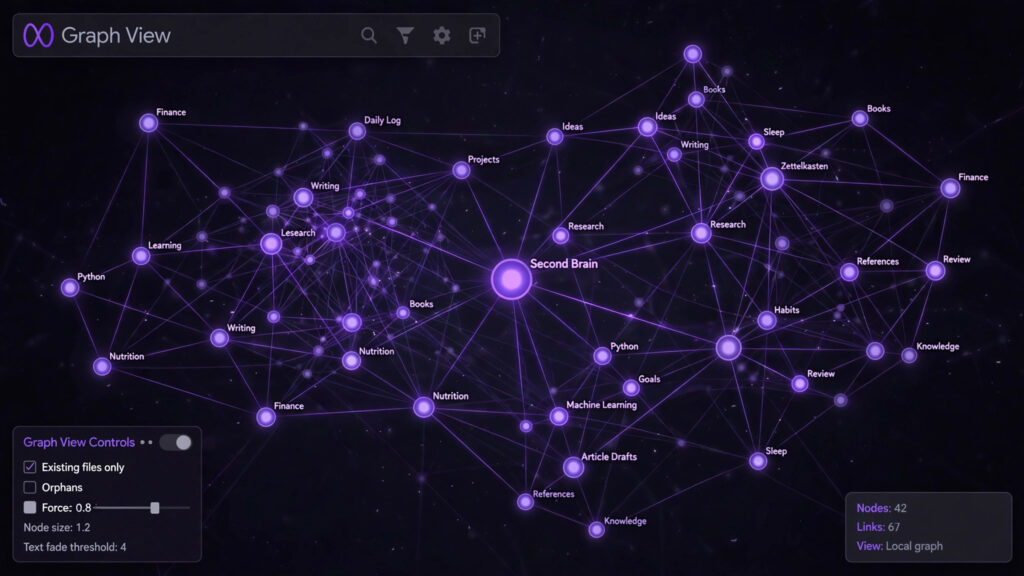
What it is: A local-first app that stores your notes as plain Markdown files on your own device. Obsidian is famous for its graph view and backlinks, which let you build a genuine “second brain” of connected ideas.
Key features: Local Markdown vaults you fully own; backlinks and graph view; 1,000+ community plugins; Canvas for visual thinking; optional end-to-end encrypted Sync.
Pricing: The full app is free for personal use. Sync costs around $4/month billed yearly; commercial use has a separate licence. See obsidian.md.
Pros: Complete data ownership; blazingly fast; endlessly extensible; no lock-in.
Cons: Collaboration is weak; setup and plugins have a learning curve; mobile sync costs extra.
Best for: Researchers, writers, students and privacy-conscious users building a long-term knowledge base.
3. Microsoft OneNote — Best Free Note-Taking App
What it is: Microsoft’s free-form digital notebook. OneNote mimics a physical binder: notebooks, sections and pages, with a canvas you can click anywhere to type, draw or paste.
Key features: Free-form canvas with handwriting and drawing; excellent pen support; deep Microsoft 365 integration; Copilot AI with a qualifying subscription; generous free tier tied to OneDrive.
Pricing: Free with a Microsoft account. Copilot features require Microsoft 365 (Personal around $9.99/month). See onenote.com.
Pros: Completely free core app; best-in-class free-form layout; brilliant for stylus users.
Cons: Organisation can get messy; search and AI lag behind rivals; interface differs across platforms.
Best for: Students and Microsoft 365 users who want a free, flexible notebook.
4. Evernote — Best for Capturing and Searching Everything
What it is: The original digital filing cabinet, rebuilt in recent years with faster apps, tasks, calendar integration and AI search. Evernote’s strength remains capture: clip anything, from anywhere, and find it later.
Key features: Best-in-class web clipper; OCR search across images and PDFs; tasks and calendar built in; AI-powered search and note cleanup.
Pricing: Free plan is now very limited (around 50 notes, one notebook, one device). Paid plans start around $99/year for Starter. Check evernote.com.
Pros: Superb capture and search; mature, reliable platform.
Cons: Expensive compared with rivals; free tier is restrictive; some long-time users have migrated to cheaper tools.
Best for: Professionals who capture lots of web research, documents and receipts and need bulletproof search.
5. Apple Notes — Best for Apple Users
What it is: The notes app built into every iPhone, iPad and Mac — and in 2026 it’s far more powerful than most people realise, with folders, tags, Smart Folders, PDF markup, audio transcription and Apple Intelligence writing tools on supported devices.
Key features: Instant, free, and pre-installed; Quick Notes from anywhere; handwriting with Apple Pencil; locked notes with Face ID; automatic iCloud sync.
Pricing: Free with Apple devices and iCloud storage.
Pros: Zero setup; fast and private; handwriting feels natural.
Cons: Apple-only (web access is limited); no real collaboration depth; export options are basic.
Best for: Anyone fully in the Apple ecosystem who wants notes that just work.
6. Google Keep — Best for Quick Capture
What it is: Google’s sticky-note app: colour-coded cards, checklists, voice notes and location reminders, synced instantly across everything with a Google account.
Key features: Lightning-fast capture; labels and colours; voice-note transcription; Google Workspace integration.
Pricing: Completely free. See keep.google.com.
Pros: Fastest capture in this list; effortless sharing of lists.
Cons: Too simple for long documents or knowledge management; no folders or rich formatting.
Best for: Quick notes, shopping lists, reminders and fleeting ideas.
7. Bear — Best for Beautiful Markdown Writing
What it is: A polished, Apple-only Markdown notes app loved by writers for its clean editor, tag-based organisation and lovely typography.
Key features: Elegant Markdown editor; nested tags; note encryption; export to PDF, HTML, Word and more.
Pricing: Free tier available; Pro around $2.99/month adds sync and themes. See bear.app.
Pros: Beautiful and distraction-free; excellent export options.
Cons: Apple devices only; no collaboration; no web app.
Best for: Writers and Apple users who value a calm, focused editor.
8. Craft — Best for Beautiful Documents
What it is: A document and notes app built for the Apple ecosystem (with web and Windows apps) that makes every document look professionally designed, with fast native performance and on-device AI assistance.
Key features: Stunning document design; daily notes and tasks; powerful sharing with public links; AI assistant for drafting and summarising.
Pricing: Free plan available; Plus plans from around $10/month. See craft.do.
Pros: Documents look gorgeous with no effort; very fast.
Cons: Smaller ecosystem than Notion; best experience is on Apple hardware.
Best for: Creators and professionals who share documents with clients and care about presentation.
9. Joplin — Best Open-Source Note-Taking App
What it is: A free, open-source Evernote alternative that stores notes in Markdown, supports end-to-end encryption, and syncs via your choice of cloud (including free options like Dropbox or your own server).
Key features: Open source and free; E2E encryption; web clipper; offline-first; import from Evernote.
Pricing: App is free; optional Joplin Cloud from around €2.99/month. See joplinapp.org.
Pros: Private, portable, no lock-in; very capable free tier.
Cons: Interface is functional rather than beautiful; collaboration is minimal.
Best for: Privacy-focused users and anyone leaving Evernote without losing power.
10. Standard Notes — Best for Maximum Privacy
What it is: An end-to-end encrypted notes app where even the company cannot read your notes. Minimal by design, with powerful editors unlocked on paid plans.
Key features: True E2EE by default; cross-platform; encrypted file storage on paid tiers; a 100-year longevity commitment.
Pricing: Free plan covers plain-text notes; Productivity/Professional plans from around $90/year. See standardnotes.com.
Pros: The strongest privacy story in this list.
Cons: Free tier is very basic; paid plans are pricey for a notes app.
Best for: Journalists, lawyers, health professionals and anyone whose notes are sensitive.
11. Simplenote — Best Minimalist App
What it is: Exactly what the name says: fast, plain-text notes with instant sync, version history and Markdown support. Nothing else — and that’s the point.
Pricing: Completely free, from the team behind WordPress.com. See simplenote.com.
Pros: Zero learning curve; works everywhere.
Cons: No images, attachments or rich formatting.
Best for: People who want notes, not a “system”.
12. Zoho Notebook — Best Free Alternative With Flair
What it is: A visually distinctive notebook app with card-based notes (text, checklists, audio, photos, sketches), generous free features and no ads.
Pricing: Free core app; Notebook Pro adds premium features at a low price. See zoho.com/notebook.
Pros: Generous free tier; pleasant design.
Cons: Smaller community and fewer integrations.
Best for: Budget-conscious users wanting more than Keep but less than Notion.
13. Capacities — Best for Object-Based Thinking
What it is: A modern knowledge app that organises information as objects — people, books, projects, ideas — rather than files in folders. Each object type has its own properties, which makes collections feel like a personal database without the setup pain.
Pricing: Free plan with unlimited notes and sync; Pro around $9.99/month. See capacities.io.
Pros: Fresh, structured approach; lovely daily-note workflow.
Cons: Newer and smaller ecosystem; cloud-based.
Best for: Thinkers who found folders limiting and Notion databases heavy.
14. Heptabase — Best for Visual Research
What it is: A visual knowledge base built around whiteboards and cards. You spread sources, highlights and notes across an infinite canvas and literally see connections — superb for research and writing projects.
Pricing: Paid, from around $11.99/month, with a trial. See heptabase.com.
Pros: Unmatched for making sense of complex research.
Cons: No meaningful free tier; overkill for everyday notes.
Best for: Researchers, students writing essays and anyone who thinks visually. Pair it with the research-friendly tools in our AI tools for students guide.
15. Notta — Best for Transcription Notes
What it is: An AI transcription app that turns meetings, lectures and recordings into searchable text notes in 58+ languages, with summaries and exports.
Pricing: Free tier with limited minutes; Premium from around $9/month billed yearly. See notta.ai.
Pros: Fast, accurate multilingual transcription.
Cons: It’s a transcription tool first, a notes organiser second.
Best for: Students and professionals who record lectures and meetings. For live meeting bots, compare the best AI meeting assistants instead.
Bonus: Goodnotes and Notability — Best for Handwriting
If you take notes by hand on a tablet, dedicated handwriting apps beat every general app above. Goodnotes (iPad-first, now cross-platform) offers superb pen feel, handwriting-to-text search and PDF annotation. Notability adds synced audio recording — tap a word and hear what was said when you wrote it, which is gold for lectures. Both offer a free tier with paid plans around $8–15/year-to-month ranges; check goodnotes.com and the App Store for current pricing. Tablet users should also browse our best free AI tools roundup.
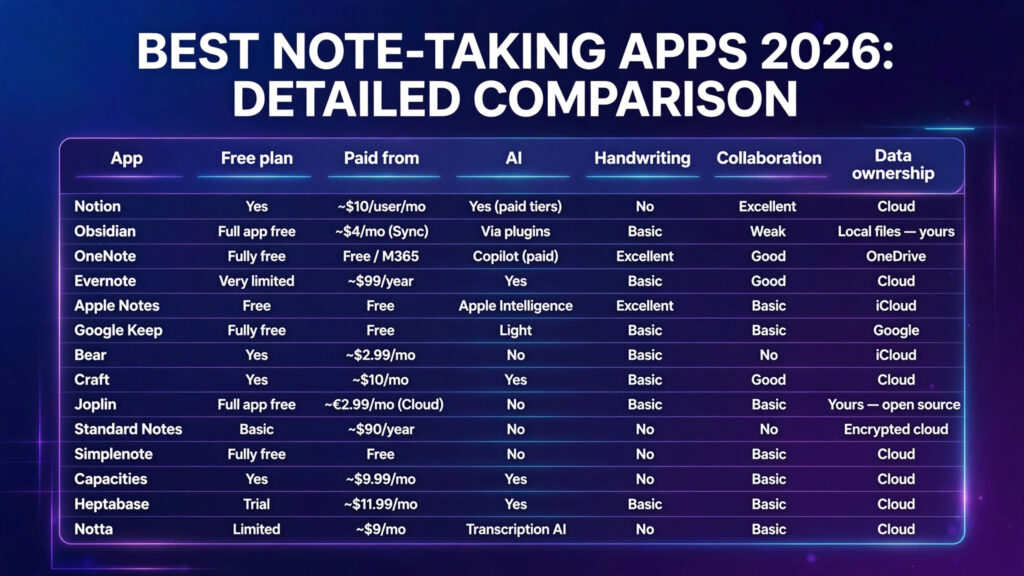
Detailed Comparison Table: Best Note-Taking Apps 2026
| App | Platforms | Free plan | Paid from | AI | Handwriting | Collaboration | Data ownership |
|---|---|---|---|---|---|---|---|
| Notion | All + web | Yes | ~$10/user/mo | Yes (paid tiers) | No | Excellent | Cloud |
| Obsidian | All | Full app free | ~$4/mo (Sync) | Via plugins | Basic | Weak | Local files — yours |
| OneNote | All | Fully free | Free / M365 | Copilot (paid) | Excellent | Good | OneDrive |
| Evernote | All | Very limited | ~$99/year | Yes | Basic | Good | Cloud |
| Apple Notes | Apple only | Free | Free | Apple Intelligence | Excellent | Basic | iCloud |
| Google Keep | All + web | Fully free | Free | Light | Basic | Basic | |
| Bear | Apple only | Yes | ~$2.99/mo | No | Basic | No | iCloud |
| Craft | Apple, Windows, web | Yes | ~$10/mo | Yes | Basic | Good | Cloud |
| Joplin | All | Full app free | ~€2.99/mo (Cloud) | No | Basic | Basic | Yours — open source |
| Standard Notes | All | Basic | ~$90/year | No | No | No | Encrypted cloud |
| Simplenote | All | Fully free | Free | No | No | Basic | Cloud |
| Capacities | All + web | Yes | ~$9.99/mo | Yes | No | Basic | Cloud |
| Heptabase | Desktop + mobile | Trial | ~$11.99/mo | Yes | Basic | Basic | Cloud |
| Notta | All + web | Limited | ~$9/mo | Transcription AI | No | Basic | Cloud |
How to Choose the Right Note-Taking App
Work through these five questions and your answer will pick itself:
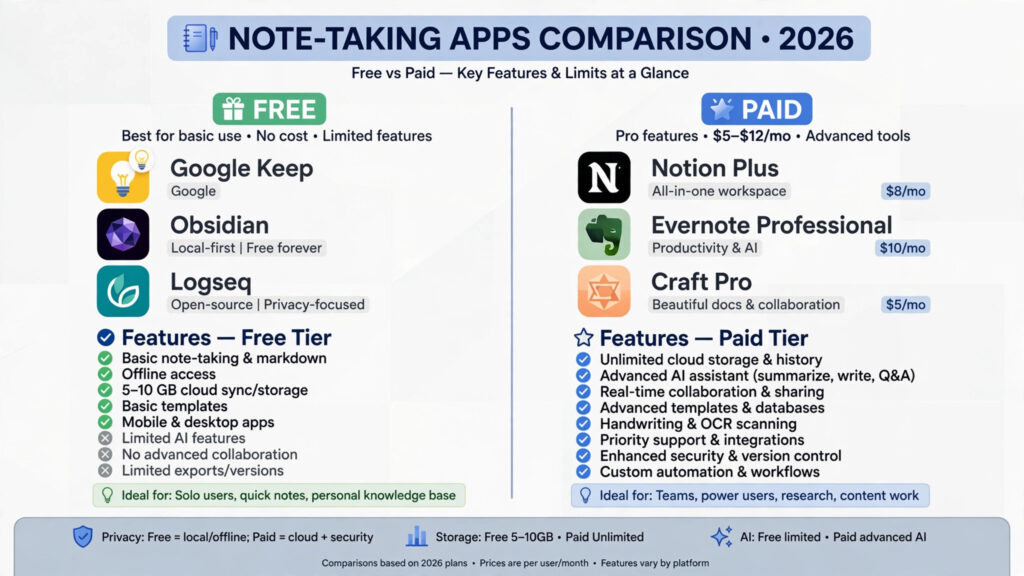
- What kind of notes do you create? Quick lists → Google Keep or Apple Notes. Long documents → Notion, Craft or Bear. Connected ideas → Obsidian or Capacities.
- Do you need handwriting? iPad users: OneNote (free), Goodnotes or Notability (dedicated), Apple Notes (built in).
- Is this for a team? Notion is the clear winner for shared workspaces; OneNote suits Microsoft shops.
- How much do you care about privacy and ownership? Obsidian (local files), Joplin and Standard Notes (encryption) are the safest hands.
- What’s your budget? OneNote, Keep, Apple Notes, Joplin and Obsidian’s core app are all free and genuinely capable — start there before paying anything.
The best note-taking app for students: OneNote or Obsidian for lectures; Notion for organising a whole degree.
The best note-taking app for work: Notion for teams; Obsidian for solo deep work.
The best free note-taking app: Microsoft OneNote, with Google Keep and Apple Notes close behind.
Getting Started: Set Up Your Note-Taking System in 20 Minutes
- Pick one primary app from the shortlist above — resist installing five. The best system is the one you’ll actually open.
- Create a simple structure: three areas only — Inbox (capture everything), Projects/Subjects, Reference. You can refine later.
- Install it everywhere — phone, tablet, desktop and the browser extension/web clipper.
- Set up quick capture: a home-screen widget or keyboard shortcut so a thought becomes a note in under five seconds.
- Migrate only what matters — import your most-used recent notes, not your entire archive. Leave the rest behind.
- Book a weekly 10-minute review to file Inbox items and delete what no longer matters. This single habit matters more than which app you chose.
FAQs: Best Note-Taking Apps
1. What is the best note-taking app overall in 2026?
Notion, for its combination of notes, databases, collaboration and AI. For a purely personal knowledge base, Obsidian is the better pick.
2. What is the best free note-taking app?
Microsoft OneNote — a complete notebook experience with no paywall. Google Keep and Apple Notes are excellent free options for lighter needs, and Obsidian’s core app is free for personal use.
3. Which note-taking app is best for students?
OneNote for free-form lecture notes and handwriting, Obsidian for building a connected revision knowledge base, and Notion for organising subjects, assignments and deadlines.
4. Are AI features in note-taking apps worth paying for?
If you take meeting or lecture notes daily, AI summaries and Q&A over your notes save real time. For occasional notes, free tiers are enough. Heavy meeting users should look at dedicated AI meeting assistants too.
5. Which note-taking app is best for privacy?
Standard Notes and Joplin offer end-to-end encryption; Obsidian keeps files on your own device entirely. All three avoid the lock-in of cloud-only apps.
6. Notion vs Obsidian — which should I choose?
Choose Notion for teams, databases and sharing. Choose Obsidian for personal, private, offline notes you own forever. Many people use both.
7. Can I switch note-taking apps later?
Yes, but difficulty varies. Apps storing notes as Markdown (Obsidian, Joplin) are trivial to leave. Proprietary systems (Evernote, Notion) export adequately but with some formatting loss — another reason to favour open formats.
8. Do I need a separate app for handwriting?
If handwriting is occasional, OneNote or Apple Notes will do. If you handwrite daily on a tablet, Goodnotes or Notability’s pen experience and audio sync are worth the small subscription.
Conclusion
The best note-taking apps in 2026 succeed by matching how you think, not by having the longest feature list. Start free with OneNote, Apple Notes or Obsidian; move to Notion when you need team structure; reach for Joplin or Standard Notes when privacy decides. Then build the weekly-review habit — that’s where notes turn into knowledge.
Ready to go further? Explore our guides to the best AI meeting assistants, the best free AI tools, and AI tools for students to complete your productivity stack.