

Finding a time when everyone is free shouldn’t take twelve emails. The best scheduling apps in 2026 remove that friction completely: you share your availability, people book a slot, calendars sync, reminders go out, video links are attached, and nobody gets double-booked.
But “best scheduling apps” now covers several different jobs. A freelancer may only need a simple booking link. A sales team needs round-robin routing and CRM integration. A salon needs client payments and no-show protection. A manager might need an AI assistant that protects focus time around meetings. And some teams mean something different again — employee shift scheduling.
This guide compares 18 of the best scheduling apps in 2026, grouped by what they’re actually best at, with real pricing, honest pros and cons, and a clear verdict for each. By the end, you’ll know exactly which tool fits your situation.
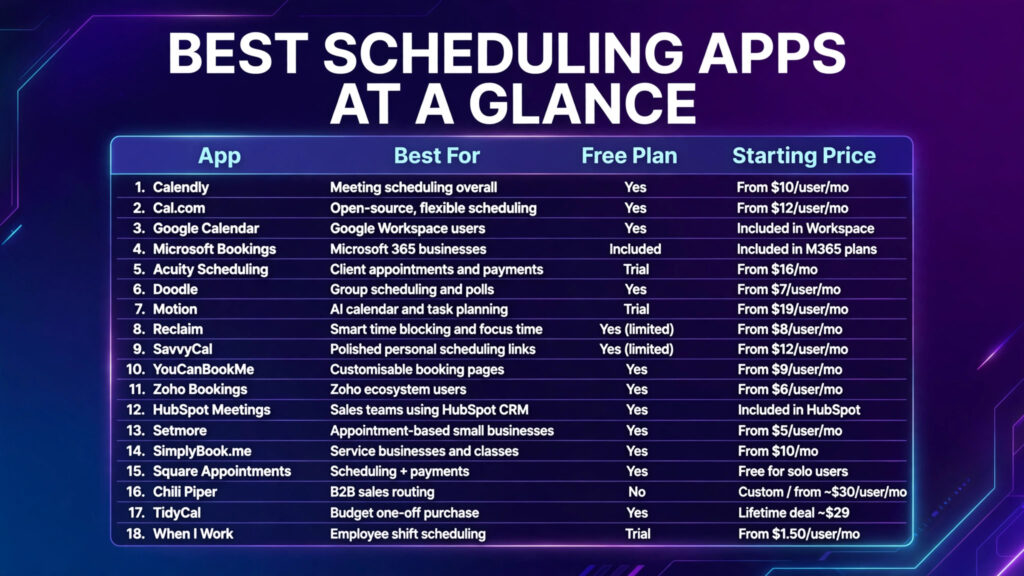
Quick Answer: What Are the Best Scheduling Apps in 2026?
| App | Best For | Free Plan | Starting Price |
|---|---|---|---|
| Calendly | Meeting scheduling overall | Yes | From $10/user/mo |
| Cal.com | Open-source, flexible scheduling | Yes | From $12/user/mo |
| Google Calendar | Google Workspace users | Yes | Included in Workspace |
| Microsoft Bookings | Microsoft 365 businesses | Included | Included in M365 plans |
| Acuity Scheduling | Client appointments and payments | Trial | From $16/mo |
| Doodle | Group scheduling and polls | Yes | From $7/user/mo |
| Motion | AI calendar and task planning | Trial | From $19/user/mo |
| Reclaim | Smart time blocking and focus time | Yes (limited) | From $8/user/mo |
| SavvyCal | Polished personal scheduling links | Yes (limited) | From $12/user/mo |
| YouCanBookMe | Customisable booking pages | Yes | From $9/user/mo |
| Zoho Bookings | Zoho ecosystem users | Yes | From $6/user/mo |
| HubSpot Meetings | Sales teams using HubSpot CRM | Yes | Included in HubSpot |
| Setmore | Appointment-based small businesses | Yes | From $5/user/mo |
| SimplyBook.me | Service businesses and classes | Yes | From $10/mo |
| Square Appointments | Scheduling + payments | Yes | Free for solo users |
| Chili Piper | B2B sales routing | No | Custom / from ~$30/user/mo |
| TidyCal | Budget one-off purchase | Yes | Lifetime deal ~$29 |
| When I Work | Employee shift scheduling | Trial | From $1.50/user/mo |
The short version: Calendly is the safest default for most professionals. Cal.com is the best flexible alternative. Motion and Reclaim lead for AI-assisted personal scheduling. Acuity and Square Appointments win for client-facing service businesses.
What Are Scheduling Apps?
Scheduling apps let people book time with you (or your team, or your business) without back-and-forth emails. The category now includes five distinct types:
- Meeting schedulers (Calendly, Cal.com, SavvyCal) — share a link, guests pick a time.
- Client appointment systems (Acuity, SimplyBook.me, Square Appointments) — booking pages with payments, intake forms and reminders for service businesses.
- Group schedulers (Doodle) — polls that find a time that works for everyone.
- AI calendar assistants (Motion, Reclaim) — software that schedules tasks, habits and focus time around your meetings automatically.
- Employee shift schedulers (When I Work) — rotas, availability and shift swaps for hourly teams.
Knowing which type you need is half the decision. The rest is ecosystem (Google vs Microsoft), team features and price.
How We Chose the Best Scheduling Apps
We evaluated each app against seven criteria that actually matter in daily use:
- Ease of use — can a new user share a working booking link in under ten minutes?
- Calendar integrations — Google Calendar, Outlook and iCloud sync, plus conflict detection across multiple calendars.
- Booking pages — branding, custom questions, time-zone handling and embed options.
- Team scheduling — round-robin, collective events, routing rules and admin controls.
- Automation — reminders, follow-ups, workflows and no-show reduction.
- Integrations — Zoom, Teams, CRMs like HubSpot and Salesforce, payments (Stripe, PayPal, Square) and automation tools like Zapier.
- Pricing — not just the entry price, but what it costs when your team grows.
Where competitors publish scores, we sanity-checked our shortlist against the same tools they rank highly — Calendly, Acuity, Cal.com and Doodle consistently place at the top across independent comparisons.
1. Calendly – Best Scheduling App Overall
Best for: Professionals and teams who want the most polished, recognisable booking experience.
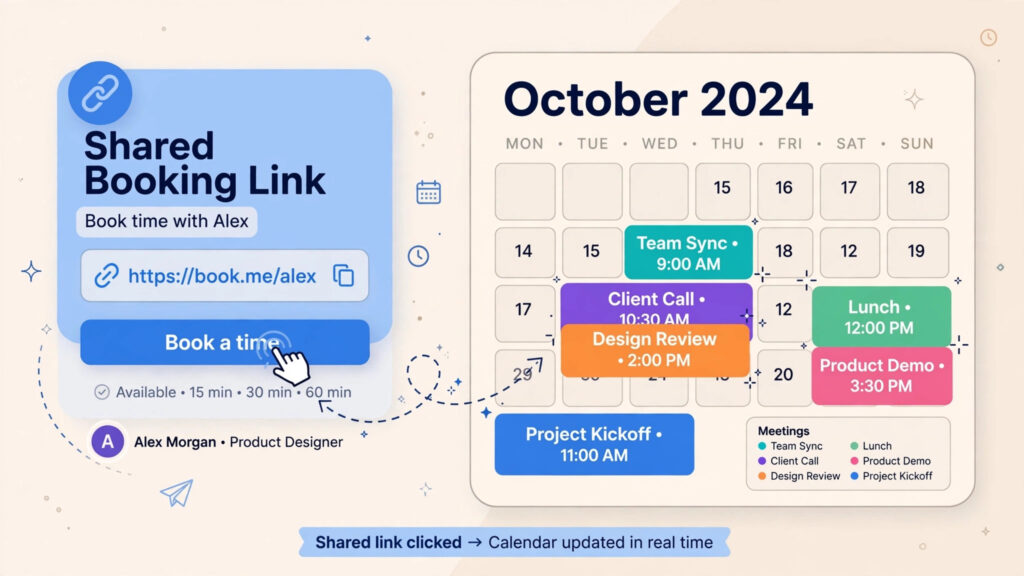
Calendly invented the modern scheduling category, and its network effects are real: recipients recognise the interface and trust the flow. Sharing a link, embedding a booking page on your website, and round-robin team scheduling all work smoothly. Integrations with Salesforce, HubSpot, Zoom and hundreds of other tools make it the connective tissue of many sales and recruiting stacks.
Key features: One-to-one and team event types, round-robin and collective scheduling, routing forms, automated reminders and follow-ups, payment collection via Stripe/PayPal, 100+ integrations.
Pricing: Free plan with one event type and one calendar connection. Standard from $10/user/month (billed annually) adds multiple calendars, reminders and automations; Teams plans add routing and Salesforce integration.
Pros: Easiest link sharing in the category; huge integration ecosystem; strong team features; guests trust the brand.
Cons: Advanced features live on higher tiers; customisation is limited on lower plans; per-user pricing adds up for large teams.
Verdict: If you schedule meetings with people outside your company and want zero friction, Calendly remains the default choice in 2026.
2. Cal.com – Best Open-Source and Developer-Friendly
Best for: Teams that want Calendly-level power with more flexibility, white-labelling and API control.
Cal.com is the open-source scheduling platform that’s become the credible alternative to Calendly. It’s API-first, supports self-hosting, offers workflows and routing forms, and handles team scheduling with conflict prevention. Developers love it; non-technical teams can use the hosted version like any other app.
Key features: Open-source core, team round-robin and collective events, workflows (reminders, follow-ups), dynamic group links, app store with 100+ integrations, white-label options.
Pricing: Generous free plan for individuals. Teams from around $12/user/month.
Pros: Most flexible platform here; open-source and self-hostable; strong API; competitive pricing.
Cons: Interface slightly less polished than Calendly; some advanced features need the paid tier; brand recognition lower with guests.
Verdict: Choose Cal.com if you want control, customisation or an API-first approach — or if Calendly’s pricing model doesn’t suit your team.
3. Google Calendar – Best for Google Workspace Users
Best for: Google Workspace users who want built-in appointment scheduling at no extra cost.
Google Calendar’s appointment schedules let you create bookable pages directly inside the calendar you already use, with availability windows, buffers, booking limits and confirmation emails. For solo professionals inside Google Workspace, it removes the need for a separate tool entirely.
Key features: Appointment schedules with multiple bookable calendars (paid Workspace), buffer times, co-hosts, Stripe payment collection (Workspace), automatic Meet links.
Pricing: Included with Google Workspace plans (from $7/user/month); basic version available to personal Google accounts with limits.
Pros: Zero extra tools to manage; deep Google Meet and Gmail integration; no per-user scheduling fee on top of Workspace.
Cons: Fewer team routing features than Calendly; booking pages are functional rather than beautiful; best features require a paid Workspace plan.
Verdict: If your whole business runs on Google Workspace and your scheduling needs are simple, try this before paying for anything else. For heavier needs, pair it with our software for small business stack guide.
4. Microsoft Bookings – Best for Microsoft 365 Businesses
Best for: Businesses standardised on Microsoft 365 that need staff-based appointment booking.
Microsoft Bookings is included with many Microsoft 365 business plans and provides a public booking page where customers choose a service, staff member and time. It syncs with Outlook calendars and Teams meetings, and handles confirmations and reminders automatically.
Key features: Service and staff management, public booking page, Outlook/Teams integration, automated confirmations and reminders, reporting.
Pricing: Included in Microsoft 365 Business Standard and Premium plans.
Pros: No additional cost if you already pay for M365; solid for clinics, salons, IT services and internal bookings; enterprise-grade security.
Cons: Interface feels dated next to Acuity; customisation is limited; requires eligible M365 licences for all staff.
Verdict: The obvious choice for Microsoft shops — check whether you already own it before buying anything else.
5. Acuity Scheduling – Best for Service Businesses
Best for: Coaches, consultants, clinics, salons and any business selling appointments with payments and intake forms.
Acuity Scheduling (from Squarespace) is built for client businesses rather than internal meetings. Its booking rule engine combines lead times, buffers, rescheduling and cancellation policies per appointment type, and it takes payments, sells packages and gift certificates, and syncs multiple calendars per staff member.
Key features: Client self-booking with intake forms, payment processing (Stripe, Square, PayPal), packages and subscriptions, automated email/SMS reminders, HIPAA-friendly options on higher tiers.
Pricing: From $16/month (Emerging) to $49/month (Powerhouse); 7-day free trial, no free plan.
Pros: Deepest appointment-specific controls in this list; excellent client experience; strong automation for confirmations and follow-ups.
Cons: No free plan; pricing is per-business rather than per-user, which suits some and not others; overkill for simple meeting links.
Verdict: If clients book and pay for your time, Acuity is the professional standard.
6. Doodle – Best for Group Scheduling
Best for: Finding a time across large groups, committees, boards and external participants.
Doodle does one thing brilliantly: polls. Create a poll, invite participants, and Doodle finds the slot that works for everyone — no accounts required for voters. It also offers booking pages and 1:1 scheduling now, but group coordination is its home turf.
Key features: Group polls with deadlines and reminders, booking pages, calendar sync, time-zone intelligence, integrations with Zoom and Teams.
Pricing: Free plan with ads and limits; Pro from around $7/user/month.
Pros: Unbeatable for group availability; dead simple for participants; works across companies and time zones.
Cons: Not a full appointment system (no payments on polls); free tier shows ads; fewer automation features than Calendly.
Verdict: Keep Doodle in your toolkit for the meetings where 8+ people’s calendars collide — even if you use another app day to day.
7. Motion – Best AI Scheduling App
Best for: Busy professionals and teams who want tasks and meetings auto-scheduled around each other.
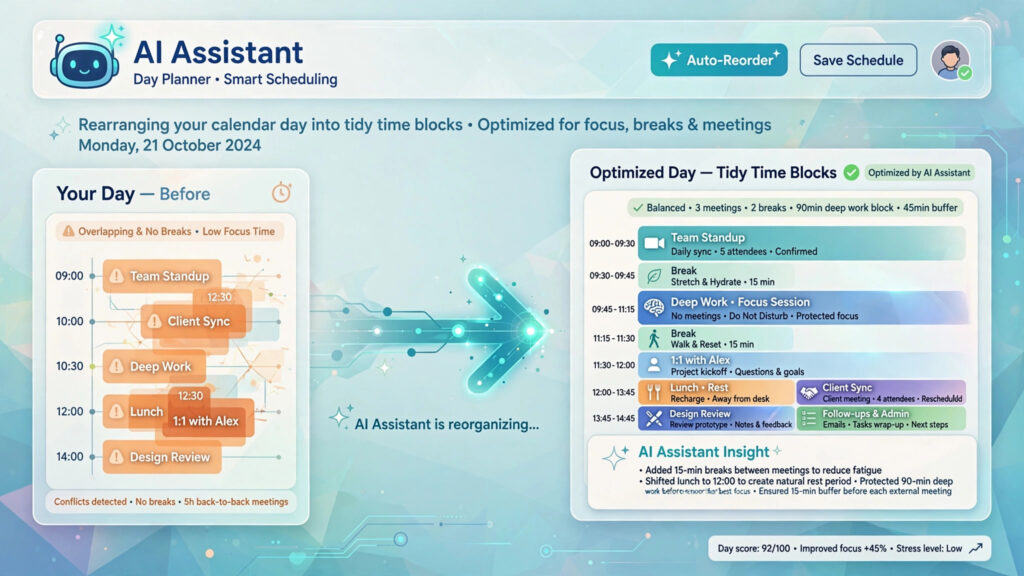
Motion goes beyond booking links: it uses AI to build your day, automatically scheduling tasks by priority and deadline, rescheduling when meetings move, and warning you when a deadline is at risk. It includes meeting booking pages too, so it can replace both a to-do app and a scheduler.
Key features: AI auto-scheduling of tasks and projects, booking pages, deadline tracking, project management views, calendar sync with Google and Outlook.
Pricing: From around $19/user/month (annual billing); free trial available.
Pros: Genuinely useful AI prioritisation; combines task management and scheduling; great for deadline-driven work.
Cons: Premium price; the AI needs a few days to learn your patterns; can feel opinionated if you like full manual control.
Verdict: The best choice if your problem isn’t booking meetings — it’s fitting everything else around them. Pair it with ideas from our best free AI tools guide to build a fuller AI productivity stack.
8. Reclaim – Best for Smart Calendar Optimisation
Best for: Individuals and teams who want AI to defend focus time, habits and task blocks automatically.
Reclaim layers intelligence on top of Google Calendar (and Outlook): it auto-schedules tasks from your to-do tools, books recurring habits like exercise or planning, syncs multiple calendars to prevent double-booking, and provides analytics on where your time actually goes.
Key features: Smart task scheduling, habit templates, calendar sync across work/personal accounts, focus-time defence, team scheduling links, time analytics.
Pricing: Limited free plan; paid from around $8/user/month.
Pros: Best-in-class focus-time protection; calendar sync alone is worth it for multi-calendar people; helpful analytics.
Cons: Google-centric (Outlook support is newer); setup takes thought to get the priorities right; not a client-payment booking system.
Verdict: Choose Reclaim over Motion if you love your existing task manager and just want your calendar to organise itself.
9. SavvyCal – Best for Professional Scheduling Links
Best for: Freelancers and professionals who send a lot of scheduling links and care about the guest experience.
SavvyCal refines the booking-link experience: calendar overlays let guests compare availability against their own calendar, links can be personalised per recipient, and ranking rules let you prioritise which times you offer first.
Key features: Calendar overlay for guests, personalised single-use links, availability ranking, team scheduling, polished minimal design.
Pricing: Limited free plan; paid from $12/user/month.
Pros: Most elegant guest experience in this list; overlay feature genuinely reduces back-and-forth; thoughtful design throughout.
Cons: Smaller integration ecosystem than Calendly; fewer enterprise routing features; less known brand.
Verdict: If you live by your scheduling link and want it to feel premium, SavvyCal is the connoisseur’s pick.
10. YouCanBookMe – Best for Customisable Booking Pages
Best for: Teams that want heavily branded, flexible booking pages with granular control.
YouCanBookMe offers deep customisation: custom domains, branded pages, complex availability rules, multiple team calendars, and payment collection. It’s a favourite in education and public-sector contexts where accessibility and branding matter.
Key features: Fully branded booking pages, per-team-member pages, custom notifications, Stripe payments, strong accessibility support.
Pricing: Free plan available; paid from around $9 per calendar/month.
Pros: Excellent customisation and branding; generous feature set; per-calendar pricing suits some teams better than per-user.
Cons: Interface is less modern than newer rivals; setup has more options to wade through; fewer native integrations.
Verdict: Pick YouCanBookMe when your booking page is a public-facing part of your brand, not just a utility.
11. Zoho Bookings – Best for Zoho Users
Best for: Small businesses already using Zoho CRM, Zoho Mail or other Zoho apps.
Zoho Bookings integrates natively across the Zoho suite: appointments flow into Zoho CRM, invoices into Zoho Books, and meetings into Zoho Meeting. For Zoho One subscribers it’s effectively included in the bundle, making it remarkable value.
Key features: Workspaces and staff scheduling, payment collection, Zoho suite integrations, custom booking page, automated reminders.
Pricing: Free plan for one staff member; paid from around $6/user/month; included with Zoho One.
Pros: Superb value inside the Zoho ecosystem; clean interface; solid feature coverage.
Cons: Outside Zoho, integrations are thinner; smaller third-party app ecosystem than Calendly.
Verdict: If you’re a Zoho business, this is a no-brainer. If you’re not, the standalone value is good but not category-leading.
12. HubSpot Meetings – Best for Sales Teams
Best for: Sales teams using HubSpot CRM who want bookings logged automatically against contacts and deals.
HubSpot’s meeting tool creates booking links that check your calendar and write everything back to the CRM — new contacts are created, meetings logged, and follow-up workflows triggered. Combined with HubSpot’s automation, it removes the manual admin between “call booked” and “deal progressed.”
Key features: CRM-connected booking links, round-robin team links, automatic contact creation and activity logging, workflow triggers, embedded forms.
Pricing: Available in HubSpot’s free CRM with limits; fuller features in Sales Hub Starter from around $15–20/month.
Pros: Zero-friction CRM sync; free tier genuinely usable; scales into full sales automation (see our best CRM software for small business guide).
Cons: Only compelling inside HubSpot; advanced routing needs paid tiers; not designed for client appointment businesses.
Verdict: Sales teams already on HubSpot shouldn’t pay for a separate scheduler until they outgrow this.
13. Setmore – Best for Appointment-Based Small Businesses
Best for: Salons, clinics, studios and local services that need free, simple online booking.
Setmore offers a genuinely usable free plan with a booking page, staff calendars, reminders and payment options via Square and Stripe. It’s designed for businesses where customers book appointments — not internal teams booking meetings.
Key features: Free booking page, staff and class scheduling, email reminders, payment integrations, Teleport video meetings, social booking via Facebook/Instagram.
Pricing: Free plan (up to 4 staff); Premium from around $5/user/month.
Pros: One of the best free plans in the category; simple for non-technical owners; good for multi-staff service businesses.
Cons: Design is functional rather than slick; advanced features spread across tiers; limited reporting.
Verdict: The best free starting point for a local service business that needs online booking today.
14. SimplyBook.me – Best for Service Businesses and Classes
Best for: Service businesses, classes and multi-location operations needing a full booking website.
SimplyBook.me provides a complete booking website (not just a page), widgets for your existing site, class and membership management, and a modular feature system where you enable only what you need. It scores highly in independent rankings for flexibility.
Key features: Booking website and widgets, classes and memberships, intake forms, payment processing, multi-location support, custom features à la carte.
Pricing: Free plan with limited bookings; paid from around $10/month scaling with booking volume.
Pros: Extremely flexible; great for classes and memberships; booking-volume pricing can be cheap for small operations.
Cons: Modular system takes time to configure; interface can feel busy; some features cost extra as add-ons.
Verdict: Choose SimplyBook.me if your “scheduling” involves classes, memberships or multiple locations — it’s built for that complexity.
15. Square Appointments – Best for Scheduling Plus Payments
Best for: Solo practitioners and service businesses that want booking and payments in one system, free.
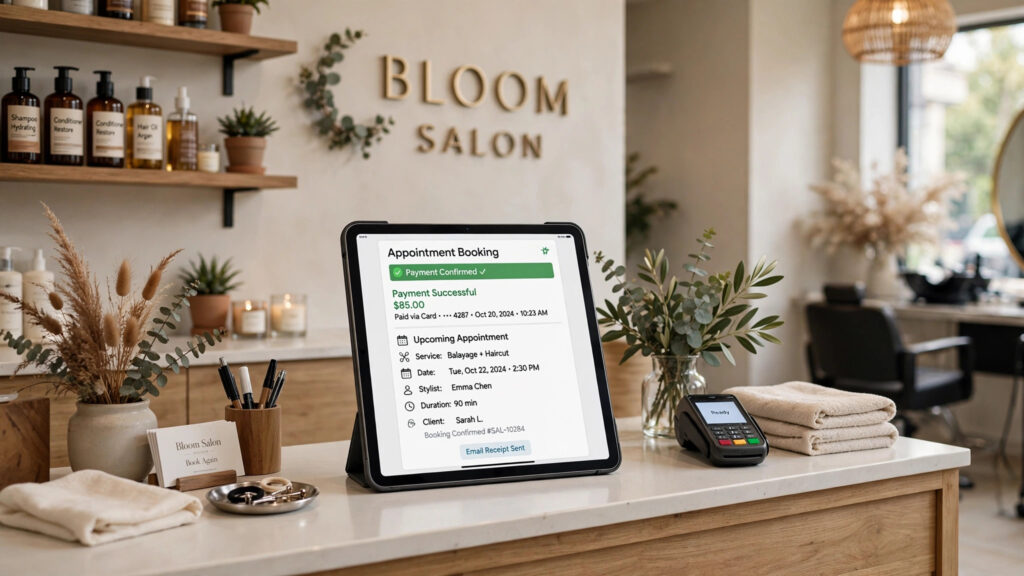
Square Appointments combines a booking calendar with Square’s payment processing: clients book, pay or prepay, and no-shows can be charged per your cancellation policy. For solo users it’s free (you just pay card processing fees), which makes it exceptional value.
Key features: Online booking with prepayment, no-show protection, point-of-sale integration, automated reminders, staff management on paid tiers.
Pricing: Free for individuals; Plus from around $29/month per location for teams.
Pros: Free tier with real payment processing; no-show protection protects revenue; a natural fit if you already use Square POS.
Cons: Best inside the Square ecosystem; less suited to B2B meeting scheduling; team features require paid tiers.
Verdict: If you sell your time in person and already take cards, Square Appointments is hard to beat on value.
16. Chili Piper – Best for B2B Sales Scheduling
Best for: B2B sales teams that need instant lead routing and booking from web forms.
Chili Piper specialises in the moment a prospect fills in a demo form: it qualifies, routes and offers the right rep’s calendar instantly, before the lead goes cold. It’s enterprise-focused and priced accordingly, but for high-value B2B pipelines the conversion lift justifies it.
Key features: Instant form-to-meeting booking, lead routing and round-robin rules, Salesforce/HubSpot integration, handoff scheduling between SDRs and AEs, routing analytics.
Pricing: Custom pricing; typically from around $30/user/month plus platform fees.
Pros: Best-in-class inbound conversion workflow; deep CRM routing logic; strong analytics.
Cons: Expensive for small teams; no free plan; overkill for general scheduling.
Verdict: A specialist tool for sales-led companies — if a single extra demo per week matters to revenue, it pays for itself.
17. TidyCal – Best Budget Scheduling App
Best for: Solopreneurs who want Calendly-style booking without a monthly subscription.
TidyCal (from the AppSumo team) offers clean booking pages, calendar sync, team features and integrations for a one-time lifetime payment. It covers 90% of what most solo users need from Calendly at a fraction of the long-term cost.
Key features: Unlimited booking types on paid tier, Google/Outlook/iCloud sync, Zoom/Meet/Teams links, payment collection, team pages.
Pricing: Free plan with limits; lifetime deal typically around $29–$39 one-time.
Pros: No subscription; simple and fast; great value for individuals.
Cons: Fewer advanced automations; smaller integration library; less suitable for large teams.
Verdict: The budget champion. If recurring SaaS fees annoy you, TidyCal is the pragmatic pick.
18. When I Work – Best for Employee Shift Scheduling
Best for: Retail, hospitality, healthcare and other hourly-workforce businesses scheduling shifts, not meetings.
When I Work represents the other meaning of “scheduling app”: building staff rotas. It handles availability, shift swaps, time-off requests, automated reminders and labour-cost visibility, with time-clock features built in.
Key features: Drag-and-drop shift builder, availability and swap management, team messaging, time clock and attendance, labour forecasting.
Pricing: From around $1.50/user/month for scheduling-only essentials; free trial available.
Pros: Purpose-built for shift work; staff love the mobile app; strong swap/availability workflows.
Cons: Not a meeting or client-booking tool; per-user costs scale with headcount; some features need higher tiers.
Verdict: Don’t force a meeting scheduler to run your rota. If you schedule hourly staff, start here.
Best Scheduling Apps by Use Case
| Use Case | Best Pick |
|---|---|
| General meetings and booking links | Calendly |
| Open-source / developer control | Cal.com |
| AI time management | Motion or Reclaim |
| Client appointments with payments | Acuity Scheduling |
| Free for a local service business | Setmore or Square Appointments |
| Group meetings and polls | Doodle |
| Sales teams on a CRM | HubSpot Meetings or Chili Piper |
| Classes and memberships | SimplyBook.me |
| Employee shift rotas | When I Work |
| No subscription | TidyCal |
Detailed Comparison: Features, Pricing and Best For
| App | Team Scheduling | Payments | AI Features | Integrations | Starting Price |
|---|---|---|---|---|---|
| Calendly | ✅ Round-robin & routing | Stripe/PayPal | Basic | 100+ | Free / $10 |
| Cal.com | ✅ Advanced | Stripe | Workflows | 100+ | Free / $12 |
| Google Calendar | Basic | Stripe (Workspace) | Gemini (Workspace) | Google ecosystem | Included |
| Microsoft Bookings | ✅ Staff-based | Limited | Copilot (M365) | Microsoft ecosystem | Included |
| Acuity | ✅ Staff-based | Stripe/Square/PayPal | No | 20+ | $16/mo |
| Doodle | Polls | No | No | Core apps | Free / $7 |
| Motion | ✅ | No | ✅ Core product | Core apps | $19/mo |
| Reclaim | Links | No | ✅ Core product | Core apps | Free / $8 |
| SavvyCal | ✅ | Stripe | No | Core apps | Free / $12 |
| YouCanBookMe | ✅ | Stripe | No | Core apps | Free / $9 |
| Zoho Bookings | ✅ | ✅ | No | Zoho suite | Free / $6 |
| HubSpot Meetings | ✅ Round-robin | Via HubSpot | HubSpot AI | HubSpot ecosystem | Free |
| Setmore | ✅ | Square/Stripe | No | Core apps | Free / $5 |
| SimplyBook.me | ✅ | ✅ | No | 60+ | Free / $10 |
| Square Appointments | ✅ | Square native | No | Square ecosystem | Free |
| Chili Piper | ✅ Advanced routing | No | Routing logic | Salesforce/HubSpot | ~$30/user |
| TidyCal | ✅ Basic | Stripe/PayPal | No | Core apps | $29 lifetime |
| When I Work | ✅ Shifts | No | Forecasting | Payroll apps | $1.50/user |
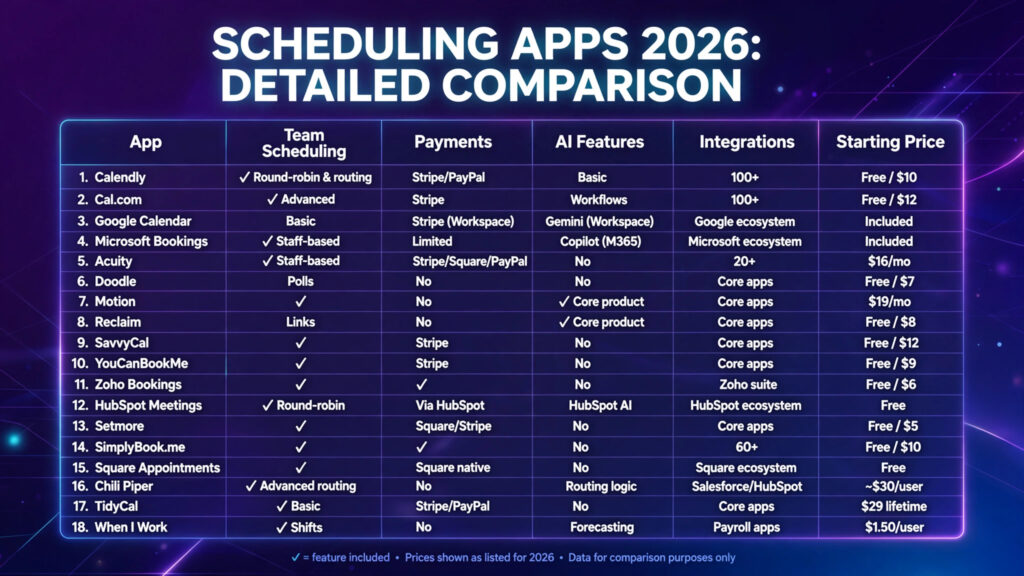
Head-to-Head: Calendly vs Google Calendar
Choose Calendly if you book with external clients, need team round-robin, routing forms, payments or CRM integrations. Choose Google Calendar if your scheduling is mostly internal or simple 1:1s and you’re already paying for Workspace — the built-in appointment schedules cost you nothing extra.
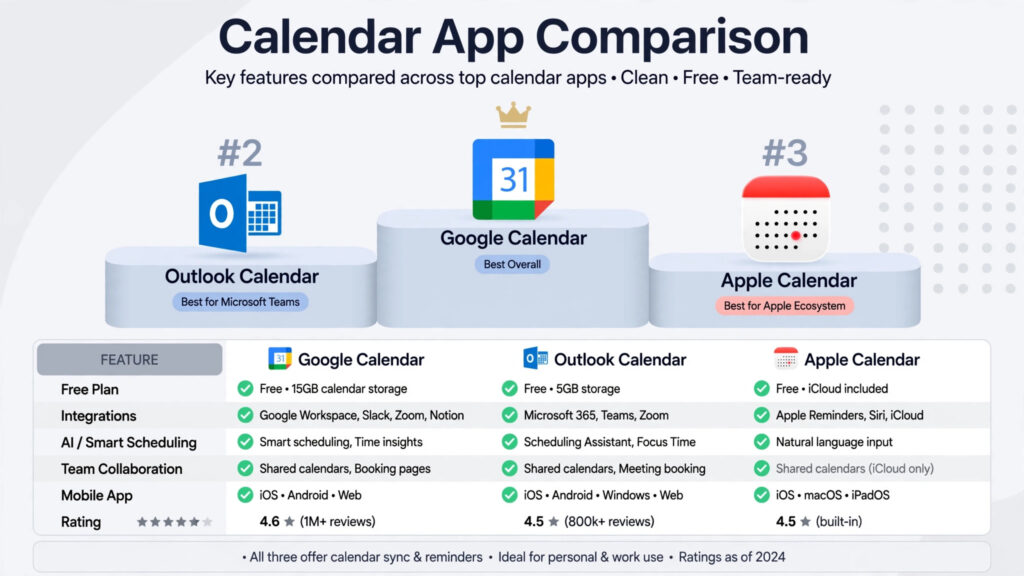
Head-to-Head: Calendly vs Microsoft Bookings
Choose Calendly if you need polished guest experience and cross-platform integrations. Choose Microsoft Bookings if your business is standardised on Microsoft 365, you book staff-based services (not just meetings), and you’d rather not add another subscription.
Head-to-Head: Motion vs Reclaim
Motion replaces your task manager and scheduler — best if you want one AI system to plan tasks, projects and meetings. Reclaim layers onto your existing tools and focuses on defending time — best if you like your current task app and just want smarter calendar blocking. Motion is the bigger commitment; Reclaim is the lighter touch.
How Much Does Scheduling Software Cost?
Most professionals pay between $8 and $20 per user per month for paid scheduling. Pricing styles differ:
- Per-user (Calendly, Cal.com) — predictable, scales with headcount.
- Per-business/per-location (Acuity, Square) — better for multi-staff service businesses.
- Per-calendar (YouCanBookMe) — suits agencies managing many pages.
- One-time (TidyCal) — cheapest over time for solo users.
- Bundled (Google, Microsoft, Zoho, HubSpot) — “free” if you already pay for the suite; always check this first.
Free plans are genuinely good enough for solo users with one calendar and basic needs. Pay when you need multiple calendars, team scheduling, payments, or removing the vendor’s branding.
How to Choose the Best Scheduling App for Your Business
Step 1 | Identify what you’re scheduling. Meetings, client appointments, group events, tasks, or staff shifts? Each maps to a different category above — choosing the wrong category is the most common mistake.
Step 2 | Check your existing ecosystem. Already paying for Google Workspace, Microsoft 365, Zoho One or HubSpot? You may already own a good-enough scheduler. Test it for a week before buying anything.
Step 3 | Decide whether you need payments. If clients pay for your time, shortlist Acuity, Square Appointments or Setmore and set up no-show protection from day one.
Step 4 | Consider team scheduling. Round-robin, collective events and routing matter once more than one person takes bookings. That’s Calendly, Cal.com, HubSpot or Chili Piper territory.
Step 5 | Consider automation. Reminders cut no-shows dramatically. AI features (Motion, Reclaim) matter if your problem is time management, not just booking. For broader workflow automation, see our guide to the best AI workflow automation tools for small business.
Step 6 | Calculate the real cost. Multiply per-user pricing by your team in 12 months, not today. Check whether “free” bundled options remove the need entirely.
How to Get Started With Your Chosen App
- Connect your calendar and set your availability. Block out non-working hours honestly — the app can only protect boundaries you define.
- Create one event type first. A simple 30-minute meeting or your most-booked service. Resist configuring everything.
- Add the essentials: confirmation email, one reminder (24 hours before), buffer time between bookings, and your video link or location.
- Test it yourself. Book a slot from your phone as a guest. Fix anything confusing — guests won’t tell you, they’ll just not book.
- Share it everywhere. Email signature, website contact page, social profiles, Google Business Profile.
- Review after two weeks. Check no-show rates and booking volume; add a second reminder or adjust availability if needed.
Are Free Scheduling Apps Good Enough?
For freelancers and solo professionals: usually, yes. Calendly’s free plan, Cal.com’s free tier, Setmore and Google Calendar appointment schedules cover basic booking well. The triggers to upgrade are consistent: a second calendar to check, team bookings, payment collection, or branding removal. Don’t pay in anticipation of those needs — pay when you hit them.
Final Verdict
The best scheduling apps in 2026 are excellent — the real risk is picking the wrong type. Calendly is the best all-round answer for meetings; Cal.com is the best flexible alternative; Acuity and Square Appointments own client bookings with payments; Motion and Reclaim lead the AI category; and When I Work handles the shift-scheduling job the others can’t.
Start with what you already own (Google, Microsoft, Zoho or HubSpot), test the free tier of one specialist tool, and keep whichever one your guests actually complete bookings on.
Frequently Asked Questions
What is the best scheduling app in 2026?
Calendly is the best scheduling app for most people in 2026 thanks to its ease of use, integrations and team features. Cal.com is the best alternative for flexibility and open-source control, while Acuity Scheduling leads for client appointment businesses.
What is the best free scheduling app?
Calendly’s free plan and Cal.com’s free tier are the best for meeting links. For service businesses, Setmore and Square Appointments offer the strongest free booking with payments. Google Calendar’s appointment schedules are free with a Google account for basic use.
Is Calendly still worth using in 2026?
Yes. Despite strong competition from Cal.com and SavvyCal, Calendly’s guest recognition, integrations and team routing keep it the default choice for professional meeting scheduling.
What is the best scheduling app for small business?
It depends on the business type: service businesses should look at Acuity, Setmore or Square Appointments; B2B teams at Calendly or HubSpot Meetings; hourly-workforce businesses at When I Work.
What is the best AI scheduling app?
Motion is the best all-in-one AI scheduler for tasks and meetings; Reclaim is best for AI-powered focus-time protection and calendar optimisation on top of your existing tools.
Can scheduling apps accept payments?
Yes. Acuity, Square Appointments, Setmore, SimplyBook.me, Calendly and Cal.com all support payment collection via Stripe, Square or PayPal — including deposits and no-show fees.
Can scheduling software prevent double bookings?
Yes. All reputable apps check your connected calendars in real time before offering a slot, and most let you connect multiple calendars (work, personal) so conflicts are blocked automatically.
Should a small business pay for scheduling software?
Only when free or bundled options stop fitting: typically when you need team scheduling, multiple calendars, payments or branding control. Many small businesses run indefinitely on free tiers or tools bundled with Google Workspace or Microsoft 365.