
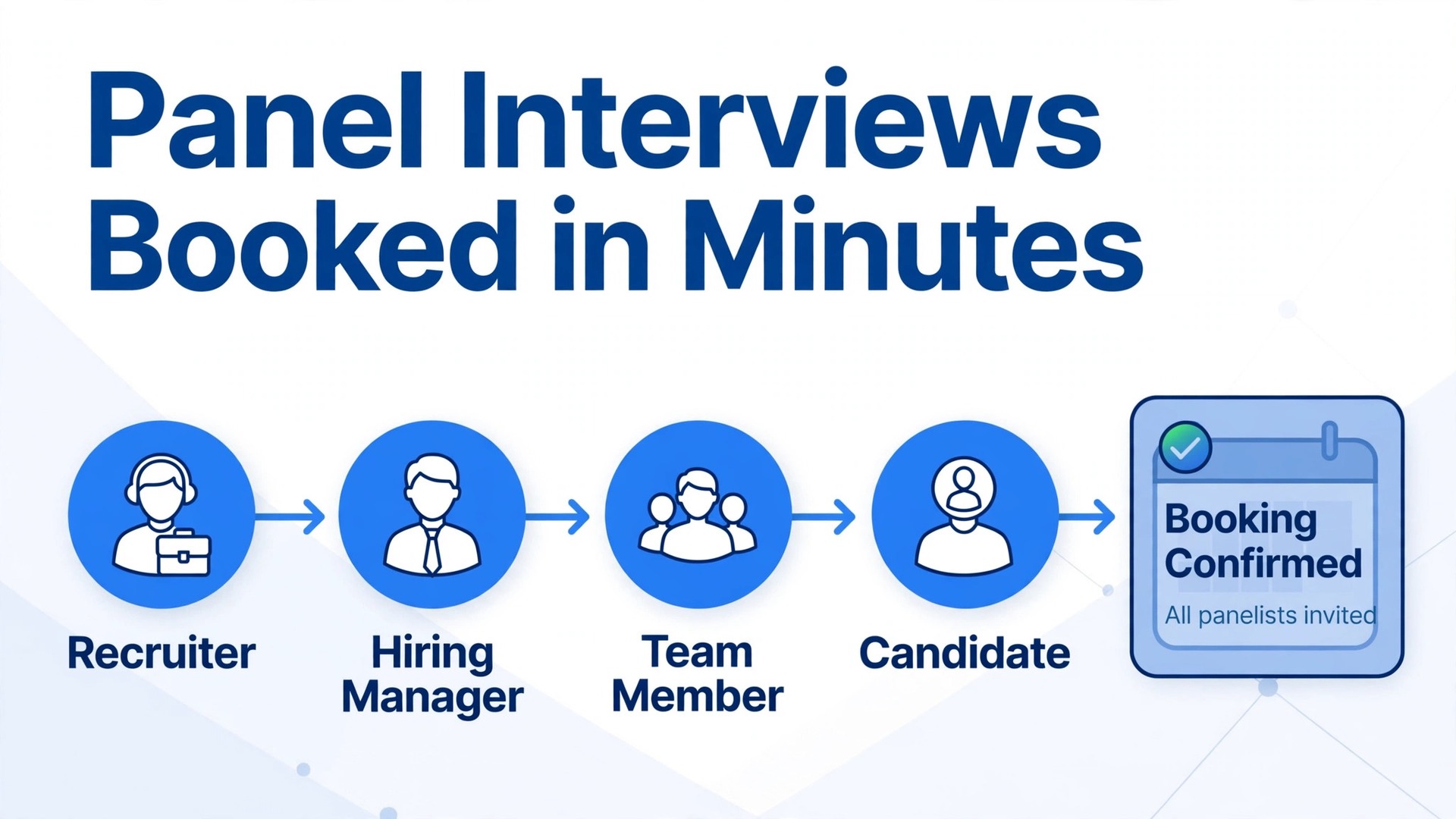
A recruiter with five open roles can lose two full days a week to scheduling alone, and that is before a single interview question gets asked. When you use Calendly for interview scheduling HR, the back and forth email thread disappears and candidates pick from times that already work for every interviewer on the panel. The result is a shorter time to interview, fewer dropped candidates, and a hiring process that looks organised from the first message. This guide shows how to set that system up, panel by panel, without turning the candidate experience into a cold booking form.
The problem is not that recruiters are slow. The problem is that a panel interview is a coordination problem disguised as a calendar problem. One hiring manager, two team members, and one peer interviewer each have their own meetings, while the candidate has a current job and a narrow window for calls. A booking link changes the shape of that problem. Instead of negotiating times in sequence, the candidate sees only the times when everyone required is free, and the booking lands on every calendar at once.
Why Interview Scheduling Eats Recruiter Days
Put a number on the scheduling tax before you judge any tool. Imagine a recruiter running twenty phone screens in a week. If each screen takes four email exchanges and each exchange takes five minutes, that is close to seven hours of inbox work for scheduling alone.
The cost is not only recruiter time. Strong candidates are usually interviewing with more than one employer at the same time. If your process takes nine days to fix a first interview and a competitor fixes one in two days, the competitor gets the first conversation and often the first offer. Candidates also read scheduling speed as a signal about the company.
How to use Calendly for interview scheduling HR
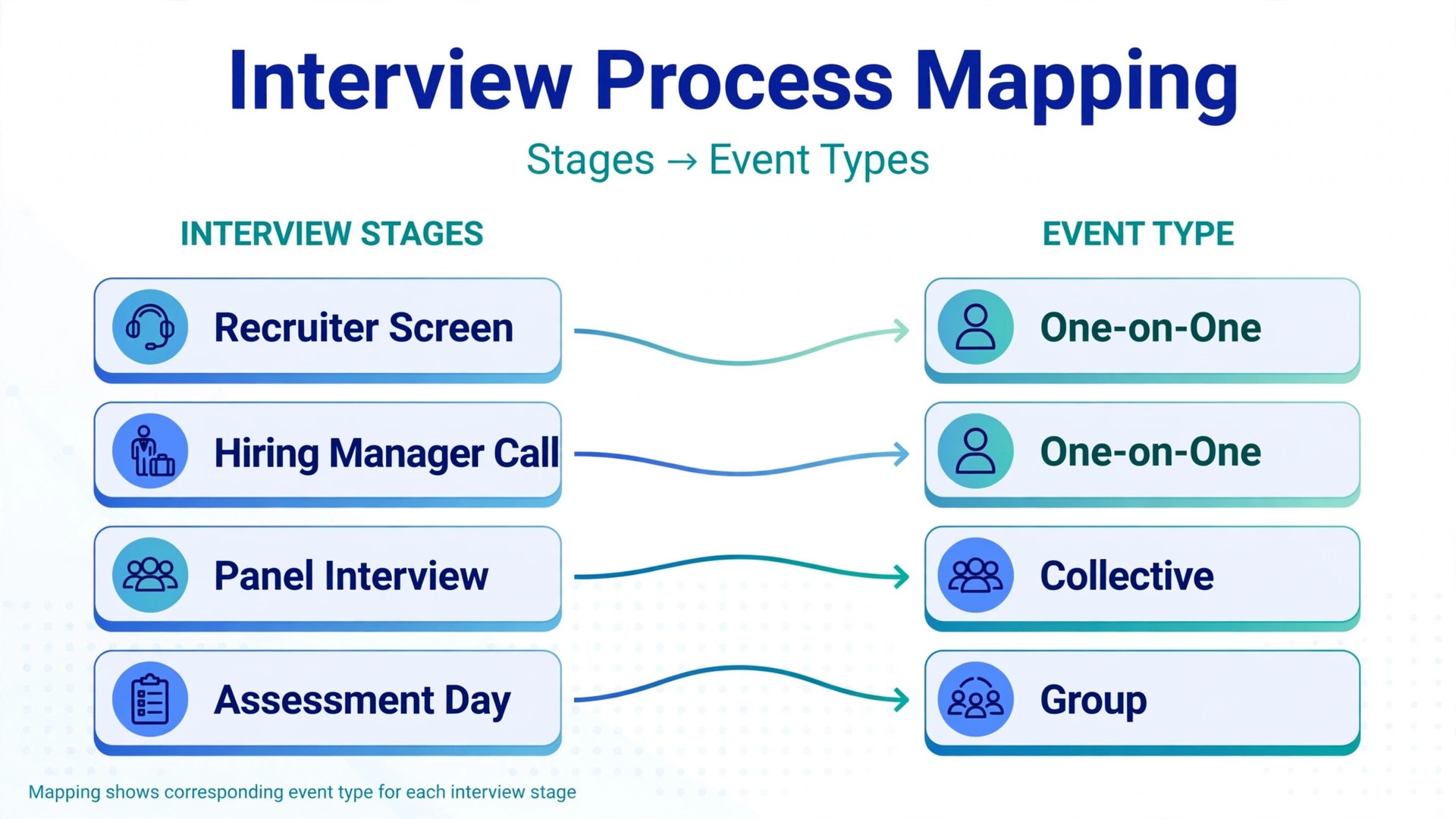
Start with the shape of your hiring process, not with the settings screen. Most companies run the same four stages, even if they call them different names. There is a recruiter screen, a hiring manager conversation, a panel or technical round, and a final conversation. Each stage needs its own event type, because each stage has a different length, a different set of hosts, and different questions.
A recruiter screen is usually a one-on-one event of 30 minutes, with questions about availability, salary range, and notice period. A hiring manager conversation is also one-on-one in most teams, but it runs 45 to 60 minutes and needs questions about the role and the work the candidate has actually done. A panel interview is a collective event, where every required host must be free at the booked time, and it runs 60 to 90 minutes with a structured set of topics.
The four event types, and when each one fits interviews
Calendly offers four event types, and interviews use all four in different places. One-on-one events suit recruiter screens and hiring manager conversations. Round robin events suit screening at volume, where any one of several recruiters can take the call and the system spreads bookings across the team. Collective events suit panel interviews, where several hosts meet one candidate at the same time. Group events suit assessment days, where several candidates attend the same session.
| Event type | Best interview use | Who must be free |
|---|---|---|
| One-on-one | Recruiter screen, hiring manager call | The single host |
| Round robin | High volume screening across a recruiter team | One host from the pool |
| Collective | Panel interview, final round | Every assigned host |
| Group | Assessment centre, group exercise | The host, with seats for several candidates |
The distinction between round robin and collective is the one that causes the most setup errors, so it is worth stating plainly. In a round robin event, the candidate books with one host, chosen from a pool, and the other hosts stay free. In a collective event, the candidate books with every host at once, and every host becomes busy at that time. If you build a panel as a round robin event by mistake, the candidate will meet one interviewer instead of four. Teams and Enterprise plans also support a combined form, where some hosts always attend and others rotate in from pools.
Setting Up a Multi-Interviewer Panel Without Calendar Chaos
A panel fails in setup long before it fails in the interview room. The usual failure is a panel of five people where two are nice to have and three are essential, but the event type treats all five as essential. The booking page then shows almost no available times. The fix is to separate essential hosts from optional guests. Essential hosts go on the collective event. Optional guests get the invite after booking, rather than blocking the booking page.
Start the panel build with a short planning pass for each role. Write down the essential hosts, the interview length, the topics each host covers, and the decision each host owns. When each host owns a topic, the interview stops being four people asking the same generic questions, and the candidate gets a fairer conversation.
Panel setup in seven practical steps
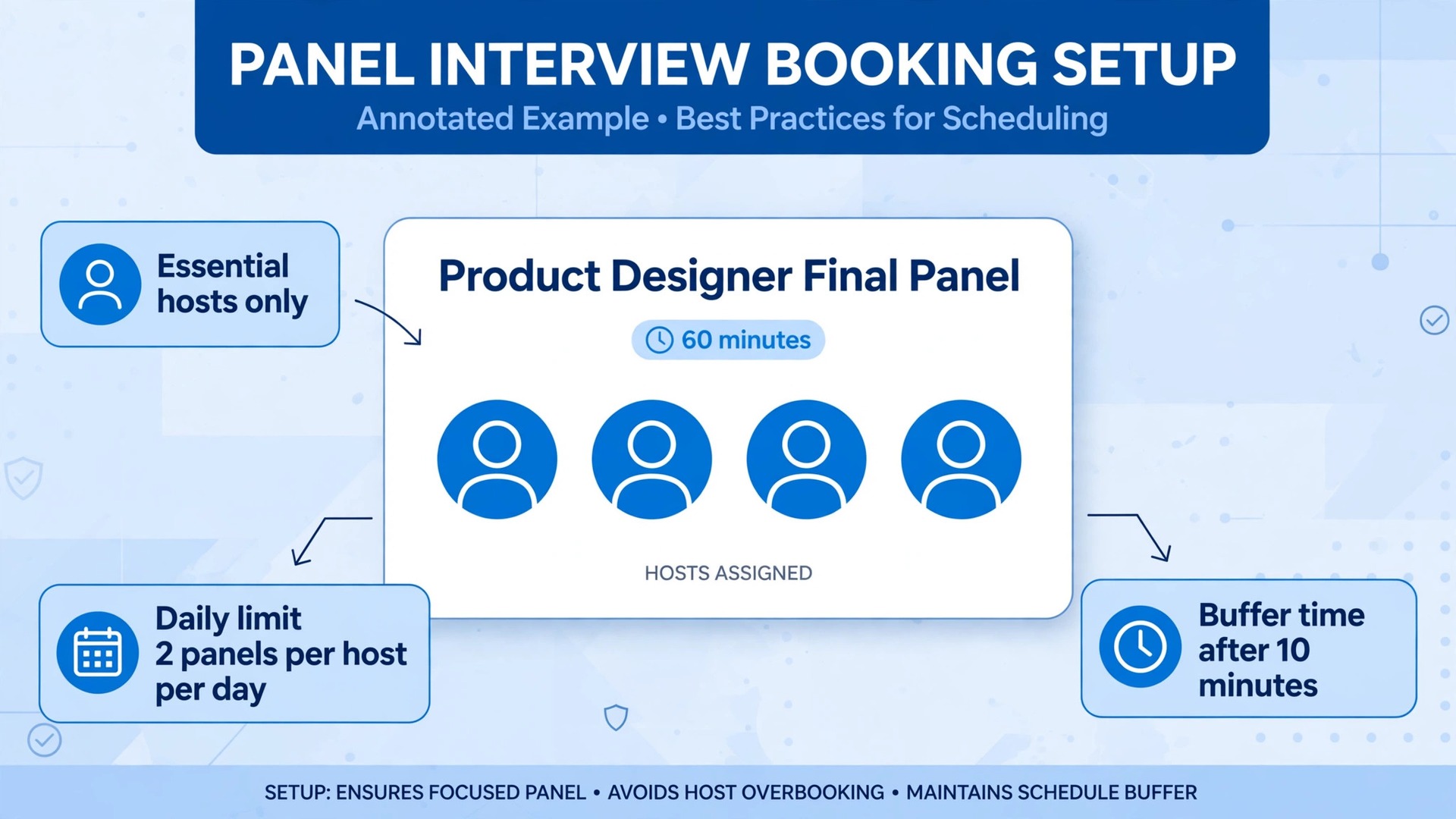
- Create a collective event type for the panel stage, named after the role and the stage, for example “Product Designer Final Panel”.
- Add only the essential hosts, and confirm each host has connected the calendar that holds their real meetings.
- Set the length to match the real interview, including a realistic overrun margin.
- Add buffer time before and after, so one interview never bleeds into the next and hosts have time to write notes.
- Set a daily limit on panel bookings per host, so no interviewer faces four panels in one day.
- Add booking questions that give hosts what they need, which are the portfolio link, availability notes, and any access needs.
- Test the event with a colleague booking as a candidate, then check that every host received the invite, the video link, and the candidate answers.
Buffers deserve a special note, because they are the setting most teams skip and then regret. Ten minutes of buffer after each panel is a small price for notes written while the conversation is fresh. Daily limits work the same way. A limit of two panels per host per day keeps panels sharp and keeps interviewers willing to help next time.
Time Zones Without the 6 Am Mistake
Time zone errors are the most embarrassing scheduling failure, because they are entirely preventable and they fall on the candidate. Calendly detects the invitee time zone from their device settings and shows availability in their local time, which handles the common case well. The errors come from the settings that override that detection.
The first setting to check is the time zone display on each interview event type. For remote interviews, leave the display set to the invitee time zone, so candidates see times in their own local time. Locking the display to the host time zone makes sense only for in person interviews, where the candidate travels to the office.
The second check is the confirmation type. Calendly help guidance notes that calendar invitations, sent by the connected calendar, can display in unexpected ways when the receiving calendar cannot detect the time zone cleanly, sometimes falling back to UTC. Email confirmations, sent by Calendly, carry the time zone as shown on the booking page and avoid that quirk. Whichever type you use, state the time with the day and date in words and the time zone written out in full, for example “Tuesday, 3 November at 10 am London time”.
Practical time zone habits for a hiring team are simple, and they cost nothing. Keep interview windows inside overlapping working hours where possible. For a London and New York panel, a late morning London window overlaps with a morning New York window and suits both sides. Publish the interview time zone in every message, not only on the booking page. Finally, add a time zone question to the booking form for roles that regularly attract overseas candidates, asking the candidate to confirm their city.
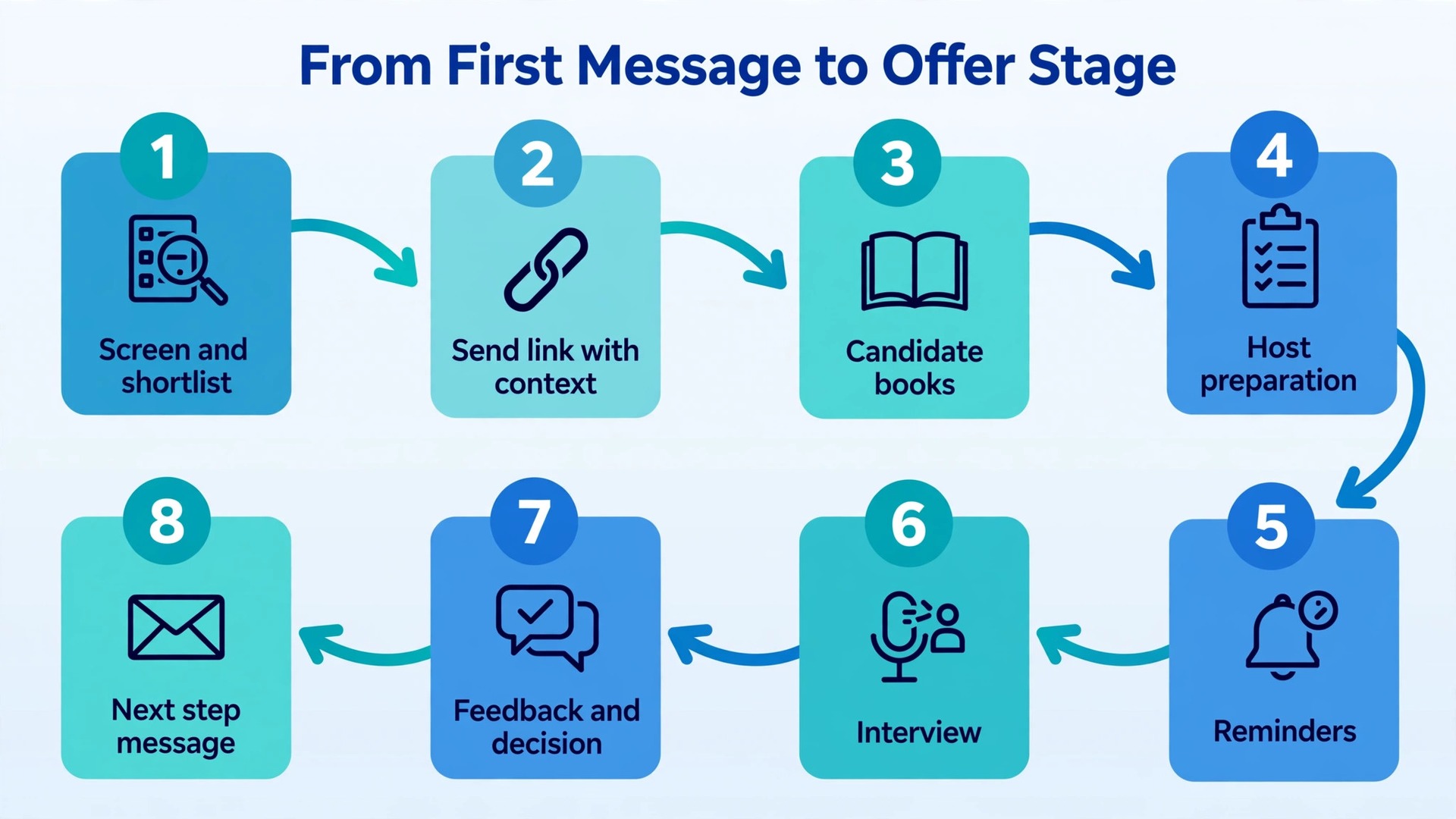
The Interview Scheduling Workflow From First Message to Offer Stage
This workflow is the overview proof element of this guide, and it is the part to copy into your hiring playbook. When you use Calendly for interview scheduling HR at team scale, the booking link is only step three of a longer chain. The chain below covers eight stages, from the first recruiter message to the post interview decision, with the output of each stage spelled out. A team that runs all eight stages will book faster than a team that only shares a link, because the link alone does not prepare hosts, remind candidates, or collect feedback.
- Screen and shortlist. The recruiter reviews applications and confirms the role, salary range, and interview stages with the hiring manager before any link goes out. Output. A shortlist with a named panel for each stage.
- Send the booking link with context. The recruiter sends a short message naming the stage, the length, the hosts by role, and the link, plus a line on what the candidate should prepare. Output. A candidate who knows what the interview is, not only when it is.
- Candidate books. The candidate picks a time from live availability, answers the booking questions, and receives a confirmation with the video link, the time zone in words, and reschedule and cancel links. Output. A booking on every host calendar, with candidate answers attached.
- Host preparation. Each host receives the candidate pack, which is the CV, work samples, previous stage notes, and the topics they own, at least one working day before the panel. Output. Hosts who arrive ready.
- Reminders. Automated reminders go out a day before and again a few hours before, each carrying the time, the time zone, the video link, and the reschedule link. Output. A candidate who can still move the interview instead of vanishing.
- Interview. The panel runs to its structure, with each host covering their topics and writing notes during the buffer time after the session. Output. Fresh notes, written the same day.
- Feedback and decision. The recruiter collects written feedback within one working day, chases missing feedback once, and records a clear next step. Output. A decision within the timeline promised to the candidate.
- Next step message. The candidate receives the outcome or the next booking link within the promised window, even when the outcome is a rejection. Output. A candidate experience that holds up even when the answer is no.
Two habits make this workflow hold together under real hiring pressure. The first is a single source of truth for the candidate timeline. When a booking moves, the recruiter updates the hiring tracker the same day. The second habit is a weekly scheduling review, lasting fifteen minutes, where the recruiter checks open bookings, missing feedback, and links for roles that have closed.
The Panel Checklist Every Interviewer Gets Before the Call
A checklist is the second overview proof element in this guide, and it is the document that turns a booking into a good interview. Teams that use Calendly for interview scheduling HR should copy this checklist into the host briefing for every panel, and treat a missing item as a reason to pause, not as a detail to sort out during the call. A panel that starts without the candidate pack, without a named decision owner, or without a video link that works is already behind, and the candidate can feel it.
- Candidate pack received. CV, work samples or portfolio link, application answers, and notes from previous stages, sent at least one working day before the panel.
- Topics assigned. Each host owns named topics and knows which questions are theirs, so the candidate is not asked the same generic question four times.
- Decision owner named. One person owns the final recommendation for this stage, and every host knows who that person is before the panel starts.
- Scoring or feedback form ready. Hosts know whether they score numerically, write structured notes, or both, and where to submit them.
- Video link tested. The meeting link from the booking opens correctly, the host can share screen if needed, and a backup contact route exists if the link fails.
- Time zone confirmed. The interview time is stated in the candidate local time zone in the briefing, and hosts in different zones have checked their own calendar entry.
- Access needs checked. Any access need the candidate noted at booking, such as captions, breaks, or an alternative format, has been arranged before the call.
- Buffer protected. Ten to fifteen minutes after the panel are blocked for notes, and no host has a meeting booked into that buffer.
- Debrief time booked. A short debrief, even fifteen minutes, is on the calendar within one working day of the panel, with the decision owner attending.
- Candidate next step agreed. The panel knows what happens after this stage, and who tells the candidate, so the candidate is never left waiting without a named owner.
The checklist also protects fairness. When every host uses the same topics, the same scoring form, and the same candidate pack, candidates are judged on comparable evidence. Run the checklist as a briefing, not as a form to file. A five minute huddle before the panel is enough.

Candidate Communication Templates That Sound Human
Templates fail when they read like system output, and they succeed when they read like a short message from a person who has thought about the candidate. The templates below are written for copying, with bracketed fields to replace for each role. Keep them short, keep the time zone in words, and keep the reschedule link visible. A candidate who needs to move an interview should never have to write an apology email to do it. One click on the reschedule link is kinder, faster, and far more likely to produce a new booking than a request to reply with new times.
Teams that use Calendly for interview scheduling HR should personalise one line in every message, naming the candidate project or the team they will join, because that one line turns a system message into a human one.
**Invitation message.** Thank you for speaking with us about the role. The next stage is a panel interview of 60 minutes with the hiring manager and two team members, by video. Please choose a time that suits you from this link. The page shows times in your local time zone. You will receive a confirmation with the video link as soon as you book, and you can move the booking from that confirmation if your plans change. To prepare, please have one recent project ready to talk through, including what you owned and what you would change.
**Confirmation message.** Your panel interview is booked for Tuesday, 3 November at 10 am London time, by video. The video link is in your calendar invite and in this message. Please join five minutes early if you can, and bring one question about the team or the work. If you need to move the interview, use the reschedule link in this message. There is no penalty for moving once, and a moved interview is always better than a missed one.
**Reminder message, one day before.** A quick reminder that your panel interview is tomorrow, Tuesday, 3 November at 10 am London time, by video. The video link is in your calendar invite. Your interviewers are looking forward to hearing about your recent project work. If anything has changed, please use the reschedule link in your confirmation message so we can find a new time.
Three rules keep these templates honest. First, never promise a timeline you cannot meet. If feedback usually takes five working days, say five working days, not “soon”. Second, never send a template that names the wrong stage, hosts, or length. Third, send the invitation during the candidate working day where possible, so the candidate can book while the role is fresh in their mind.

No-Show Reduction That Respects the Candidate
No-shows are rarely a sign that a candidate does not care. More often, they are a sign that something changed, and the candidate had no easy way to say so. A candidate who accepted another offer, fell ill, or faced a work emergency will often go quiet rather than write a rejection message to a recruiter they barely know. The job of a no-show routine is therefore to make rescheduling easier than disappearing, and to catch at-risk bookings before the slot is lost. When you use Calendly for interview scheduling HR with that goal in mind, the reminder settings matter as much as the booking page itself.
Start with the booking window. Interviews booked three weeks ahead are forgotten more often than interviews booked within a week. Where the hiring timeline allows it, keep the booking window to ten to fourteen days ahead for early stages, and shorter for final stages. Add a minimum notice period of twelve to twenty four hours, so a candidate cannot book a panel for an hour from now while hosts are unprepared.
Reminders do the heavy lifting, and the Calendly workflow system, available on Standard plans and above, is where they are built. A sensible pattern is a confirmation at booking, a reminder one day before, and a short reminder a few hours before. Each reminder should carry the time in words with the time zone, the video link, and the reschedule link. Text reminders, where the candidate has consented, are worth adding for final stage interviews.
A reconfirmation step adds a further layer for high cost panels. It asks the candidate to confirm they will attend, rather than only reminding them of the time. Any candidate who has not confirmed one hour before a panel should be treated as at risk, and the recruiter should send one short personal message offering a new time. When a no-show still happens, send one short, gracious message offering a new time through the same link.

Feedback Collection After Interviews Before Memories Fade
Feedback is where most interview processes quietly fail, because the interview itself went well and then nothing was written down. Teams that use Calendly for interview scheduling HR should treat feedback collection as part of scheduling, not an afterthought, because the buffer time, the reminder, and the debrief are all scheduling decisions. A week later, the hiring manager asks what the panel thought, and three interviewers reconstruct impressions from memory, each remembering a different conversation.
Build feedback into the event itself. The buffer after each panel is feedback time, and hosts should treat it as part of the interview. A feedback form with four fields is enough for most stages. Those fields are the overall recommendation, the strongest evidence, the main concern, and the suggested next step. Where scores are used, keep the scale simple and defined, so a score of three means the same thing to every host.
Automate the feedback chase, but keep the chase human. A workflow message sent shortly after the panel, linking the feedback form, works better than a recruiter message sent three days later. The recruiter then chases missing feedback once, the next working day. If feedback is still missing after two chases, the decision owner should decide with the feedback available, rather than holding the candidate in limbo.
Pricing and Which Plan Fits a Hiring Team
Prices below come from public pricing summaries checked in October 2026, and you should confirm the figure on the official Calendly pricing page before you pay, because Calendly has added Plus tiers and adjusted plan names during 2026. Pricing is per seat per month. Panel guests do not need a seat to attend a collective event hosted by someone else. Seats are for hosts.
| Plan | Annual billing per seat per month | Monthly billing per seat per month | Best fit for hiring |
|---|---|---|---|
| Free | 0 dollars | 0 dollars | Testing one event type only |
| Standard | 10 dollars | 12 dollars | Solo recruiter, one-on-one screens |
| Teams | 16 dollars | 20 dollars | Recruiter teams, round robin, panels |
| Enterprise | From about 15,000 dollars a year | Annual only | Large organisations, security controls |
For most hiring teams, use Calendly for interview scheduling HR on the Teams plan, because round robin screening and team panel forms are the features that change hiring speed, and those sit on Teams rather than on Standard. A solo recruiter who runs one-on-one screens and occasional panels hosted alone can start on Standard, which covers unlimited event types, workflow reminders, and enough calendar connections to protect personal time. Free is a trial in disguise for hiring, because one event type cannot cover a screen, a hiring manager call, and a panel without forcing candidates into the wrong form. A four person recruiting team on Teams at annual billing costs 64 dollars a month, before any Plus tier additions.
Compare that with the recruiter hours saved. If scheduling currently absorbs even five hours a week across the team, and the booking system returns four of those hours to real hiring work, the plan pays for itself in the first month.
Mistakes That Break an Interview Booking System
Most Calendly hiring setups fail in the same handful of ways, and every one of them is fixable with a settings change rather than a new tool. The first mistake is treating every panel member as essential, which leaves almost no bookable times and pushes recruiters back to email. The second mistake is leaving old event types live after a role closes, so candidates book interviews for jobs that no longer exist. Fix it with the weekly link review, and by turning off event types the day a role closes. The third mistake is asking too many booking questions. A booking form with twelve questions feels like an application, and candidates abandon it halfway through.
Keep booking questions to the answers hosts genuinely need before the interview. The fourth mistake is a confirmation message that lacks the video link, the time zone in words, or the reschedule link. The fifth mistake is no feedback deadline, which produces feedback a week late, if at all. When you use Calendly for interview scheduling HR across several roles, fixing these five mistakes is what turns a booking link into a hiring advantage that compounds over time.
Three measures tell you whether the system is working. Time to interview measures the days from shortlist to booked interview. No-show rate measures the share of booked interviews where the candidate neither attended nor rescheduled. Feedback turnaround measures the working days from interview to recorded recommendation. Record the three measures for the month before the new setup, then monthly for three months after launch, changing one setting at a time.
For wider context on the hiring side of this setup, see the Stratilyze guides to AI agents for HR recruiting and AI tools for HR teams, and for the scheduling side, compare the broader field in best scheduling apps and Calendly alternatives. Candidates preparing for the other side of the table may also find AI interview preparation tools useful, and that perspective helps recruiters write booking pages that answer the questions candidates actually ask.
Frequently Asked Questions
Can one recruiter run panel interviews on the free plan
The free plan covers one event type and one connected calendar, which is enough to test a single one-on-one screen but not enough for a real hiring process. Panels need a collective event, screens need a one-on-one or round robin event, and final rounds need their own event. A solo recruiter can start on Standard, and a team that needs round robin screening and team panels should step up to Teams.
What is the difference between round robin and collective events for interviews
Round robin events book a candidate with one host drawn from a pool, which suits high volume screening where any recruiter can take the call. Collective events book a candidate with every assigned host at the same time, which suits panel interviews. Building a panel as a round robin event books one interviewer instead of four.
How does Calendly handle candidates in different time zones
Calendly detects the candidate time zone from their device settings and shows availability in the candidate local time. For remote interviews, leave the display set to the invitee time zone, and state the time with the time zone written out in full in every message. Lock the time zone to the host time zone only for in person interviews.
How can a team reduce interview no-shows
Keep the booking window short, usually ten to fourteen days ahead for early stages. Send a confirmation at booking, a reminder one day before, and a short reminder a few hours before, each carrying the time, the time zone, the video link, and the reschedule link. Add a reconfirmation step for high cost panels, and send one kind message offering a new time when a no-show happens.
Do candidates need a Calendly account to book an interview
No. Candidates need only an email address to book, and they can reschedule or cancel from the links in the confirmation email without logging in. If a candidate reports being asked to log in, check that the team is sharing the scheduling page link, not an admin page link from inside the Calendly account.
How should feedback be collected after a panel interview
Give hosts buffer time after the panel to write notes while the conversation is fresh, and use a short form with four fields, which are the overall recommendation, the strongest evidence, the main concern, and the suggested next step. Chase missing feedback once the next working day, and hold a short debrief within one working day with a named decision owner.
Book the Interview, Then Get Back to Hiring
Hiring improves when scheduling stops being the work. A booking page that shows only times when the whole panel is free, reminders that carry the time zone in words and a reschedule link, a checklist that prepares every host, and a feedback routine that records decisions while they are fresh, together remove the admin that currently eats recruiter weeks. Each one is a setting, a template, or a fifteen minute weekly review. When you use Calendly for interview scheduling HR in this full form, the recruiter calendar stops being a negotiation and becomes a hiring tool.
Start with one role and one stage, not with a rebuild of the whole hiring process. Build the screen event, the panel event, and the reminder pattern for that role, test them with a colleague, and run them for two weeks. Measure time to interview, no-show rate, and feedback turnaround, fix the top complaint, and then roll the same pattern out to the next role.