

At 40 words per minute, a typist presses about 12,000 keys per hour, which works out at roughly 96,000 key presses across an eight hour day. That is the arithmetic behind sore fingers, stiff wrists and tired forearms, and it is why the keyboard in front of a writer matters far more than it matters to someone who types a few emails a day. When you use mechanical keyboard for long writing sessions, every small difference in force, travel and posture is multiplied thousands of times before lunch, let alone before the end of a book draft or a week of client work.
This guide is written for people who write for hours at a time. Novelists, journalists, students, researchers, copywriters, technical writers and anyone who drafts reports all day will find the same questions here. Which switch type actually suits long prose, and which one only sounds good in a shop demo. Which layout saves time, and which one forces your shoulders into a cramped position. How much you should pay, what you can safely skip, and how to set the whole desk up so the keyboard helps rather than hurts.
Why Long Writing Punishes a Bad Keyboard
Short typing hides bad design. A stiff key, a cramped layout or a keyboard that sits too high will not bother you much across ten minutes of email. Across three hours of drafting, those same faults start to show up as repeated typos, a habit of hammering keys harder than needed, and a dull ache in the forearms that you notice only when you stop. The problem is rarely one dramatic fault. It is the accumulation of small frictions, and that is why writers often blame themselves for slow progress when the tool deserves part of the blame.
A good writing keyboard does three things at once. It gives consistent feedback on every key so you know a press has registered without bottoming out hard on every stroke. It keeps your hands in a neutral position, with wrists straight and shoulders relaxed, instead of forcing a twist or a reach. And it stays predictable across a whole session, with no keys that stick, double register or feel different from their neighbours. When any one of those three fails, your brain spends attention on the keyboard instead of on the sentence, and the writing slows even if your fingers keep moving.
Mechanical keyboards earn their place here for a practical reason, not a fashion reason. Each key has its own switch, so the feel can be tuned in a way a rubber dome sheet cannot match. You can choose a light press, a clear tactile bump, a quiet action or a low profile design, and you can replace a single faulty switch on many boards instead of replacing the whole keyboard. That repairability matters for a tool you may use for five or ten years. A membrane keyboard is cheaper to buy, but once its sheet wears unevenly, the whole board feels uneven, and there is usually no fix short of buying another one.
How to Use Mechanical Keyboard for Long Writing Without Hurting Your Hands
The single most useful habit is to stop pressing keys all the way down with full force. Mechanical switches register a press partway through travel, usually around 2 millimetres down on a standard 4 millimetre switch. If you train yourself to release just after that point, you cut the impact on every keystroke. It feels strange for the first few days, especially if you learned on a laptop keyboard that needed a firm bottoming out action, but it is the cheapest ergonomic upgrade available, because it costs nothing and it works on any board.
Start with a switch that matches your natural finger strength rather than the switch a reviewer loved. Light fingers suit a 45 gram switch. Stronger fingers, or writers who tend to rest their hands heavily on the keys, often do better with a slightly heavier tactile switch, because the extra resistance stops accidental presses when a finger brushes a key. If you are unsure, a switch tester with six or eight switch types costs far less than a wrong keyboard, and ten minutes of typing a real paragraph on each switch tells you more than an hour of reading spec sheets.
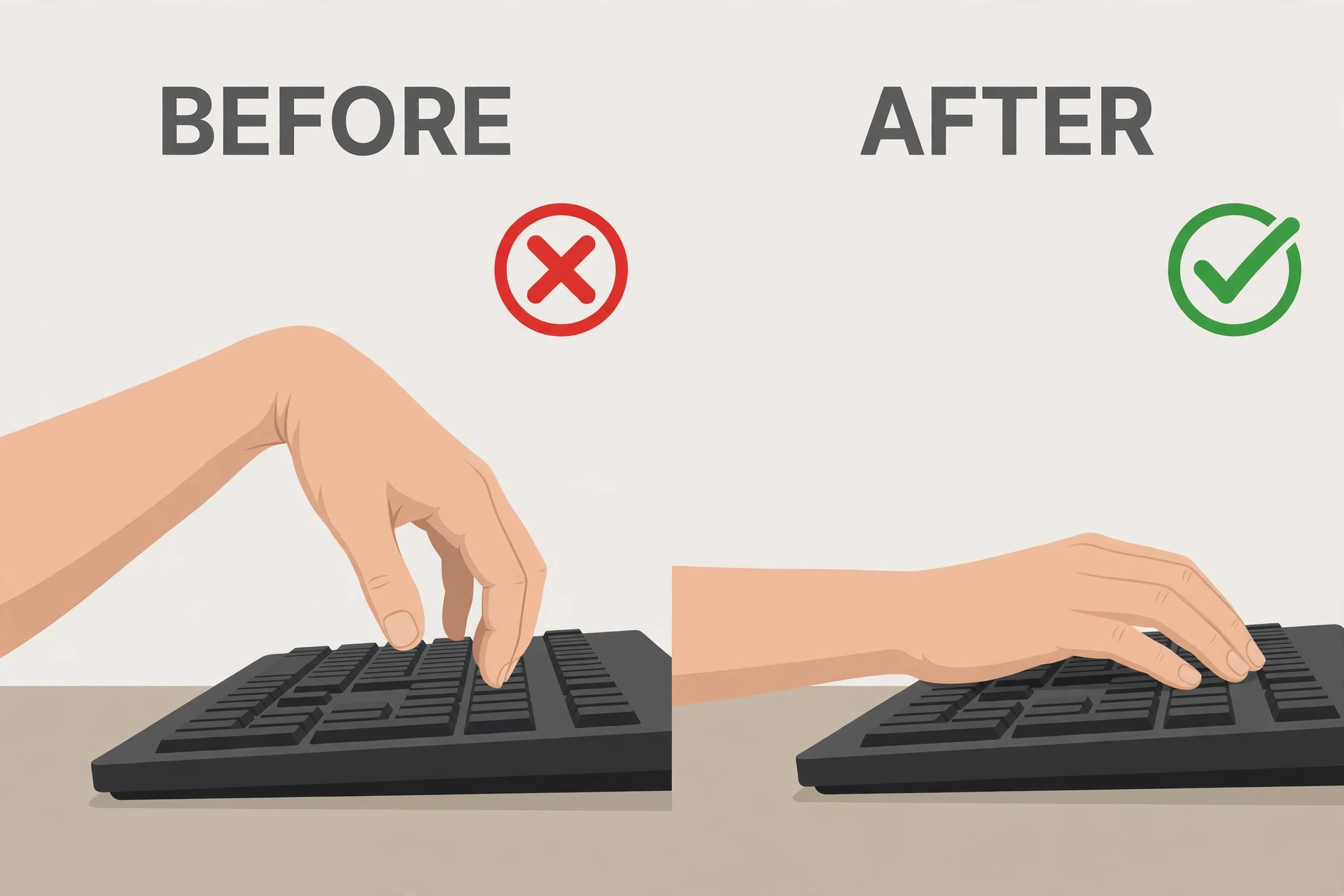
Set the keyboard height before you judge the switches. A board that sits too high forces your wrists to bend upward, and no switch can fix that angle. Use the keyboard feet only if they keep your wrists straight, not because they came in the box. Many writers type better with the feet folded flat and a thin wrist rest filling the gap to the desk, while others need a slight tilt. The test is simple. Type for five minutes, then look at your wrists from the side. If they bend up or down sharply, change the height, not the switch.
Take breaks on a schedule, not when pain forces you to stop. A short break every 25 to 30 minutes, even just standing, shaking out your hands and looking away from the screen, does more for a long session than any single purchase. Writers resist this advice because a break interrupts flow, but flow that ends in a sore wrist at 4 pm is not a good trade. Put a glass of water out of arm’s reach if you need a physical reason to stand, and keep the break short enough that returning to the draft feels easy.
Switches Explained in Plain Terms
Switches fall into three families, and almost every buying decision starts here. Linear switches press smoothly from top to bottom with no bump and no click. Tactile switches add a small bump partway down, so you feel the press register. Clicky switches add that bump plus a sharp audible click. For long writing, the middle family is usually the safest starting point, because it gives feedback without the noise penalty of a clicky switch, and it gives control without the accidental presses that a very light linear switch can cause.
Actuation force is measured in grams or centinewtons, and for practical purposes the two numbers are close enough to compare directly. A 45 gram switch needs a light touch. A 60 gram switch needs a firm push. Most writers land in the 45 to 55 gram range for all day work, because lighter switches can feel vague over hours, while heavier switches tire the small finger muscles first, especially the little finger on keys like Shift and Enter. Total travel matters too. Standard switches travel about 4 millimetres, while low profile switches travel about 3 to 3.2 millimetres, which can feel faster but can also feel abrupt if you are used to a deeper press.
Sound is a separate question from feel, and it deserves its own decision. A switch can feel tactile and still be quiet, thanks to dampened stems and foam inside the case. A switch can also feel smooth and still sound loud, because the keycap hitting the case makes most of the noise, not the switch itself. If you share a room, record audio, or take calls while writing, judge a board by a recording made in a normal room, not by a studio sound test with the microphone inches from the keys. Desk mats, thicker keycaps and foam in the case all soften sound more cheaply than buying a whole new board.
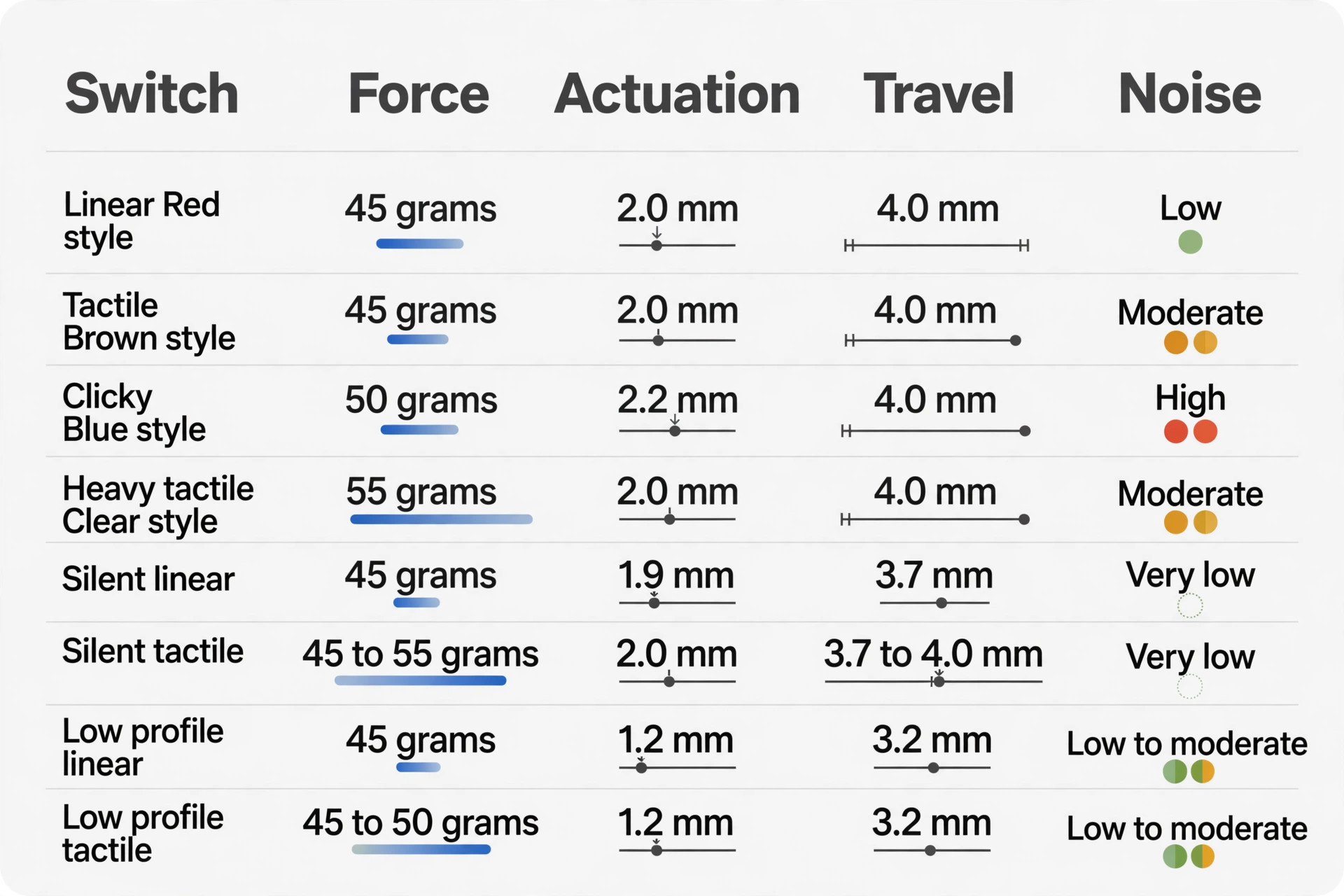
Switch Comparison Table for Writers
The table below compares the switch types most writers actually meet in shops and online listings. Forces are the widely published Cherry MX figures, which other brands use as a reference point even when their own switches feel slightly different. Treat the table as a starting map, not a final verdict, because case material, keycap thickness and lubrication all shift the real feel.
| Switch type | Feel | Actuation force | Actuation point | Total travel | Noise | Best for long writing |
|---|---|---|---|---|---|---|
| Linear, Cherry MX Red style | Smooth, no bump | About 45 grams | About 2.0 mm | About 4.0 mm | Low, soft tap | Fast typists and quiet rooms, if you do not bottom out hard |
| Tactile, Cherry MX Brown style | Small bump, no click | About 45 grams | About 2.0 mm | About 4.0 mm | Moderate, muted | Most writers, mixed home and office use |
| Clicky, Cherry MX Blue style | Strong bump plus click | About 50 grams | About 2.2 mm | About 4.0 mm | High, sharp click | Solo rooms where sound is welcome, not shared spaces |
| Heavy tactile, Cherry MX Clear style | Firm bump, no click | About 55 grams | About 2.0 mm | About 4.0 mm | Moderate | Heavy handed typists who rest fingers on keys |
| Silent linear, Cherry MX Silent Red style | Smooth, dampened | About 45 grams | About 1.9 mm | About 3.7 mm | Very low | Open offices, libraries and late night writing |
| Silent tactile, dampened tactile style | Soft bump, dampened | About 45 to 55 grams | About 2.0 mm | About 3.7 to 4.0 mm | Very low | Writers who want feedback without disturbing anyone |
| Low profile linear | Smooth, short travel | About 45 grams | About 1.2 mm | About 3.2 mm | Low to moderate | Laptop converts and travellers who want a slim board |
| Low profile tactile | Small bump, short travel | About 45 to 50 grams | About 1.2 mm | About 3.2 mm | Low to moderate | Slim boards for writers who still want feedback |
The first decision when you use mechanical keyboard for long writing is switch feel, not brand. Brand matters for build quality, software and warranty, but two boards with the same switch family can feel closer to each other than two boards from the same brand with different switches. If a shop lets you type on a demo board, type a full paragraph you know well, not just a few test keys. The paragraph test reveals fatigue, rhythm and typo patterns that a quick tap test hides.
Layouts and Why Size Changes Your Posture
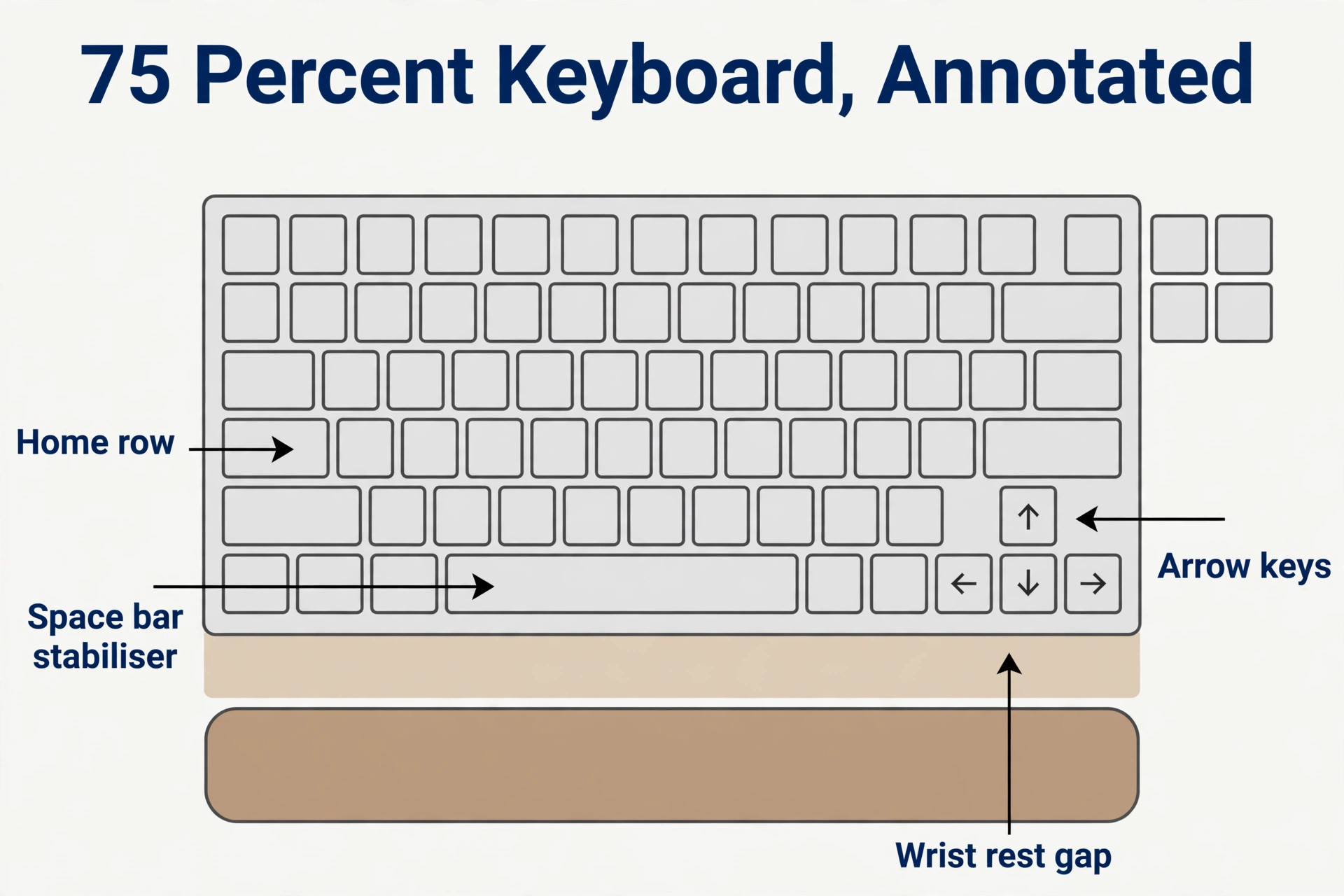
Layout is the second big decision, and it affects your shoulders more than your fingers. A full size board includes a number pad, which pushes the mouse further to the right and forces the right shoulder outward for hours. That reach is a common source of shoulder ache for writers who also edit with a mouse, even though the keyboard itself feels fine. A tenkeyless board drops the number pad and brings the mouse closer. A 75 percent board goes further, keeping the function row and arrow keys in a compact frame, and it is the size many writers settle on after trying larger boards.
Smaller layouts have real trade offs. A 65 percent board drops the function row, so you reach those keys through a function layer. A 60 percent board drops the arrow keys too, which slows editing for writers who move through text with arrows all day. Those compact boards look tidy and travel well, but for a writer who edits as much as they draft, the missing keys cost time on every paragraph. Unless desk space is genuinely tight, a 75 percent or tenkeyless board is a better balance than the smallest possible board.
Split and tented keyboards are a different category, and they suit writers with existing wrist or shoulder pain better than a standard board suits them. A split board separates the left and right halves, so each hand sits at shoulder width instead of squeezed together. Tenting raises the inner edge of each half, so the hands rest at a more natural angle instead of flat. These boards cost more, often 180 dollars to 450 dollars for a good split model, and they take a week or two to learn, but for a writer who already feels pain, they can be the difference between writing daily and writing in short bursts.
Try a standard ergonomic setup first, and move to a split board if pain persists after you fix height, breaks and switch weight.
The Ergonomics Checklist for a Long Session
Ergonomics is not one purchase. It is a set of small settings that work together, and the checklist below is the overview proof element to run through before you blame a keyboard for a sore session. Work through it in order, because fixing the chair before the keyboard height usually saves a second round of adjustments.

– Chair height lets your feet rest flat on the floor, with knees at roughly a right angle and no pressure under the thighs.
– Screen top sits at or just below eye level, so your neck stays neutral instead of tilting down for hours.
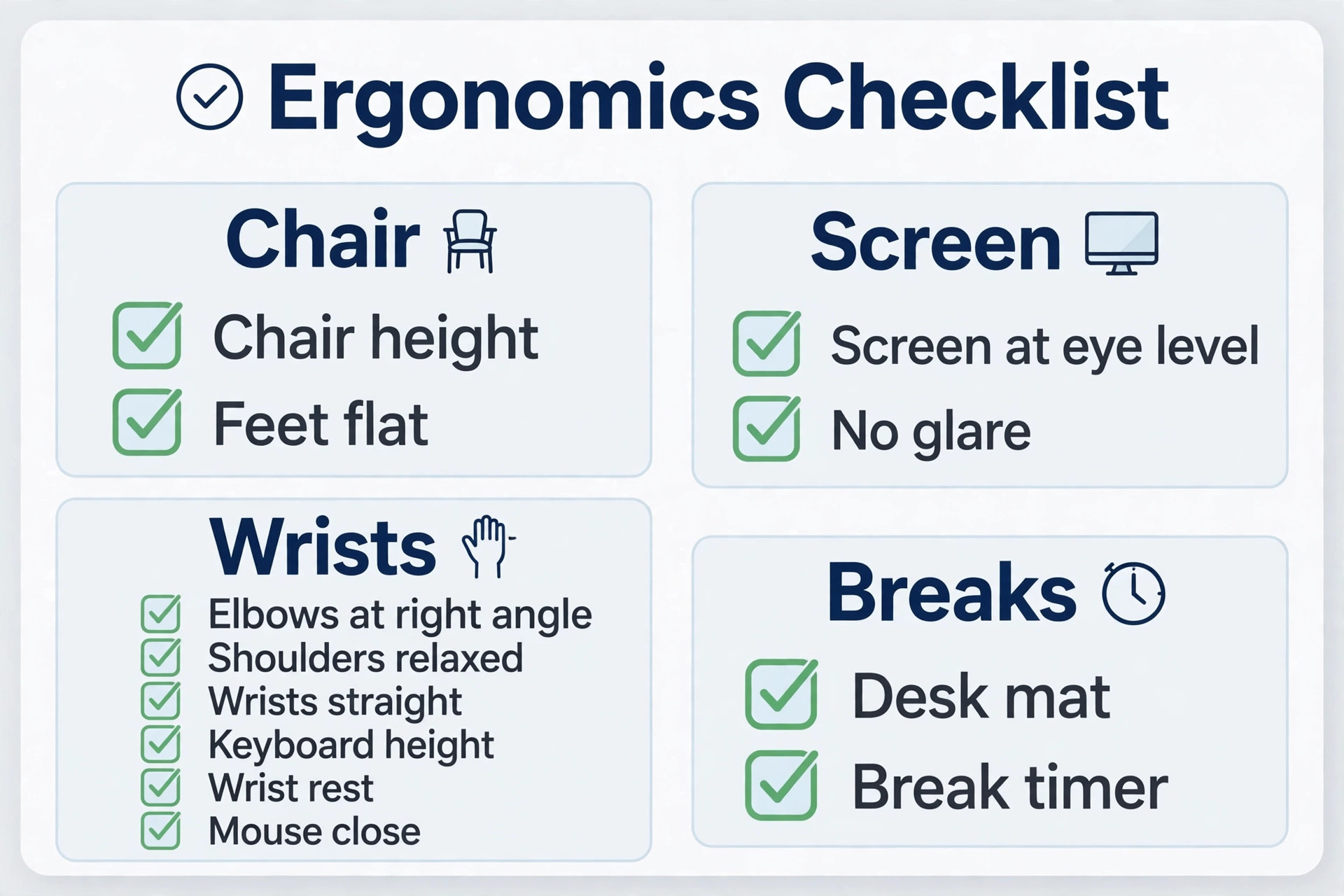
- Elbows rest at roughly a right angle, with forearms level and shoulders relaxed, not hitched up toward your ears.
- Wrists stay straight in line with the forearms, with no sharp bend up, down or sideways while typing.
- Keyboard feet are set flat or tilted only enough to keep wrists straight, not tilted high because the feet exist.
- Wrist rest, if used, supports the palms between typing bursts, not the wrists while keys are being pressed.
- Mouse sits close to the keyboard, ideally beside a tenkeyless or 75 percent board, so the right shoulder does not reach outward.
- Desk mat sits under the keyboard to soften sound and stop the board sliding during fast typing.
- Break timer runs every 25 to 30 minutes, with a short stand, stretch and hand shake before returning to the draft.
- Room light avoids glare on the screen, so you do not lean forward to read text and change your whole posture to compensate.
- Switch weight matches your fingers, light enough to avoid fatigue, heavy enough to avoid accidental presses.
- Pain that lasts more than a few days, or that includes numbness and tingling, gets a professional opinion instead of another keyboard purchase.
If you use mechanical keyboard for long writing every day, run this checklist once a month, not just once. Desks drift. Chairs sink, monitors get moved for a call, and a wrist rest migrates to the other side of the desk. A monthly two minute check catches those drifts before they turn into a sore week. It also stops the common trap of buying a new keyboard to fix a problem that is actually a chair set too low.
People who use mechanical keyboard for long writing often blame the switch when the real fault is the setup around it. A heavy switch on a well set desk can feel easier than a light switch on a desk where the wrists bend upward. Test changes one at a time. Change the height, type for a day, then change the switch or the wrist rest. Changing three things at once makes it impossible to know which change helped, and it leads to a drawer full of accessories that each felt promising for an afternoon.
What to Buy at Three Budgets
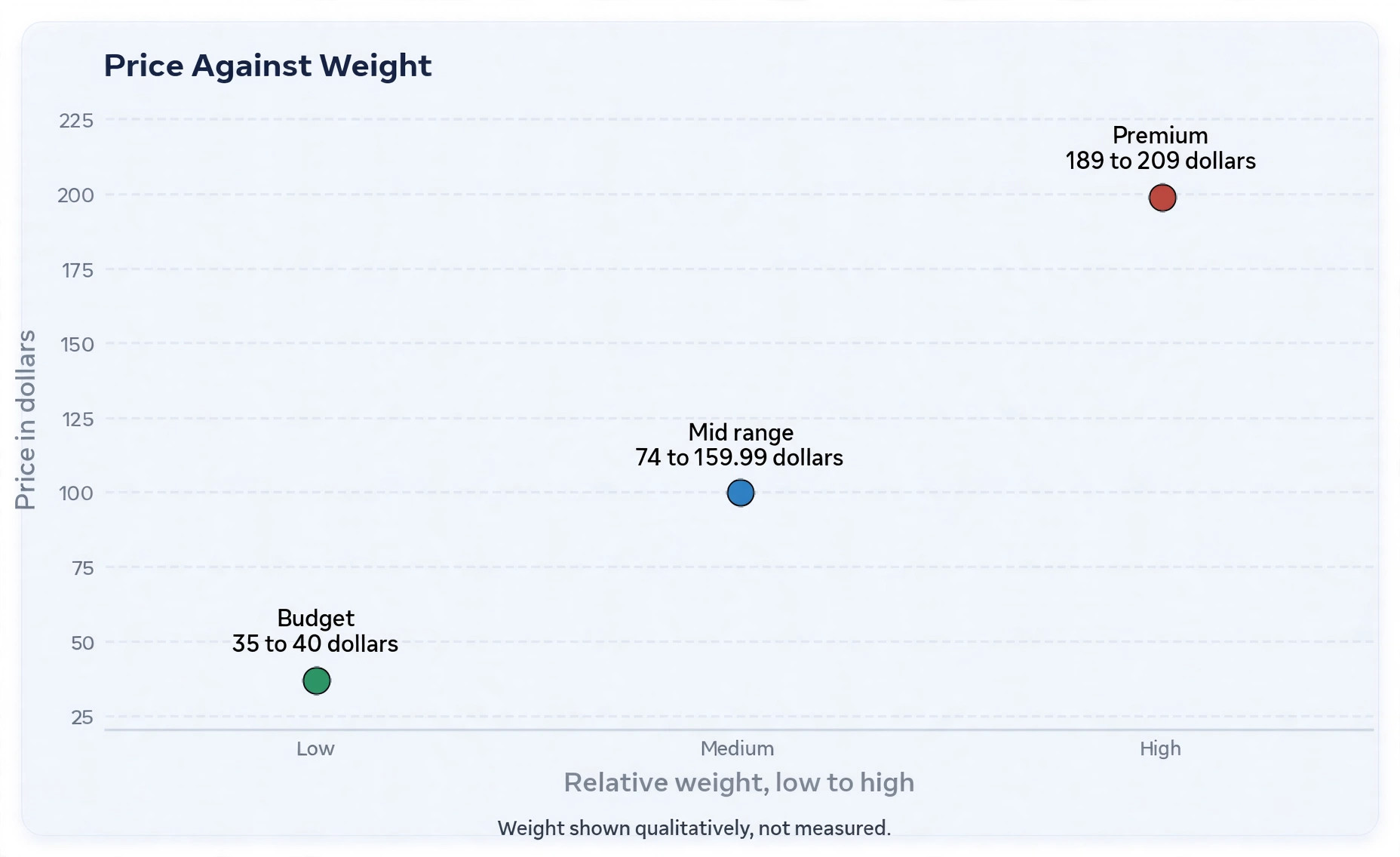
Budget boards prove the core idea without a large outlay. The Keychron C3 Pro is a wired tenkeyless board that appears in recent listings around 35 to 40 dollars, with hot swap sockets and a straightforward design that suits a first mechanical board. It will not feel as refined as an aluminium board, and it lacks wireless, but it gives a writer the essential mechanical experience and a way to try different switches later. At this price, spend the saving on a decent desk mat and a switch tester if you have not typed on mechanical switches before.
Mid range boards are where most writers should shop. The Keychron K2, a 75 percent wireless board, appears in listings around 74 to 89 dollars depending on backlight and frame options, and it is a common first upgrade from a laptop keyboard. The NuPhy Air75 V2, a slim 75 percent wireless board, is listed around 119.95 dollars in recent comparisons, and it suits writers who want a lower profile without giving up hot swap sockets.
The Logitech MX Mechanical Mini, a compact low profile board, carries a regular price of 159.99 dollars in Logitech listings, with sale prices often in the 129.99 to 159.99 dollar range, and it suits office writers who value multi device switching and a quiet low profile action over customisation.
Higher end boards buy refinement, not a different kind of typing. The Keychron Q1 Max, a 75 percent aluminium board with QMK and VIA support, is listed from about 189 dollars for a barebone kit to about 209 dollars assembled in recent listings, with some regional listings higher. That price buys a heavier case that sounds deeper, full programmability for macros and layers, and tri mode connectivity across wired, 2.4 GHz and Bluetooth. For a writer, the real value is durability and the ability to remap keys for editing shortcuts, not the metal itself. If those features do not matter to you, the mid range boards above will serve just as well for prose.
You do not need to spend the top price to use mechanical keyboard for long writing well. Spend first on the right switch and the right layout, then on desk setup, and only then on case material and extras. A 90 dollar board with the right switch, a straight wrist position and regular breaks will beat a 210 dollar board with the wrong switch and a poor desk setup on every measure that matters for a writer, including comfort at the end of the day.
For official details and current prices, see the Keychron Q1 Max product page at Keychron Q1 Max and the Keychron K2 HE product page at Keychron K2 HE. Check the layout, switch and frame options on those pages carefully, because the same model name can cover several configurations at different prices.
How to Choose in a Two Week Test
A two week test beats a weekend of reading reviews, because the first days with a new board are misleading. New switches feel strange, new layouts slow you down, and enthusiasm covers faults that appear in week two. Use this test if you can return the board, and keep your old keyboard nearby so you can compare fairly instead of forcing yourself to love a purchase.
Week one is for setup and basics. Set the desk height, choose the feet position, and type at least one real piece of work per day, not just test sentences. Note three things at the end of each day. How your hands feel after the session, how many typos you made compared with your old board, and whether you noticed the board at all while writing. A good board disappears during a good paragraph. A bad board keeps announcing itself with rattle, missed keys or finger fatigue.
A good test when you use mechanical keyboard for long writing is a two week trial with your own documents, your own software and your own desk. If the board still feels comfortable after two weeks, if your typo rate is stable or better, and if you stop thinking about the keyboard during a paragraph, it is a good buy for you, even if a reviewer preferred a different switch. Personal fit beats consensus, because your hands, your desk and your daily word count are not the same as a reviewer’s.

Mistakes That Waste Money and Tire Hands
The first mistake is buying for gaming specs when the job is writing. High polling rates, rapid trigger and magnetic switches help competitive games, but they add little to a paragraph. A writer who pays extra for an 8,000 Hz polling rate and then types at 50 words per minute has bought speed the work cannot use. Spend that money on a better switch, a better desk setup or a second board for travel instead.
The second mistake is buying the heaviest switch because it feels premium in a shop. Heavy switches feel solid for a few minutes, then tire the little finger and the ring finger over a long session. Those fingers press Shift, Enter, Backspace and punctuation keys constantly in prose, and they are weaker than the index and middle fingers. A switch that feels crisp for a sentence can feel punishing for a chapter. Start in the middle of the force range and adjust from there.
The third mistake is ignoring layout for looks. A compact board photographs beautifully and frees desk space, but if it removes the arrow keys or the function row you use for editing, you will pay for that beauty with extra key combinations on every page. Writers edit constantly, so editing keys are working keys, not decorations. Choose layout by the keys you press in editing, not by the keys you press in drafting alone.
A common mistake when you use mechanical keyboard for long writing is buying clicky switches for a shared room. The buyer loves the sound at home, brings the board to the office, and then either stops using it or faces complaints. Check the room before the switch, and if you share a space, start with a silent tactile or standard tactile switch. You can always add a louder board for home later, and keeping both options is cheaper than replacing a board you cannot use at work.
Writers who are setting up a full writing system will find useful next steps in the site’s guides. The guide to best AI tools for freelance writers covers tools for client work and drafting, while best AI dictation tools helps writers who want to rest their hands by dictating a first draft. For organising notes and research, best note taking apps compares the main options, and how to write a book with AI sets out a longer drafting process for writers working on a full manuscript. A good keyboard supports all of that work, but it works best as part of a system that also handles notes, dictation and editing.
Frequently Asked Questions
Which switch is best for long writing?
For most writers, a tactile switch around 45 grams, such as a Cherry MX Brown style switch, is the safest starting point. It gives a clear bump so you know a press has registered, without the noise of a clicky switch and without the accidental presses a very light linear switch can cause. If you share a room, choose a silent tactile switch instead. If you type very lightly and rarely make accidental presses, a light linear switch can also work well. A switch tester is the best way to confirm your preference before you commit to a full board.
Are mechanical keyboards better than membrane keyboards for writers?
For long sessions, yes, in most cases. A mechanical board gives a more consistent feel across keys, lets you choose switch weight and feedback, and often allows single switch replacement on hot swap models. A membrane board can still be comfortable for short typing, and a good scissor switch laptop keyboard suits some writers, but once a membrane sheet wears unevenly, the whole board feels uneven. Writers who type for hours benefit most from the consistency and repairability of a mechanical board.
Is a split keyboard worth it for a writer?
A split keyboard is worth trying if you have persistent wrist or shoulder pain after fixing desk height, switch weight and break habits. Splitting the halves to shoulder width and tenting them can reduce twist in the wrists and shoulders in a way a standard board cannot. It costs more, often 180 dollars to 450 dollars, and it takes a week or two to learn, so it is not the first purchase for a writer without pain. Start with a standard ergonomic setup, and move to a split board if pain remains.
How much should a writer spend on a mechanical keyboard?
Most writers will be well served between about 75 dollars and 210 dollars. Below that range, good wired boards exist, such as models around 35 to 40 dollars, but wireless and premium build quality cost more. Above 210 dollars, you are usually paying for case material, customisation or a split ergonomic design rather than a fundamentally better typing action. Spend first on switch and layout fit, then on desk setup, and check live prices at checkout, because the same model can vary by layout and switch choice.
Do low profile mechanical keyboards suit long writing?
Low profile boards suit writers moving from a laptop, writers who travel, and writers who work in shallow desk setups. Their shorter travel can feel faster and they sit lower, which helps wrist angle on a high desk. Some writers find the shorter travel abrupt after years on a standard board, and low profile keycap and switch options are narrower than standard options. Try one for a full week of real work before deciding, because a short shop demo hides the fatigue question that matters most.
Can a mechanical keyboard help with wrist pain?
A mechanical keyboard can help if the pain comes from bottoming out hard, from a poor wrist angle, or from an inconsistent membrane board, because a lighter switch, a better height and a consistent feel all reduce strain. It cannot diagnose or treat an injury, and it will not help if the real cause is a chair, a monitor position or a medical condition. Fix the full setup, take regular breaks, and seek a professional opinion if pain lasts more than a few days or includes numbness, tingling or weakness. A keyboard is one part of an ergonomic system, not a medical treatment.
The Board That Lets You Keep Writing
If you use mechanical keyboard for long writing as a daily job, the right board is the one you forget about during a good paragraph. That usually means a tactile or silent tactile switch around 45 grams, a 75 percent or tenkeyless layout that keeps the mouse close, a height that leaves your wrists straight, and a noise level your room can live with. It does not usually mean the most expensive board, the loudest board or the board with the most lights. It means a board matched to your hands, your desk and your room, tested on real work for two weeks, and kept clean for years.
Start with a switch tester if you have never typed on mechanical switches. Choose layout by your editing habits, not by a product photo. Run the ergonomics checklist in this guide before you judge any board, and keep breaks on a schedule even when the writing is going well. Do those steps, and the keyboard stops being a source of friction and becomes what it should be for a writer, a quiet partner that lets the work, not the tool, take your attention. That is the test that matters, and it is a test any writer can run this week with the board they already own, before spending anything at all.